AI can draw a network diagram, but a language model fills gaps with what networks usually look like: links that don't exist, missing devices, guessed zones and a different layout each time. Keep the facts in NetBox and draw them with a deterministic build, so the same data always gives the same drawing and every shape links back to its record. Use AI to get data into NetBox and to ask questions of it, not as the source of truth.
Can AI draw my network diagram?
It can draw a network diagram. Ask a chat assistant for one and you get tidy boxes, a firewall in the middle and lines between them, in Mermaid, draw.io XML or a picture. Whether it is your network depends entirely on what it was given to read, and a model fills gaps with what networks usually look like.
That is fine for a whiteboard sketch. It is a problem for a drawing an auditor, an insurer or the on-call engineer will trust.
What goes wrong when a language model draws your network
These are the usual failure modes when people paste configs or descriptions into an assistant and ask for a diagram:
- Links that don't exist. The model joins the core switch to every access switch because that is the usual shape, even where your cabling runs through a second closet.
- Missing devices. Anything not in the prompt is not on the page: the out-of-band router, the vendor's 4G modem, the old switch in the plant room.
- Zones by guesswork. Given VLAN names, it infers zones from words like "guest" or "pos". A VLAN called
vlan30lands wherever looks tidiest. - A different drawing every time. Ask twice and the layout, the labels and sometimes the links change. Two people comparing revisions can't tell a network change from a model change.
- No trail back to the record. Nothing on the page says which device record, cable or prefix a shape came from, so nobody can check it.
- Data leaving the building. Pasting configs into a hosted model sends addresses, hostnames and sometimes secrets to a third party, which many security policies forbid.
None of this is a reason to avoid AI. It is a reason not to make the model the source of truth.
The pattern that works: NetBox is the source, the drawing is a build
Split the job in two:
- NetBox holds the facts. Devices, roles, cables, VLANs, prefixes, sites and, once you add them, security zones as tags or a custom field. People, imports and discovery feed it, and every change is logged.
- A deterministic build draws them. The same NetBox data gives the same drawing, every time, with every shape linked back to the object it came from.
NetDiagrams is that second half. It reads NetBox with a read-only token and writes a draw.io drawing set per site. Every title block carries a revision taken from a hash of the NetBox data and settings, so two builds from the same data have the same revision and a changed NetBox gives a new one. A drift report lists what NetBox is missing or what disagrees with the template, and you fix NetBox, not the drawing. No model is involved and nothing leaves your machine except the read calls to your own NetBox.
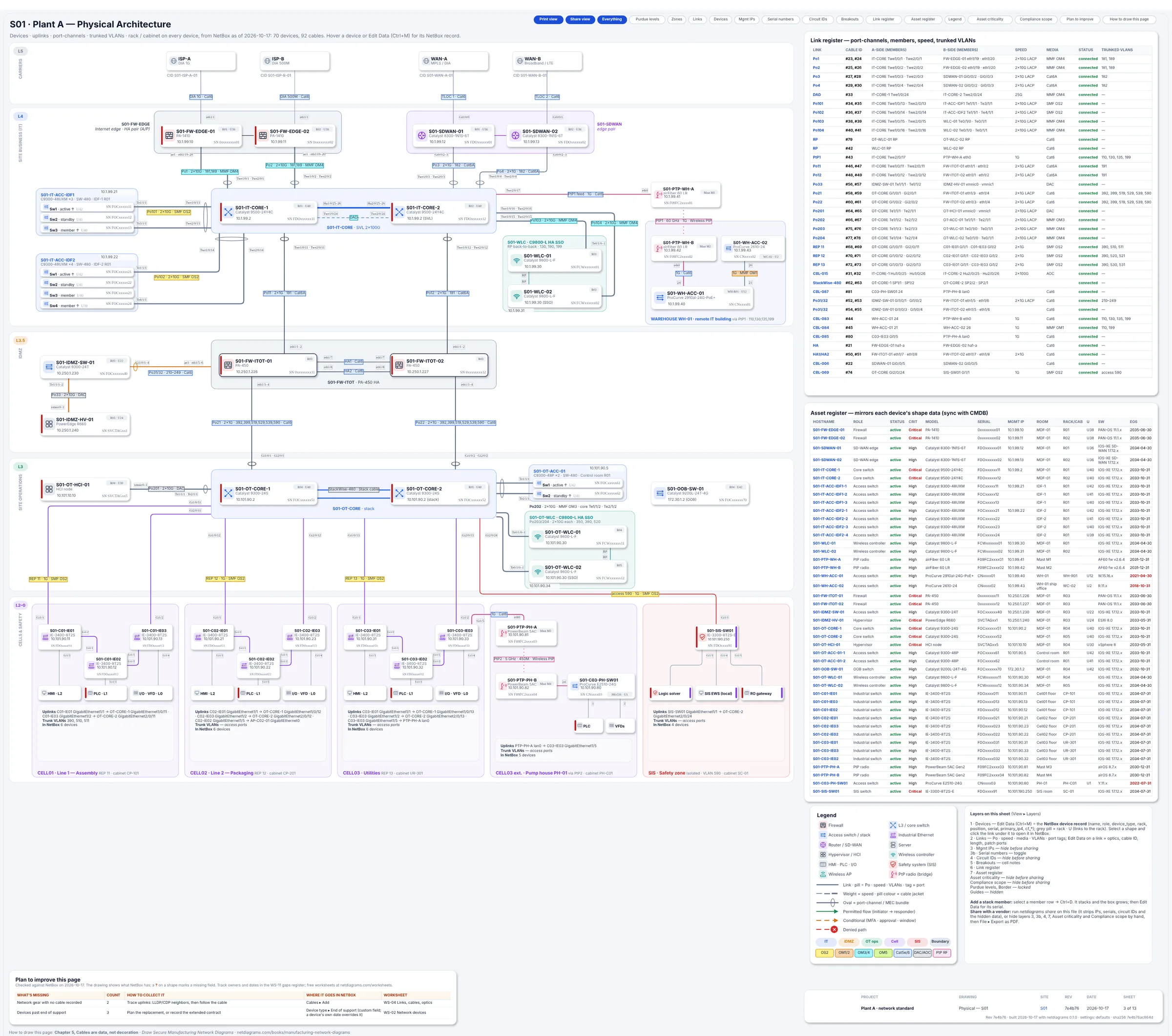
The physical page of Book 1's sample plant, built from NetBox: every rack, port and cable label links back to its NetBox object.
Where AI does help
Keep the model on the parts where a wrong answer is cheap and a person checks it:
- Getting data into NetBox. Turning a spreadsheet, a scanned rack sheet or
show cdp neighborsoutput into NetBox import CSV is a good job for a model, as long as someone reviews the rows before import. The network documentation template gives the columns NetBox expects. - Asking questions of NetBox. Read-only MCP servers for NetBox let an assistant answer "which sites still have end-of-support switches?" from your own data. Give it a read-only token.
- First drafts of the words. The overview page's plain-language summary, or a first pass at the reason column of a flow register. A person edits both.
- Reading the drift report. Summarising a long list of gaps into "fix these five first" is safe: the facts stay in NetBox.
The rule of thumb: the model may suggest, NetBox decides, the build draws.
What AI can't tell you about segmentation
A drawing, however it is made, shows what should be allowed. Whether the firewall enforces it lives in the rule base, and a model reading a 4,000-line config will summarise it with confidence and miss the one rule that matters.
That check needs to be exact. SegAudit parses PAN-OS, FortiOS, Cisco ASA, Cisco FTD and Check Point exports on your own machine and lists every rule that opens a path your zones say shouldn't exist. The same input gives the same findings, which is what an auditor needs.
Try it
- Load NetBox, or check what is there. The free NetBox import chapter gives the order and a CSV per step.
pip install netdiagrams, thennetdiagrams. The first run asks for your NetBox URL and a read-only token.- Open the
.drawiofiles in draw.io and read the.drift.mdreport beside each one.
No NetBox yet? netdiagrams sample -o plant-a.drawio writes a finished drawing for a fictional plant. It is only there to show the result: the tool never uses sample data unless you ask for it.
Where to go next
- Network Diagrams by Industry: ten field guides that decide the zones for your kind of site, so the source of truth records the right things before anything draws them.
- Best NetBox diagram tools compared: plugins, discovery tools and NetDiagrams side by side.
- Verify firewall rules match your segmentation policy: the check that comes after the drawing.
NetBox is a trademark of its owner and is named here only to describe compatibility. NetDiagrams is not affiliated with NetBox or any AI vendor.