NetBox has no whole-network topology view built in: it draws rack elevations and cable traces, and the rest comes from plugins or tools that read its API. For an interactive map inside NetBox, install the netbox-topology-views plugin. To generate a printable draw.io drawing set with security zones, VLAN tables, a flow register and a drift report, run the free NetDiagrams tool: pip install netdiagrams, then netdiagrams. It reads NetBox with a read-only token and writes one drawing per site.
What NetBox draws on its own
NetBox is a source of truth, not a drawing tool, so its own pictures are narrow on purpose:
- Rack elevations. A front and rear view of every rack, drawn from the devices and their positions.
- Cable traces. The path of one connection from interface to interface, through patch panels and circuits.
- The location tree. Regions, sites, locations and racks as lists, not as a map.
There is no page in NetBox that draws the whole network, its zones or what is allowed between them. Everything else comes from a plugin installed into NetBox or from a tool that reads the NetBox API.
Your options, compared
| Option | What you get | Where it runs | Licence | Best for |
|---|---|---|---|---|
| netbox-topology-views | An interactive graph of devices and the cables between them, filtered by site, role or tag; export to PNG or draw.io XML | Plugin inside NetBox | Apache-2.0 | Seeing what is plugged into what |
| netbox-drawio | draw.io drawings you make by hand, stored in NetBox and attached to devices, sites or circuits | Plugin inside recent NetBox 4.x | Apache-2.0 | Keeping hand-made drawings next to the objects they show |
| A script of your own | Whatever you write with the pynetbox API client and Graphviz | Your laptop or a CI job | Yours | One specific picture you need often |
| NetDiagrams | An 11-page draw.io drawing set per site, with security zones, VLAN tables, a flow register and a drift report; every shape links back to NetBox | Your laptop (Python 3.9+), reading NetBox with a read-only token | Apache-2.0 | A drawing an auditor, a vendor and the on-call engineer can all use |
Smaller plugins appear every year. netbox-diagram, for example, adds a Diagrams tab to devices and circuits, but it is still an early 0.0.x release. Check that any plugin lists your NetBox version before you install it: plugins are pinned to NetBox releases, and an upgrade can leave one behind.
Paid, hosted NetBox editions have their own visual tools. Everything on this page works with the free NetBox you host yourself.
Draw a diagram from NetBox, step by step
This is the route with NetDiagrams, because it ends with a drawing you can hand to someone. The first three steps help whatever tool you choose.
- Check the data is there. Sites, devices with roles, interfaces, cables, VLANs and prefixes. A topology drawn from half-entered cables is half a topology. The free NetBox import chapter gives the order to load things in and a CSV for each step.
- Record the zones. A diagram can only show segmentation that NetBox records. Give each device its security zone, as a
zone-tag or thesecurity_zonecustom field.netdiagrams netbox-setupwrites NetBox import files for every tag, role and custom field the template uses. Add--applyto create the missing ones through the API instead; that one step needs a token that can write, and it never changes or removes anything that already exists. - Make a read-only API token in NetBox under your user profile. Drawing needs nothing more.
- Install and run the tool:
pip install netdiagrams, thennetdiagrams. The first run asks for your NetBox URL and token. It writes one<site>.drawiofile per site and a<site>.drift.mdreport beside it. Add--profile retail,--profile bankor another industry to get that industry's zones and template. - Open the drawing in draw.io (desktop, diagrams.net or Confluence). Click any device, cable, VLAN or circuit to open it in NetBox.
- Fix NetBox, not the drawing. The drift report lists what NetBox is missing or what disagrees with the template. Fix it in NetBox and run the tool again, so the next drawing carries the fix and nothing is typed twice.
- Share a safe copy.
netdiagrams sharewrites a copy without IP addresses, serial numbers, circuit IDs or NetBox links, ready to send to a vendor.
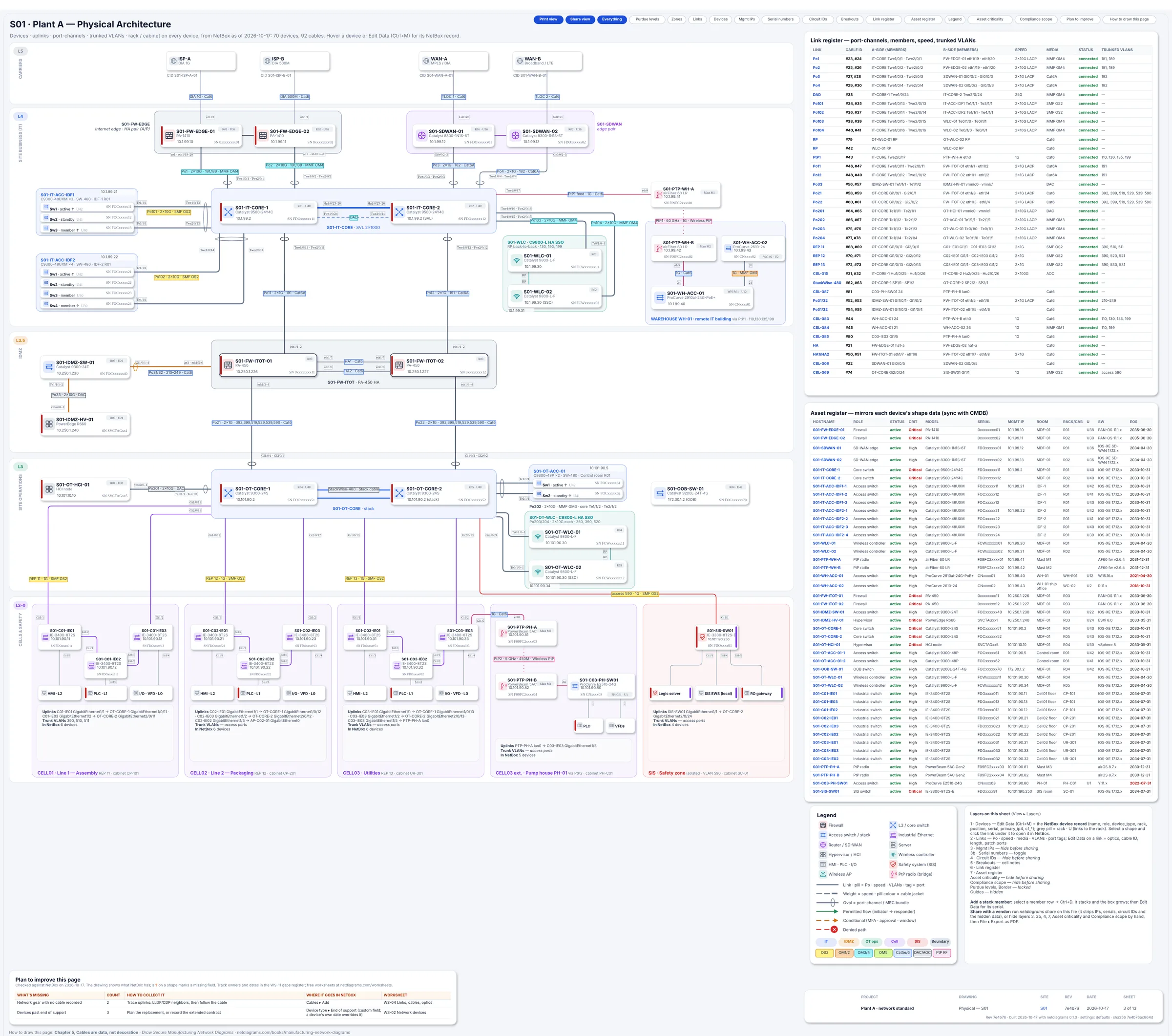
The physical page of Book 1's sample plant, filled from NetBox: racks, devices, ports and cable labels, each linked back to its NetBox object.
No NetBox yet? netdiagrams sample -o plant-a.drawio writes a finished drawing for a fictional site, so you can see the result before you load anything.
What a topology map can't tell an auditor
A topology map answers "what is connected to what". The people who ask for your diagram usually want three other answers:
- Which zone is each device in? A PCI assessor scopes the cardholder data environment from it. An OT reviewer checks the Purdue levels and the industrial DMZ.
- What is allowed to cross each boundary, and who starts it? That is a flow register: one row per allowed conversation, with default deny at the top.
- Which device enforces each boundary? A line between two zones is a hope until a named firewall or ACL sits on it.
NetDiagrams draws the first and third from NetBox and gives you the structure for the second. The books show how to decide the zones for your kind of site: the Purdue model chapter for plants, the PCI segmentation chapter for stores, and a free chapter for every other industry.
Once the drawing says what should be allowed, the firewall decides what is. SegAudit's free Quick Check reads a PAN-OS, FortiOS, Cisco ASA, Cisco FTD or Check Point config on your own machine and shows which rules open paths your zones say shouldn't exist.
Which one should you use?
- You want to see your cabling inside NetBox: install netbox-topology-views.
- You already draw by hand and want the drawings stored with the devices: install netbox-drawio.
- You need a drawing set for an audit, an insurer or a new hire, and you want it to stay true: run NetDiagrams on a schedule and read the drift report.
- You need all three: they don't conflict. The plugins live inside NetBox; NetDiagrams only reads it.
Where to go next
- The free NetDiagrams tool: what each of the 11 pages shows, the industry profiles and the install.
- Open source network diagram software compared: draw.io, Graphviz, Mermaid, D2 and the NetBox options side by side.
- Network documentation template: a free CSV whose columns import straight into NetBox.
- Network Diagrams by Industry: ten field guides, one per kind of site, that take your network from NetBox to a drawing set an auditor accepts.
NetBox is a trademark of its owner and is named here only to describe compatibility. NetDiagrams is not affiliated with NetBox or with the plugins named on this page.