The cold open
A large customer's supplier security questionnaire arrives as a spreadsheet with 160 rows. Row 38 asks: "How many security zones does your industrial network have, and what target security level is assigned to each?"
You open the network drawing to count. It has one large rounded rectangle labeled PLANT NETWORK. Inside it are forty-one switches, two firewalls, a server rack and an icon of a robot arm. The rectangle has no edges inside it. It is, in real-estate terms, open plan.
You type "1" into the spreadsheet, look at it for a while, and delete it.
The honest answer is that the plant has zones. The packaging line really is separate from the boilers; somebody set that up years ago with VLANs and a firewall rule. Nobody drew it, so as far as any outside reader can tell, it doesn't exist. And "target security level" is a phrase nobody at the site has said out loud.
This chapter is about the skeleton every other page hangs on: levels, zones and the boundaries between them. Chapter 4 puts the zones on the logical page. This one is about choosing them in the first place: how many, how big, what goes in the industrial DMZ, and how to write the decision down so a drawing tool, an auditor and the next engineer all read it the same way.
We email a link to confirm, then the download and a note when a new book or tool release ships. Unsubscribe anytime.
Three vocabularies, one plant
Three frameworks describe the same building, and it helps to know which one is talking.
The Purdue model gives you levels: a vertical ranking by function. Level 0 is the process (sensors, valves, drives). Level 1 is basic control (PLCs). Level 2 is area supervisory control (HMIs, local SCADA). Level 3 is site operations (historian, manufacturing execution system or MES, engineering workstations). Levels 4 and 5 are site business and enterprise IT. Level 3.5 is the industrial DMZ between them. Levels say what a device does, not who may talk to it.
CPwE (Converged Plantwide Ethernet) gives you zones in an architecture: the enterprise zone, the industrial DMZ (IDMZ), the industrial zone (levels 0 to 3, the whole plant floor plus site operations), and inside that, cell/area zones and a safety zone. CPwE says how to build it: where the firewalls go, where layer 2 stops, how rings and redundancy fit.
IEC 62443 gives you zones and conduits as a security model. A zone is a group of assets that share the same security requirements. A conduit is a group of communication channels between zones that share the same requirements. Each zone (and conduit) gets a target security level (SL-T). 62443 says how strong each wall must be.
The three line up neatly most of the time, which is exactly why people mix them up. A cell/area zone usually holds levels 0 to 2. It is usually one IEC 62443 zone. But "level 2" is not a zone, and "the cell" is not a security level. Keep the words apart on your drawing and the conversations get shorter.
The property tour
Let's walk the plant the way a listing agent would. Every zone below is a real one from Plant A, the fictional site that ships with NetDiagrams as its sample. The listings are ours; the facts are from the drawing.
ENTERPRISE (IT-ENT), Level 4. Spacious, well connected, busy street. Corporate PCs, phones, Wi-Fi, printers and site servers, all gatewayed on the IT core in VRF CORP. Fast internet, direct routes to head office over SD-WAN. Guests welcome (in their own VRF, internet only). Note to buyers: no access to the plant from this property. Seriously. Not even a side gate.
The enterprise zone is the busiest neighborhood and the one with the most strangers walking past. In the CPwE skeleton it is also the one that never routes directly into the plant. In Plant A, every IT path toward operations ends on a host in the next zone down.
INDUSTRIAL DMZ (IDMZ), Level 3.5. Compact meeting rooms, no through traffic. Six purpose-built suites, each its own /27: remote access, patching, data, file transfer, logging and management. Remote desktop gateway with multi-factor authentication (MFA), vendor access broker, historian replica, patch and antivirus relay, MES-to-ERP broker, secure file transfer, log forwarder. Visitors meet residents here. Nobody walks through to the back garden.
The IDMZ is not a corridor. It is a reception area with meeting rooms. Every session from IT or from outside ends on a host in the IDMZ, and a separate session (started from the plant side, or brokered by that host) carries data onward. If a packet from an office PC can arrive at a PLC with its original source address, you have a corridor, whatever the drawing calls it.
SITE OPERATIONS (OT-OPS), Level 3. Established family home, central location. Historian, SCADA and MES servers, engineering workstations, OT domain services, jump hosts, OT Wi-Fi, backup. Own routing table (VRF OT-OPS) with one way out: a default route to the IT/OT firewall. Close to every production line, but not attached to any of them.
NETWORK MANAGEMENT (OT-MGMT), Level 3. Utility room, staff only. Switch, access point, wireless controller and radio management interfaces. No end hosts. Viewings by appointment from the jump hosts only.
Management gets its own zone because the management interfaces of your switches are the keys to every other zone. In Plant A it is reachable from the OT jump hosts and nothing else.
CELL/AREA ZONES (CELL01 to CELL03), Levels 0 to 2. Three self-contained units. Line 1 Assembly, Line 2 Packaging, Utilities (air, boilers, building management). Each has its own HMI, PLCs, I/O and drives, its own ring of industrial switches, its own control and I/O VLANs and its own VRF. Units share a building but not walls. Utilities includes a detached pump house, connected by radio.
SAFETY (SIS). Secure annex, read-only viewing. Safety logic solver, local safety engineering station, read-only gateway. Layer 2 only on the OT core: no SVI there; its gateway is the firewall's
ae2.590, so every route in passes the firewall. Look, don't touch. Engineering done on site, in person.BOUNDARY. The building's security desk. One pair of firewalls in high availability. Sits between IT, IDMZ, operations, every cell and the safety annex. Belongs to no unit. Checks everyone.
Plant A tags its IT/OT firewall pair zone-boundary, and that is a habit worth copying. The device that enforces a boundary should not be counted as a member of either side. If you file the firewall under "OT", someone will eventually decide that anything already "in OT" may reach it freely.
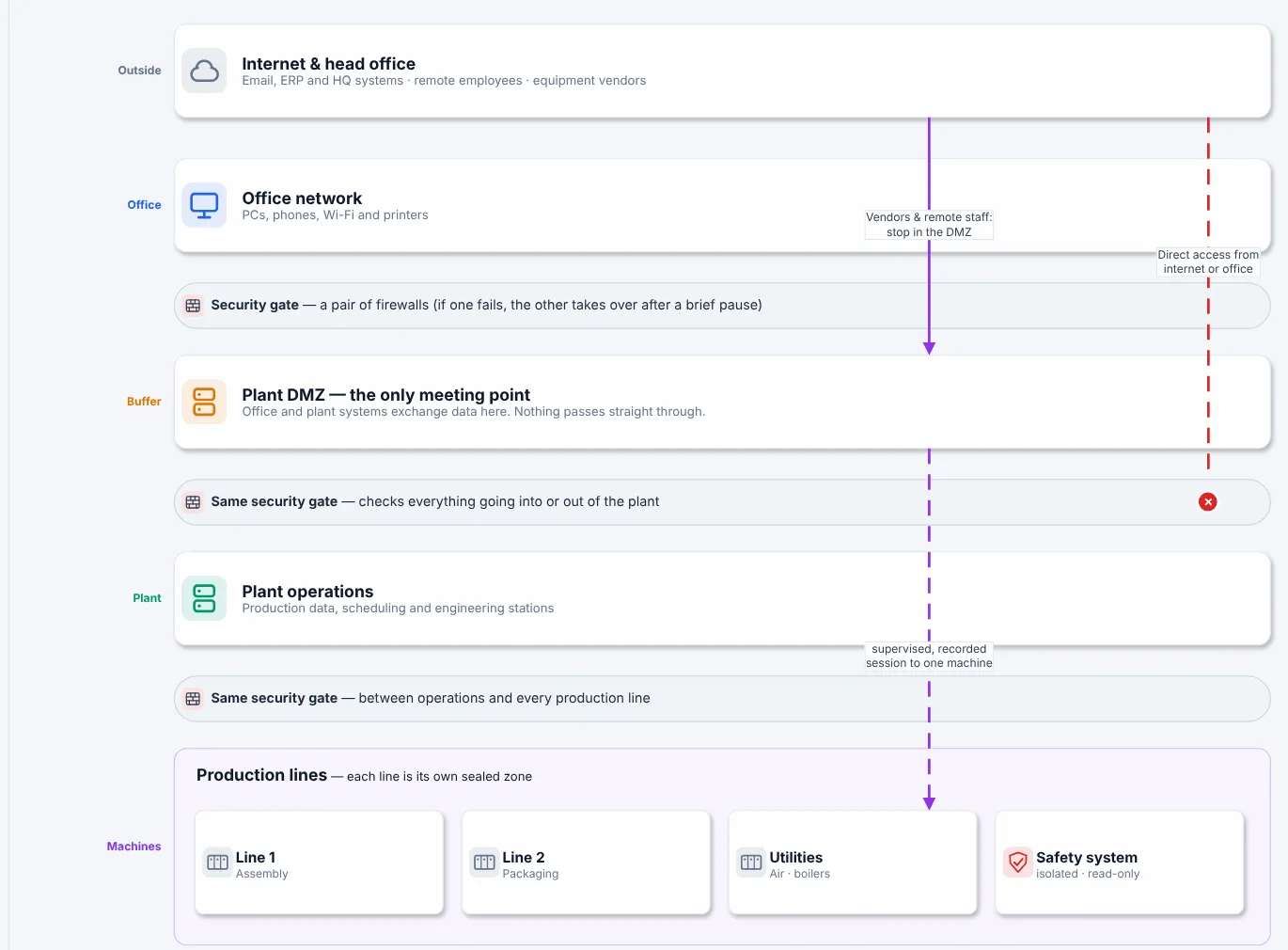
Figure 3.1. The bands of page 1 of the Plant A sample (netdiagrams sample), shown whole in Figure 2.1. The same zone skeleton in plain words: internet and head office, office network, plant DMZ ("the only meeting point"), plant operations and the production lines, each a sealed zone, with the security gate drawn between every band. Vendor and remote sessions stop in the DMZ; the direct path from internet or office is drawn and marked denied.
Notice what Figure 3.1 leaves out: VLAN IDs, subnets, models. It is the same skeleton as the logical page in Chapter 4, with the jargon removed. If your zones are right, a plant manager can read this page and an engineer can read page 2, and both are looking at the same building.
The rules
Rule 1. Draw levels as bands and zones as boxes, and never confuse the two.
Levels are horizontal bands with the number in the left margin: L5, L4, L3.5, L3, L2–0. Zones are outlined boxes sitting in a band. A band can hold several zones (OT-OPS and OT-MGMT both sit at level 3). A zone should sit in one band; when a box straddles two bands, the reader can't tell whether the design is deliberate or the box just grew.
Cells are the exception that proves the rule: one cell box covers levels 2, 1 and 0 because the HMI, PLC and I/O are one control system. Inside the box, label them HMI · L2, PLC · L1 and I/O · L0, as Plant A does, so the levels are still visible.
Rule 2. Choose zones by consequence and ownership, not by building.
The question that defines a zone is: "if something bad gets in here, what else is it allowed to reach, and what does it break?" Assets that would fail together, are maintained by the same people and need the same protection belong together. Assets that don't, don't.
Geography is a weak signal. Plant A's warehouse is a separate building across a radio link, and it sits in the enterprise zone because it is office and logistics gear. Its pump house is also across a radio link, and it sits in CELL03 because it is part of the utilities process. Two radio links, two buildings, two different zones. The drawing shows both, and the reason is written next to each.
Rule 3. One cell per thing you could lose on its own.
A cell is a blast radius. Size it so that losing the whole cell (to a broadcast storm, a bad firmware push, a curious laptop) costs you one line, one process unit or one utility, and nothing else.
Practical tests for a small plant:
- Can it run alone? If Line 2 keeps running while Line 1 is down, they are two cells.
- Who touches it? Equipment maintained by one integrator or OEM, such as a packaged skid, is a good candidate for its own cell, so their laptop reaches their machine and nothing else.
- How much does it talk sideways? If two cells exchange real-time I/O all day, they are probably one cell. If they swap a handful of tags, keep them apart and make the exchange an explicit conduit. Plant A does this with a named exception flow between CELL01 and CELL02, approved per tag pair.
- Does it fit one ring? Each Plant A cell has its own ring of industrial switches closed on the OT core (Resilient Ethernet Protocol, or REP, segments 11, 12 and 13). One ring per cell keeps the layer 2 domain, and the failure domain, the same size. Check your ring protocol's documented limits on node count and keep well inside them.
Too few cells and you are back to open plan. Too many and nobody maintains the rules between them. For a plant of 50 to 1,000 people, a cell per production line, one for utilities and one per vendor-maintained package is a sensible start.
Rule 4. The IDMZ holds brokers, never pass-throughs.
Everything in the industrial DMZ should be a host that ends one session and, if needed, starts another. The Plant A list is a good shopping list:
| IDMZ suite | What lives there | What it replaces |
|---|---|---|
| Remote access | Remote desktop gateway with MFA, vendor access broker | VPN straight into the plant |
| Patching | Update server, antivirus and EDR relay | Plant PCs reaching the internet |
| Data | Historian replica, MES-to-ERP broker | IT users querying the plant historian |
| File transfer | Secure file transfer with scanning | USB sticks and shared drives |
| Logging | Log forwarder to the security event platform (SIEM) | Plant devices sending logs to IT directly |
What does not go in the IDMZ: a domain controller shared with IT, a router "just for one application", a file share that both sides mount, or anything that needs a session from IT straight to a plant device to work. If a vendor's product requires that, the product goes on a list for a conversation, not into the IDMZ.
Give each IDMZ function its own small subnet, as Plant A does with one /27 per suite on the firewall. Then a rule that lets patching traffic in can't accidentally let file transfer traffic in too.
Rule 5. Safety is its own zone, with its own rules.
The safety instrumented system protects people and equipment when everything else has failed. It should not depend on, or be reachable from, the systems it is protecting against.
In Plant A, the safety VLAN 590 has no SVI on the OT core; its gateway is the firewall's ae2.590, so no OT core routing table reaches it and every flow in or out crosses the firewall. Data leaves through a read-only gateway, and safety engineering is done locally on a dedicated station. If the logic solver has a run/program key switch, it stays in RUN, with the key held by process safety, except during an approved change: the 2017 TRITON attack reprogrammed a safety controller that had been left in program mode.
On your drawing, the safety zone gets its own box, its own color and a note saying exactly how data gets out and how changes get in. If the honest answer to "how do changes get in?" is "from the engineering laptop in the control room", write that down. It is the first thing the next risk assessment should look at.
Rule 6. Give every zone a target security level, and write it on the drawing.
IEC 62443 defines four security levels by the attacker they are meant to resist: SL 1 against casual or coincidental violation, SL 2 against intentional attack with simple means, SL 3 against sophisticated means, SL 4 against sophisticated means with extended resources.
The target (SL-T) is what the zone needs, decided by risk assessment under IEC 62443-3-2. It is separate from what your equipment is capable of (SL-C) and what you have actually achieved (SL-A).
Plant A's design standards page records one SL-T per zone:
| Zone | Purdue | SL-T | Note |
|---|---|---|---|
| IT-ENT, GUEST | L4 | n/a | Corporate baseline |
| IDMZ | L3.5 | SL 3 | Brokers only, no through traffic |
| OT-OPS, OT-MGMT | L3 | SL 2–3 | Separate OT domain |
| CELL0n | L2–L0 | SL 2 | One zone per line or utility |
| SIS | Safety | SL 3+ | Read-only out, local engineering only |
You do not have to agree with those numbers. You do have to have numbers. A zone with no SL-T has had no risk decision made about it, and that is exactly what the customer in the cold open was asking.
Rule 7. Write each conduit down as something you can enforce.
A conduit is not an arrow on a slide. It is a named set of flows between two zones, each with an initiator, a responder, a protocol and a device that enforces it. In Plant A, the conduits are the numbered flows in the flow register (F01 to F22 permitted or conditional, D1 to D5 denied), and nearly every one names the firewall pair as its enforcement point.
Chapters 9 and 10 cover drawing and registering flows. For this chapter, the rule is about the skeleton: every pair of zones that talks needs a conduit, and every conduit needs a device on the boundary. A pair of zones that talk with no conduit is, in practice, one zone.
Deciding zones for a small plant: one afternoon
If you are starting from the open-plan drawing, here is a sequence that works in a single sitting with the controls engineer and whoever owns IT.
- List the processes. Lines, utilities, packaged units, anything with its own PLC. Each is a candidate cell.
- Merge where Rule 3 says merge. Constant real-time I/O between two candidates makes them one cell.
- Add the fixed zones. Enterprise, IDMZ, site operations, network management, safety. Most small plants need all five, even if the IDMZ is one host on day one.
- Place every device. Each one gets a zone. Anything that fits nowhere (the shared historian, the badge system, the camera recorder) goes on a list for its own decision.
- Name the boundary devices. For each pair of adjacent zones, which device enforces the edge? If the answer is "a VLAN", note it as a risk: VLANs separate traffic, they don't inspect it.
- Assign SL-T. A first pass is fine. Write "provisional" next to it and date it.
You will finish with a list of zones, a list of open questions and a few uncomfortable discoveries. All three belong on the drawing. The VLAN called TEST will turn up during step 4, carrying something nobody can name; give it a zone, a provisional one if necessary, and a note.
In NetDiagrams
NetBox has no built-in security zone, Purdue level or security level. NetDiagrams reads them from wherever your team records them, and writes NetBox import files to add the fields if you don't have them yet.
Set up NetBox (read-only for NetDiagrams; you import the files). Run:
netdiagrams netbox-setup
It writes numbered CSVs to a netbox-setup/ folder, plus a README.txt that says which NetBox Import button each one goes to:
| File | Import it under | What it adds |
|---|---|---|
1-custom-field-choice-sets.csv |
Custom Field Choice Sets | Purdue level (L5 to L0, with L3.5), IEC 62443 security level (SL1 to SL4), asset criticality (critical to low) and the lists for the audit evidence fields |
2-custom-fields.csv |
Custom Fields | purdue_level, security_level_target, criticality, the asset fields the cards show, the end-of-support dates on device types and the audit evidence fields (Chapter 10) |
3-zone-tags.csv |
Tags | One zone-* tag per zone in the standard |
4-device-roles.csv |
Device Roles | One role per device role the template draws |
5-inventory-item-roles.csv |
Inventory Item Roles | Transceiver, power supply and fan, for the hardware page (Chapter 6) |
6-contact-roles.csv |
Contact Roles | Asset owner and Custodian, for the audit evidence sheet (Chapter 10) |
The zone tags it writes for the standard are zone-it-ent, zone-idmz, zone-ot-mgmt, zone-ot-ops, zone-cell01, zone-cell02, zone-cell03, zone-sis and zone-boundary, each colored by its band (the safety zone in red, so it never reads as one more cell) and described with its level. One real line, with the object types column left off:
Zone IDMZ,zone-idmz,ff9800,
  Security zone IDMZ (Purdue L3.5)
purdue_level applies to devices, locations, VLANs and prefixes. security_level_target applies to devices and locations, which suits Rule 6: set the zone's target once, on the location that is the zone. When NetDiagrams can log in to your NetBox, it leaves out anything already there; --offline writes every file regardless. NetDiagrams only reads NetBox. The one exception is the opt-in netbox-setup --apply, which adds these same fields, tags and roles and never updates or deletes anything (Chapter 0).
Tag the location, not every device. NetDiagrams finds a device's zone in this order: a security_zone custom field, then a zone-* tag on the device, then the nearest location up the tree (cell, area, building) with a zone field or tag. A location whose slug looks like cell-04 or line-2 counts as that zone even untagged.
So a nested tree like Building 1 › Hall A › Cell 02, with zone-cell02 on the cell location, puts every switch, HMI and PLC filed under it into CELL02. Purdue level follows the same path: the device's own field, then its location's, then the zone's usual level.
Name zones so they find their band. When you run netdiagrams draft for a site with no drawing yet, each zone lands in a Purdue band by its name: zone-it-* and zone-guest at L4, zone-idmz at L3.5, zone-ot-* at L3, zone-cell*, zone-line* and zone-sis in the L2–0 band.
A zone with an unrecognized name (zone-packaging, say) goes to an "Other zones" band unless its devices or location carry a purdue_level. Untagged devices collect in a band called "Not zoned in NetBox", which is the most useful list on the page.
Then build:
netdiagrams
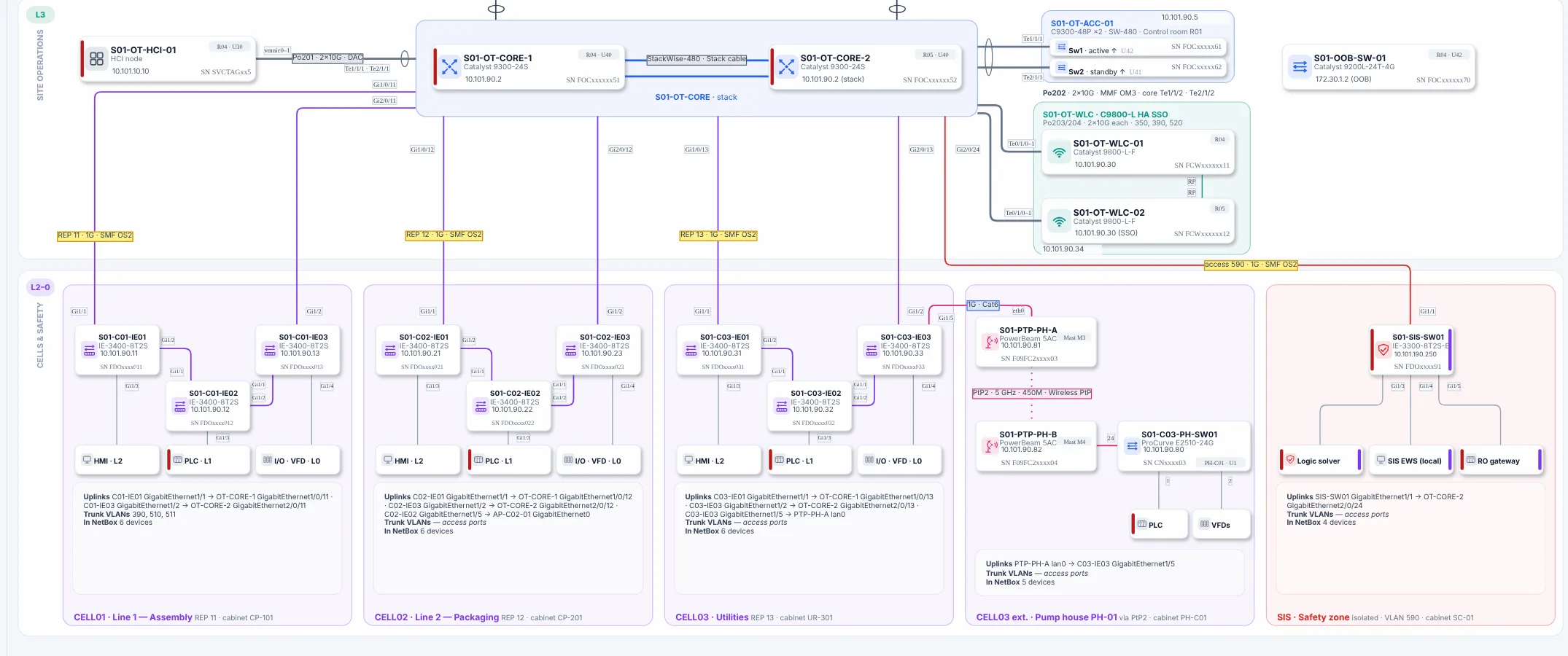
Figure 3.2. The bottom of the physical page of Plant A, built by netdiagrams from a NetBox that carries the sample's zone-* tags (the whole page is Figure 5.2). The Purdue bands are labeled down the left margin, here L3 site operations and L2–0 cells and safety; the three cells, the pump house extension and the safety zone each have their own outlined box along the bottom.
Figure 3.2 shows the result: each tagged device lands in its band and zone box.
Two things stay by hand. The SL-T per zone on the design standards page is drawn text, not generated, so update it when your risk assessment changes; a device's own security_level_target does travel into its shape data (Edit Data, Ctrl+M). And the zone boundaries themselves are a design decision. NetDiagrams draws what NetBox says; it can't tell you that Line 1 and Line 2 should have been one cell.
Once the netbox-setup files are imported and the locations are created and tagged, the site's location tree should read like this (names from Appendix F, step 3; values from Plant A's SL-T table above):
| Location | Tag | Purdue level | Security level target |
|---|---|---|---|
| Main building | |||
| › Production hall | |||
| › › Cell01 floor | zone-cell01 |
SL2 | |
| › › Cell02 floor | zone-cell02 |
SL2 | |
| › › Cell03 floor | zone-cell03 |
SL2 | |
| › SIS room | zone-sis |
SL3 | |
| PH-01 | zone-cell03 |
SL2 |
The building and hall stay blank because each holds more than one zone. Set the tag and the SL-T once per cell location, and every device filed under it inherits them. Leave the Purdue level blank on the cells: the zone tag already puts them in the L2–0 band, and a level set on the room would make every PLC (L1) and I/O module (L0) in it read L2. Set purdue_level on the devices where the true level matters, such as L1 on a PLC (Appendix I.2).
No NetBox yet?
Record zones where you already keep the asset list. Add three columns to the spreadsheet: zone, Purdue level and SL-T, using this chapter's zone names (IT-ENT, IDMZ, OT-OPS, OT-MGMT, CELL01 and up, SIS, BOUNDARY). Fill the zone for each location first, such as Line 2's cabinet or the pump house, then copy it down to every device in that location. It's the same inheritance NetDiagrams uses, done by hand.
Then draw the skeleton. netdiagrams blank -o my-site.drawio writes empty zones already sitting in their Purdue bands. Rename them, copy the cell zone once per line, and add the network management and safety zones with the "Zone + VLAN table" shape from the netdiagrams stencils library. Page 7 of netdiagrams sample shows how Plant A wrote its SL-T table; copy the structure, not the numbers.
In NetBox, the zone stops being a column only you can see. Tag a cell location once and every device filed under it lands in its band on the next build, while netdiagrams draft gathers anything untagged into "Not zoned in NetBox": the spreadsheet's blank cells, drawn as a to-do list. Appendix F covers that setup.
Missing pieces?
The skeleton asks for very little: the zones you know of, in their bands. Who guards each boundary, and to what target level, can start as gaps.
A zone you're sure exists but can't bound still gets its box, with UNKNOWN G-005 where the boundary device should be. A cell split you made on paper but haven't checked with the people who run the line gets ? G-006. A provisional SL-T is an assumed value too, so give it a gap ID and a target date, and "provisional" gets an end date of its own.
Record zones on Appendix G, worksheet WS-01 (site, areas and zones). For the cell boundaries, ask the maintenance planner. They already know which lines can stop on their own, because they schedule it.
Monday morning
Five things to do with your own skeleton this week:
- Write the zone list. Enterprise, IDMZ, site operations, network management, safety, and one cell per line, utility or vendor package. One line each, with the boundary device that guards it.
- Run the three cell tests (runs alone, who touches it, how much it talks sideways) on your two biggest cells. Split or merge on paper first.
- List what is in your IDMZ and mark each host broker or pass-through. Pass-throughs go on the change list.
- Give every zone a provisional SL-T and date it. Book the risk assessment that will replace "provisional".
- Run
netdiagrams netbox-setup, import the files, and tag one cell location. Runnetdiagramsand check that the cell's devices land in the cell. No NetBox yet? Add zone and Purdue level columns to your asset spreadsheet and fill them for one cell.
Quotable: Your plant already has zones. The ones nobody drew are the ones nobody defends.
Next: Chapter 4, "Zones on paper: the logical page", where each zone gets its VLANs, subnets and gateways.