The cold open
Picture a wildlife film crew setting up on a sorter mezzanine at four in the morning. The narrator speaks quietly, so as not to startle anything.
Dawn on the distribution floor. The first trailers back onto the dock, and the handhelds stir in their chargers. Two hundred of them, and every one lives on the same VLAN as the sorter PLC. They have always lived together. It is called, by the people who look after it, "the warehouse VLAN".
Here, at pack station 14, a temporary worker on his second day has found a small unmanaged switch in a drawer. He wants a second label printer. He connects both of its spare ports to the wall, one for each printer, because the cables were there.
A loop. In the wild, a loop announces itself quickly.
The broadcast storm took the pack stations first, then the handhelds, then the inbound conveyor's remote I/O, which shared the same layer 2 domain and stopped hearing its PLC. The sorter faulted to a safe stop with eleven thousand parcels on the induction lines and four carrier trailers waiting for a cut-off they were now going to miss.
The network diagram showed a box labeled WAREHOUSE with everything inside it. That was accurate. It was also the problem. One VLAN held people, printers, scanners and machine control, so one cheap switch could reach all of them at once. BPDU guard and storm control on the pack-station ports would have shut that one port down; zones are what stop the next fault you didn't plan for from reaching the sorter.
This chapter is about splitting that box into zones: groups of devices that share a job, a level of trust and a guarded edge. It works for a distribution center, a cross-dock or a third-party logistics (3PL) site, with or without conveyors, and you don't need to have read anything before it.
Three vocabularies for one building
Three frameworks describe the same warehouse. They overlap so neatly that people mix them up, and the drawing gets vaguer each time they do.
Purdue levels rank equipment by what it does. Level 0 is the physical process: photo-eyes, motors, barcode scanners on the belt, drives. Level 1 is basic control, the PLCs. Level 2 supervises an area, such as the sorter's HMI. Level 3 runs the site's operations, which in a warehouse means the warehouse control system (WCS) that drives the conveyors and sorter, and the warehouse execution system (WES) that releases and balances work. Levels 4 and 5 are business IT and the enterprise. Level 3.5 is the DMZ between them.
Zones and conduits, from IEC 62443, are a security model. A zone is a set of assets with the same security requirements. A conduit is the set of channels between two zones, with the same requirements. Each zone gets a target security level (SL-T), which says how hard its walls need to be.
A reference architecture, such as CPwE, says how to build the zones with real equipment: where the firewalls go, where layer 2 stops, how the rings close. Material handling automation sits on the same levels as a factory line, so the same architecture fits a warehouse floor with very few changes.
Keep the three words apart on your drawing. "Level 2" is not a zone, "the sorter" is not a security level, and "the warehouse VLAN" is none of the three.
The warehouse zone model
Here is the model this book uses. It is a recommendation, not a law. A small cross-dock will merge some rows, and a large DC with a robotics fleet will split others.
| Zone | Purdue level | What lives there | One-line rule |
|---|---|---|---|
| Business | 4 to 5 | Office PCs, phones, printers, ERP and email access | Never routes straight onto the warehouse floor. |
| Driver and visitor Wi-Fi | Outside | Truck drivers, visitors, the vending machine | Internet only. |
| Integration DMZ | 3.5 | EDI and API gateway, carrier label and rating services, client portals, vendor remote access, patch relay | Outside parties end here; nothing passes through. |
| Warehouse operations | 3 | WMS site services, WES and WCS servers, label print servers, AMR fleet manager, ops workstations | Serves the floor; talks up only through the DMZ. |
| Mobile devices | 3 | Handhelds, vehicle-mount terminals, wearable scanners, voice picking | Talks to WMS and print, nothing else. |
| MHE control zones | 0 to 2 | Conveyor, sorter and AMR controls: PLCs, HMIs, drives, scanners and print-and-apply, per system | One zone per system; reached only from WCS and engineering. |
| Safety | Own zone | Safety PLCs, E-stop and light curtain networks | Read-only out, nothing in. |
| Building and security | Own zone | Cameras, access control, dock door controllers, fire panel gateway | Its own path out, never through the floor. |
| Network management | Own zone | Switch, AP and controller management | From jump hosts only. |
MHE means material handling equipment: conveyors, sorters, autonomous mobile robots (AMRs), print-and-apply heads, the machinery that moves cartons without a person carrying them. The warehouse management system (WMS) owns inventory and orders; at many sites it now lives in the cloud.
Dock door controllers appear under building systems in the table, because at many sites they belong to the facilities team. Where doors and levelers are part of an automated dock run by the WCS, they belong in an MHE zone instead, as they do in the sample below: W01's door controllers are wired, in the dock area's CELL03. Rule 3 explains how to decide.
What the sample actually draws
Every screenshot in this book comes from a fictional distribution center called W01 · Riverside DC, which ships with NetDiagrams as its warehouse sample. It has an office, a WES/WCS server room, a receiving conveyor, a cross-belt sorter with AMRs, dock doors and levelers, a yard gate with a gate house, a safety PLC on the conveyors and sorter, and a returns annex across a radio link.
Its drawing has nine zone boxes. Here is how they line up with the model:
| Zone model | W01 zone (tag) | Notes |
|---|---|---|
| Business | IT-ENT (zone-it-ent) |
VRF CORP on the IT core. The returns annex sits here too. |
| Driver and visitor Wi-Fi | GUEST (zone-guest) |
VRF GUEST, internet only. |
| Integration DMZ | IDMZ (zone-idmz) |
Six small subnets, gateways on the IT/OT firewall pair. |
| Warehouse operations | OT-OPS (zone-ot-ops) |
WES, WCS, label print servers, engineering, jump hosts, and VLAN 360 WH-IOT for wireless label printers and scales. |
| Mobile devices | inside OT-OPS | VLAN 350 RF-HANDHELD, SSID WH-SCAN. Not a separate zone at W01. |
| MHE control zones | CELL01 Inbound, CELL02 Sortation, CELL03 Dock and yard (zone-cell01 to zone-cell03) |
One automation area per system. |
| Safety | SAFETY (zone-safety) |
VLAN 590, layer 2 only on the OT core, gateway on the PA-450, read-only conduit. |
| Building and security | not drawn | W01 has no camera, access control or fire panel network on its drawing. |
| Network management | OT-MGMT (zone-ot-mgmt) |
No end hosts, reachable from OT jump hosts only. |
Two rows deserve a plain statement. Handhelds are a VLAN inside warehouse operations at W01, not a zone of their own. That is a reasonable choice for a single building with one WMS. At a site with several clients, several device fleets or voice picking, a separate mobile zone is worth the extra firewall rules.
Building systems are simply absent from W01's drawing. The model recommends their own zone; the sample doesn't draw one. Don't read VLAN 330 OT-SECURITY as the camera network. It holds the tools that watch the OT network itself.
The automation areas carry the tag word cell (zone-cell01) because the same tags serve factories, and one NetBox can hold both. In prose this book calls them automation areas: inbound, sortation, and dock and yard.
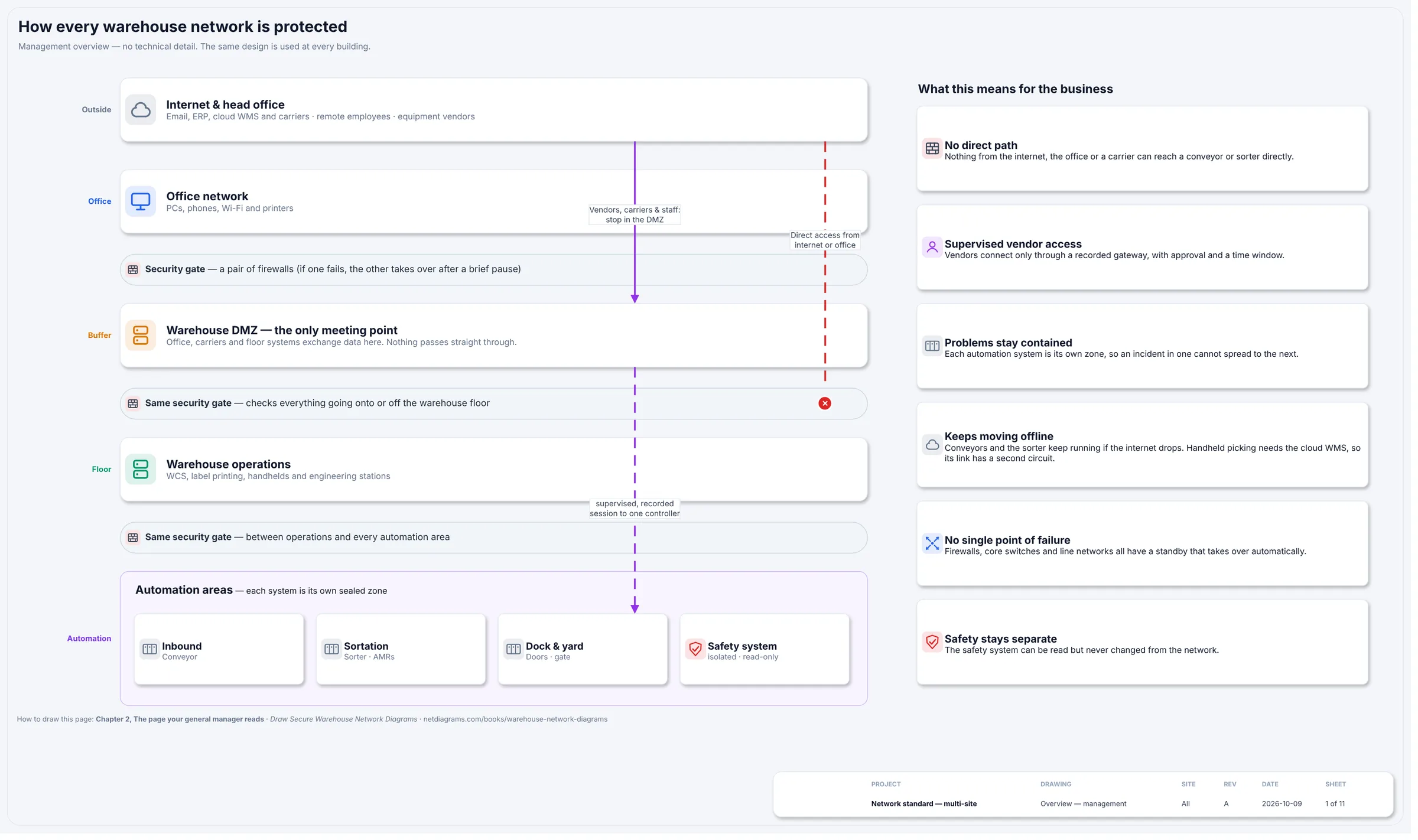
Figure 3.1. Sheet 1 of the warehouse standard for W01 · Riverside DC, from netdiagrams sample --profile warehouse. The zones in plain words: internet and head office, office network, the warehouse DMZ ("the only meeting point"), warehouse operations, and four automation boxes (inbound, sortation, dock and yard, safety). Security gate bars separate the office, buffer, floor and automation bands. Vendors, carriers and staff stop in the DMZ; the direct path from the internet or office is drawn dashed red and marked with a cross.
Figure 3.1 is the zone model for a general manager. Its right-hand column turns the zones into six business promises, such as "Problems stay contained" and "Safety stays separate". Each promise is only true if the zones behind it exist.
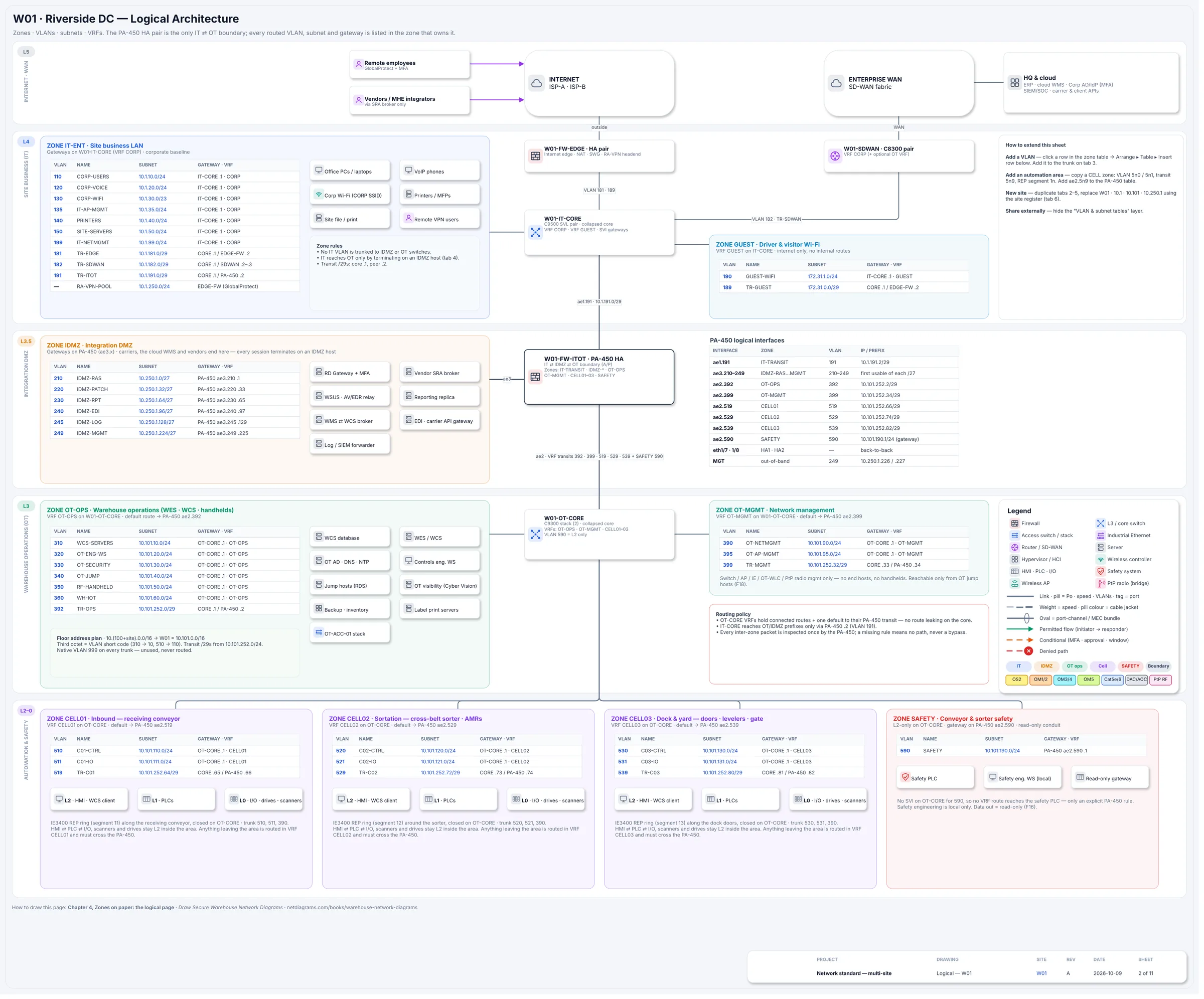
Figure 3.2. Sheet 2 of the same drawing. Purdue bands run down the left margin (L5 internet and WAN, L4 site business, L3.5 integration DMZ, L3 warehouse operations, L2–0 automation and safety). Each zone box holds its own VLAN table, and the W01-FW-ITOT PA-450 pair sits on the spine between IT, the DMZ and operations, with its logical interfaces listed beside it.
Figure 3.2 is the same skeleton for an engineer. Chapter 4 reads it row by row. For now, notice the shape: zone boxes sit inside bands, and every band below L4 connects to the rest only through one firewall pair.
The rules
Rule 1. "The warehouse VLAN" is not a zone.
A VLAN separates broadcast traffic. A zone is a decision about trust: who belongs inside, what they may reach, and which device checks everything that crosses the edge. A VLAN with no guarded edge is just a large room with the lights on.
The test is simple. Point at any two devices in the box and ask whether they should be able to talk freely. If the answer for a handheld and a sorter PLC is "no", they are in different zones, whatever the switch configuration says today.
Rule 2. Draw levels as bands and zones as boxes.
Levels run across the page as horizontal bands with the number in the left margin. Zones are outlined boxes sitting in one band each. A band may hold several zones: at W01, OT-OPS and OT-MGMT both sit at L3.
Automation areas are the allowed exception. One box covers L2 to L0 because the HMI, PLC and I/O are one machine. Label them inside the box, as W01 does: "L2 · HMI · WCS client", "L1 · PLCs", "L0 · I/O · drives · scanners".
Rule 3. One automation area per system you could lose on its own.
An automation area is a blast radius. Size it so that losing the whole area costs you one system and nothing else. Four tests help:
- Does it run alone? If receiving keeps inducting while the sorter is down for a belt change, they are two areas.
- Who maintains it? The conveyor integrator, the sorter OEM and the robotics vendor each need their own laptop to reach their own equipment and nothing else.
- How much does it talk sideways? W01's receiving conveyor hands cartons to the sorter, so the two PLCs exchange a few signals. The sample keeps them apart and registers that exchange as one named flow (F15, inbound to sorter handoff), approved per tag pair.
- Does it fit one ring? Each W01 area has its own ring of industrial switches closed on the OT core: REP segments 11, 12 and 13. One ring per area keeps the failure domain and the area the same size.
Geography is a weak signal. W01's returns annex is across a 60 GHz link and sits in IT-ENT, because it is office and returns-desk equipment. The gate house is across a 5 GHz link and sits in CELL03, because its PLC and barrier gate operator are part of the dock and yard system. Two radios, two zones, each with its reason written beside it.
Rule 4. Outside parties end in the integration DMZ.
A warehouse has more outsiders than most factories: carriers, 3PL clients, the cloud WMS, the MHE integrator, the robotics vendor, the label printer service company. Every one of them should end their session on a host in the DMZ, and a separate session should carry anything onward. That way a compromised partner account or vendor laptop lands on a host you control and log, not on the floor.
W01's DMZ has six suites, each its own /27 on the firewall:
| VLAN | Name | What lives there |
|---|---|---|
| 210 | IDMZ-RAS | Remote desktop gateway with MFA, vendor remote access broker |
| 220 | IDMZ-PATCH | Update server, antivirus and EDR relay |
| 230 | IDMZ-RPT | Reporting replica |
| 240 | IDMZ-EDI | WMS-to-WCS broker, EDI and carrier API gateway |
| 245 | IDMZ-LOG | Log forwarder to the security operations center |
| 249 | IDMZ-MGMT | Management of the DMZ itself |
The cloud WMS never talks to the WCS directly. It talks to the broker in VLAN 240, and the WCS talks to the broker. If the WMS vendor's implementation guide asks for a route from the internet to the WCS database, that request goes on a list for a conversation, not into a firewall rule.
Rule 5. Decide where handhelds live, and write it down.
Handhelds, vehicle-mount terminals and wearables are the most numerous devices on the floor, the most likely to leave the building in a coat pocket, and the most likely to be rented by the hundred for peak. They need a decided home.
At W01 they are VLAN 350 RF-HANDHELD (10.101.50.0/24) on SSID WH-SCAN, inside OT-OPS, with a wireless controller of their own in the OT network. Whichever way you choose, the rule from the model holds: handhelds talk to the WMS and to print, nothing else. A rule nobody enforces is only a wish. Inside OT-OPS nothing filters handhelds by default: the OT core would route VLAN 350 to the engineering workstations (320) and the jump hosts (340) as readily as to the WCS. So W01 puts an inbound ACL on the Vlan350 SVI that permits DHCP, DNS, the WCS and print servers and the IDMZ WMS broker, and denies everything else, including 320 and 340. It is flow row WF09 on the wireless page. Better still, give handhelds their own VRF and route it through the PA-450; that is what the separate mobile zone buys you. Chapter 8 covers their Wi-Fi.
AMRs are different. They are machine control, so W01 puts them inside the sortation area: a workgroup bridge joins SSID C02-AMR, and that traffic stays in CELL02, and keeps flowing for robots already connected if the controller goes down.
Rule 6. Safety is its own zone, read-only out.
The safety PLC stops the conveyors and sorter when someone opens a guard or hits an E-stop. It must not depend on, or be reachable from, the systems it is protecting people from.
W01's safety VLAN 590 has no gateway on the OT core at all. Its gateway is a firewall interface, ae2.590, so every path in or out needs an explicit firewall rule. Data leaves through a read-only gateway (flow F16), and safety engineering is done locally, on a station in the safety room.
Rule 7. Every zone gets a target security level and a guarded edge.
A zone without a target has had no risk decision made about it. W01's standards sheet records one per zone:
| Zone | SL-T | Note |
|---|---|---|
| IT-ENT, GUEST | n/a | Corporate baseline |
| IDMZ | SL 3 | Brokers only; no through-traffic |
| OT-OPS, OT-MGMT | SL 2–3 | Separate OT AD forest |
| CELL0n | SL 2 | One zone per conveyor, sorter or dock system |
| SAFETY | SL 3+ | Read-only out; local engineering only |
Copy the structure, not the numbers. Your own risk assessment sets them.
The edge matters as much as the number. At W01 the PA-450 pair is the only IT-to-OT boundary, and every packet between the IT and OT sides is inspected once by it. Inside OT-OPS the OT core's ACLs do the guarding, such as the handheld filter in Rule 5. Every pair of zones that talks needs a named set of flows (a conduit) and a device on the boundary that enforces it. Chapters 9 and 10 draw and register those flows.
Placing the awkward ones
Most devices sort themselves. These are the ones that start arguments:
| Device | Where it usually belongs | Why |
|---|---|---|
| Label printer at a pack station | Warehouse operations, or mobile | It prints for the WMS; it should not share a VLAN with a PLC. |
| Print-and-apply head on the sorter | The sortation automation area | It is part of the machine and stops with it. |
| AMR fleet manager server | Warehouse operations | It is a level 3 server; the robots themselves are in the MHE zone. |
| Dock door controllers | Building systems, or the dock automation area | Whoever maintains them and whether the WCS drives them decides it. |
| Driver check-in kiosk | Driver and visitor Wi-Fi, or business | It serves outsiders; it never touches the floor. |
| Yard cameras | Building and security | Their own path out, never through the floor. |
| A 3PL client's own server in your MDF | Integration DMZ | The client is an outside party, however friendly. |
When something fits nowhere, give it a zone anyway, a provisional one, with a note. An unplaced device is how the next "warehouse VLAN" begins.
In NetDiagrams
Out of the box, NetBox knows nothing about security zones, Purdue levels or target security levels. NetDiagrams looks for them in the places teams usually keep them, and if your NetBox has no such fields yet, it writes the import files that add them.
Set up NetBox for the warehouse standard. Run:
netdiagrams netbox-setup --profile warehouse
It writes numbered CSV files to a netbox-setup/ folder, with a README.txt naming the NetBox Import button for each: the Purdue level and IEC 62443 security level choice sets, the purdue_level and security_level_target custom fields, the zone tags, and one device role per role. You import them. netbox-setup --check compares your NetBox with what the template needs and changes nothing.
The zone tags are the same slugs the manufacturing standard uses, so one NetBox can hold a plant and a warehouse. The warehouse setup writes zone-guest, zone-it-ent, zone-idmz, zone-ot-mgmt, zone-ot-ops, zone-cell01 to zone-cell03, zone-safety and zone-boundary, the tag the sample's firewall pair carries so it belongs to neither side.
Tag the location, not every device. To place a device, NetDiagrams checks three places in order: the device's own security_zone custom field, any zone-* tag on it, and finally its locations, walking upward until one carries a zone field or tag. Tag the Sorter mezzanine location zone-cell02 and every switch, HMI and PLC filed under it lands in sortation. Purdue level follows the same path.
Name new zones so they find their band. If you add zones of your own, such as a mobile zone or a second sorter, netdiagrams draft --profile warehouse places each one in a band by its name. Names starting ot-, wh- or mobile go to L3. Names starting cell, safety, conveyor, sorter, amr, dock or mhe go to the automation and safety band.
A name it doesn't recognize, such as zone-building, goes to an "Other zones" band unless its devices or locations carry a purdue_level. Anything with no zone at all lands in a band labeled "Not zoned in NetBox". Read that band first; it is the page's to-do list.
Then build:
netdiagrams build --profile warehouse
Or put "profile": "warehouse" in netdiagrams.json, or in the netdiagrams JSON custom field on the NetBox site, and plain netdiagrams will do. The build only reads NetBox.
Here is what that looks like on day one at W02 · Northgate Cross-Dock, the book's second sample, built from its own small NetBox. Its overview says "What NetBox says about this warehouse" and counts "6 security zones". It shows a single automation area, CELL03, with four devices, and it says "No warehouse DMZ zone in NetBox yet" and "No separate safety zone". Those two lines are the zone review for that site, written by the data.
No NetBox yet?
Keep zones in whatever file already holds your asset list. Give it three new columns (zone, Purdue level, SL-T) and use this chapter's names in them. Fill the zone for each location first (the sorter mezzanine, the dock cabinet, the gate house), then copy it down to every device in that location.
Then draw the skeleton. netdiagrams blank --profile warehouse -o my-dc.drawio writes empty bands with zones labeled "(rename me)". Copy the automation area once per system, and add zone and VLAN tables from the netdiagrams stencils --profile warehouse library. netdiagrams sample --profile warehouse -o riverside-dc.drawio writes the W01 drawing in Figures 3.1 and 3.2 to copy from.
With NetBox behind it, a location tagged once places every device under it on each build, and anything untagged shows up in "Not zoned in NetBox" instead of hiding. Appendix F, "Getting your warehouse into NetBox", walks through the setup.
Missing pieces?
The skeleton needs very little to start: the zones you know of, in their bands, and the outside connections you know of. Boundary devices and target levels can be gaps.
A zone you know exists but can't bound yet gets its box anyway, with UNKNOWN G-003 where the boundary device should be. An automation-area split you made on paper but haven't checked with the MHE integrator gets ? G-004. A provisional SL-T is an assumption too: give it a gap ID and a date. Each ID is a row in WS-11, the gaps register.
Collect zones on Appendix G, worksheet WS-01 (site, areas and zones). For the automation areas, ask the maintenance lead which systems they lock out on their own. They already know where the blast radius ends, because they plan around it.
Monday morning
Five things to do with your own zones this week:
- Find your "warehouse VLAN" and list what is on it: handhelds, printers, PLCs, anything else. Each kind is a candidate zone.
- Write the zone list from the model above, one line each, with the device that guards each edge. Mark which rows you merged and why.
- Run the four tests (runs alone, who maintains it, sideways traffic, one ring) on your conveyor and sorter. Split or merge on paper first.
- Decide where handhelds live, inside operations or in a zone of their own, and write the decision on the drawing.
- Run
netdiagrams netbox-setup --profile warehouse, import the files and tag one automation-area location. Build, and check that its devices land in its box. No NetBox yet? Add zone and Purdue level columns to the asset sheet and fill them for one area.
Quotable: A VLAN with everything in it isn't a zone. It's a waiting room for one bad cable.
Next: Chapter 4, "Zones on paper: the logical page", where every zone box is filled in with the VLANs, subnets and gateways that live in it.