Network segmentation, defined
Network segmentation is splitting one network into zones and controlling which traffic may cross between them. Devices that do the same job and carry the same risk share a zone. Every conversation between zones passes a control point, usually a firewall, that allows only what has been written down and denies the rest.
The point is to make a bad day smaller. When a laptop is infected, a vendor's account is stolen or a camera runs ten-year-old firmware, segmentation decides how far the damage can travel. On a flat network, the answer is "everywhere". On a segmented one, it is "this zone, and only through the doors you chose".
Segmentation is also how most security standards expect you to limit scope and exposure: PCI DSS uses it to shrink the cardholder data environment, IEC 62443 builds on zones and conduits, and the CIS Controls (safeguard 12.2) ask for a secure network architecture that includes it.
Why segment a network?
- Contain an intrusion. An attacker who lands in the guest Wi-Fi or a print server should not see the payment terminals, the wire room or the PLCs.
- Shrink audit scope. A store that keeps card data in one well-bounded zone assesses that zone, not every device it owns.
- Protect what can't protect itself. Building controllers, medical carts, door locks and production lines often can't be patched. A zone with a tight edge is the control you can apply.
- Make the network explainable. "These devices, this job, these allowed conversations" is something an auditor, an insurer and the next engineer can all check.
The zones most networks need
The names change with the industry, but the shape repeats. Order zones by trust and by what they do:
| Zone | What lives there | Typical rule |
|---|---|---|
| Internet / outside | Everything you don't own | Nothing starts a session inward except to the DMZ |
| DMZ | Web, mail and file-transfer relays, remote access gateways | Accepts from outside, starts very little inward |
| Users | Staff PCs, laptops, phones | Reaches business apps, never the systems below |
| Servers | Business applications and data | Answers users on named ports only |
| Sensitive zone | Card data, student records, the wire room, the plant floor | Its own firewall edge, short written list of flows |
| Devices you can't patch | Cameras, door locks, building controls, printers | Talks to its own controller and nothing else |
| Guests | Visitor and public Wi-Fi | Internet only |
| Management | Switch, firewall and server management interfaces | Reached only from admin workstations |
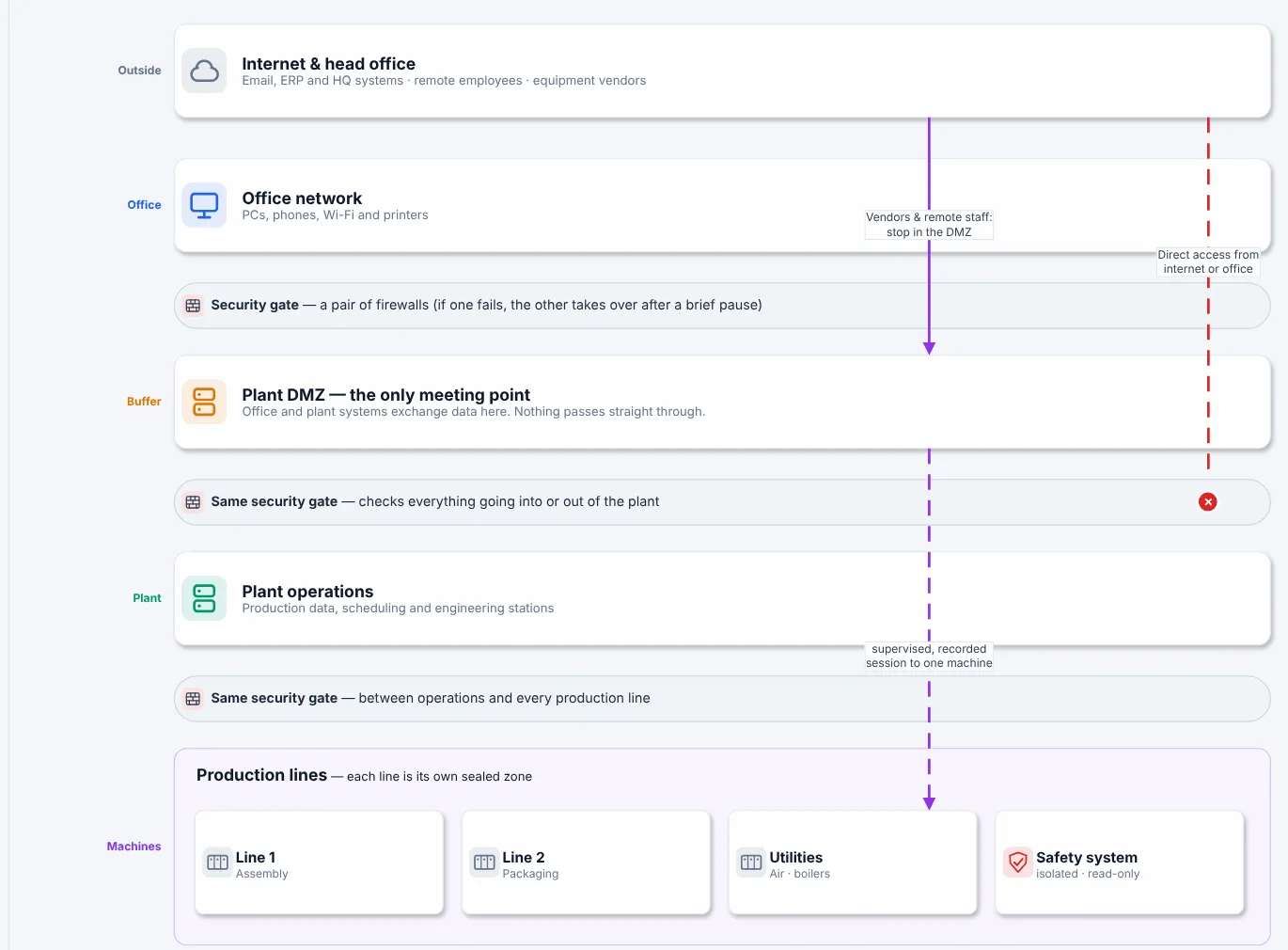
Zones in order of trust for a manufacturing plant, from Book 1: each gate between bands is a firewall boundary, and the dashed line shows a direct path that should not exist.
What is a DMZ network?
A DMZ (demilitarized zone, also called a screened subnet) is the zone between the internet and your internal network. Anything the outside must reach, such as a public web server, a mail relay or a remote access gateway, lives there, so an outsider's connection ends on a DMZ host and never on an internal one.
Two common designs:
- One firewall, three legs. One firewall with interfaces to outside, DMZ and inside. Cheap and common in small sites; one rule base controls everything.
- Two firewalls, back to back. An outer firewall between internet and DMZ, an inner one between DMZ and inside. A mistake on one does not open the whole path.
The rules that make a DMZ worth having:
- No traffic passes straight through. A session from outside ends on a DMZ host. If a packet from the internet can arrive at an internal server with its original source address, you have a corridor, not a DMZ.
- The DMZ starts almost nothing inward. Data moves inward because an inside system fetched it, or through one named, logged flow.
- DMZ hosts are treated as already exposed. Patch them first, give them no domain admin rights, and log what they do.
The same idea protects industrial sites: an industrial DMZ sits between business IT and the plant floor so no session runs end to end. Read the free chapter on the Purdue model and the industrial DMZ.
VLAN segmentation: necessary, not sufficient
A VLAN separates traffic at layer 2: devices on different VLANs don't see each other's broadcasts. That is a good start and almost every segmented network uses VLANs. It is not, by itself, segmentation.
The common trap: every VLAN gets a gateway interface on the core switch, the core routes between all of them, and nothing filters that routing. The drawing shows ten neat zones; the network behaves like one. VLANs become segmentation only when the traffic between them crosses a control point:
- Route between zones on a firewall, or on a switch with access lists that you maintain like firewall rules.
- Use VRFs to keep groups of VLANs in separate routing tables, so they can meet only at a firewall.
- Keep management on its own VLAN, reachable only from admin hosts.
- Prune trunks. A VLAN that isn't needed on a switch shouldn't be carried to it.
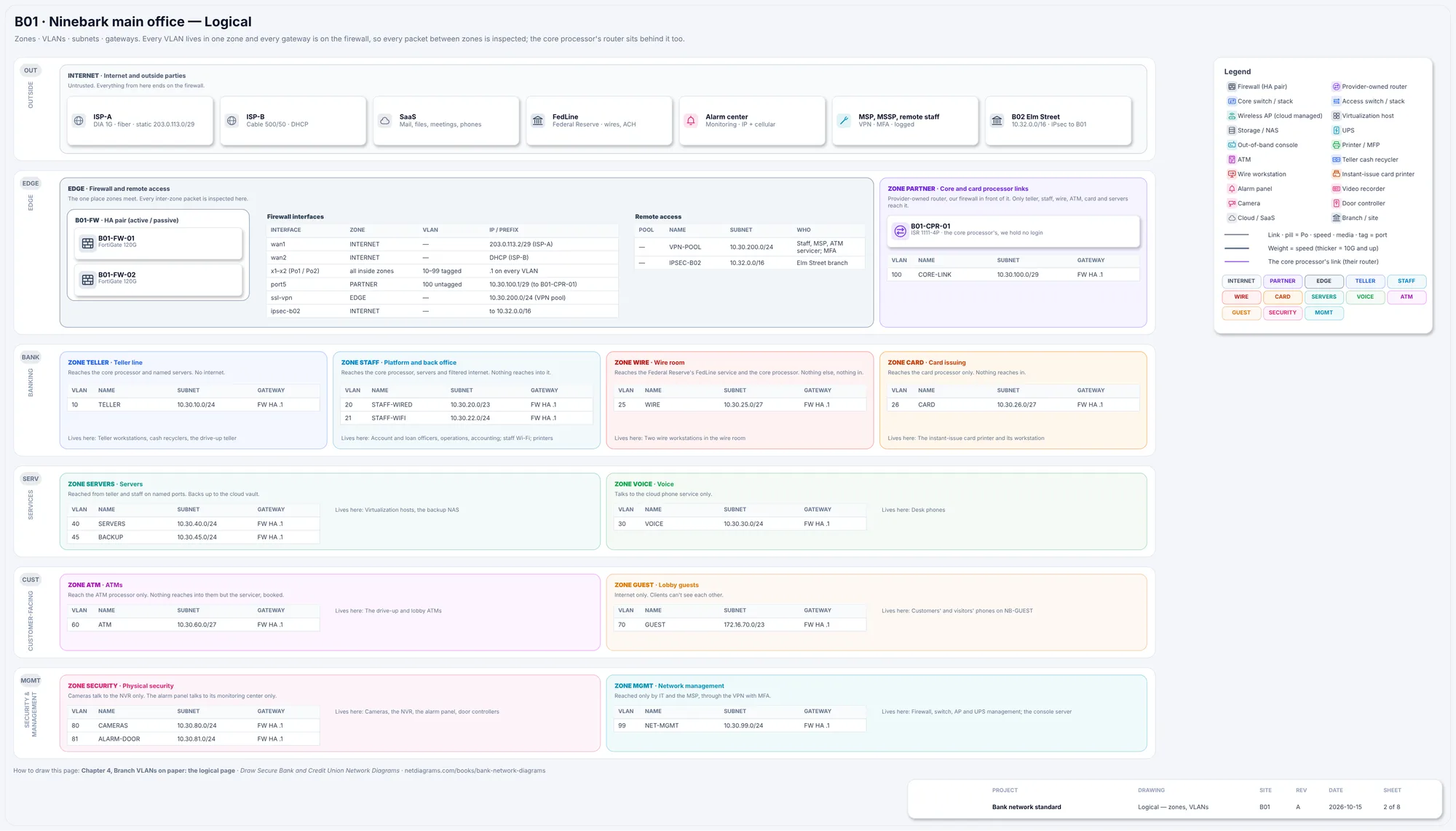
The logical page of Book 6's sample bank: one VLAN table per zone, each with its subnet and gateway, and the firewall drawn as the only way between them.
Network segmentation best practices
- Start from the conversations, not the VLANs. List who must talk to whom, on which ports, and why. The zones follow from that list.
- Group by job and risk, not by department or building. Ten zones of similar devices beat fifty zones nobody can explain.
- Default deny between zones. Allow each needed conversation by name; deny and log the rest.
- One control point per boundary. If two paths cross the same boundary, one of them is unreviewed.
- Keep a flow register. One row per allowed conversation: source zone, destination zone, port, reason, owner and review date. It is the written intent the firewall rules must match.
- Separate management. Admin interfaces of switches, firewalls and servers live in their own zone.
- Put vendors and remote access in a box. Remote sessions land on a jump host in a DMZ, are recorded, and end there.
- Test it. PCI DSS, for example, requires penetration testing of segmentation controls at least every 12 months and after changes (every six months for service providers). Whatever your standard, check that a blocked path is really blocked.
- Compare intent with reality on a schedule. Rules get added during outages and never removed. Read the firewall configuration against the flow register, not the other way round.
- Draw it. If the zones aren't on the diagram, they won't survive the next engineer.
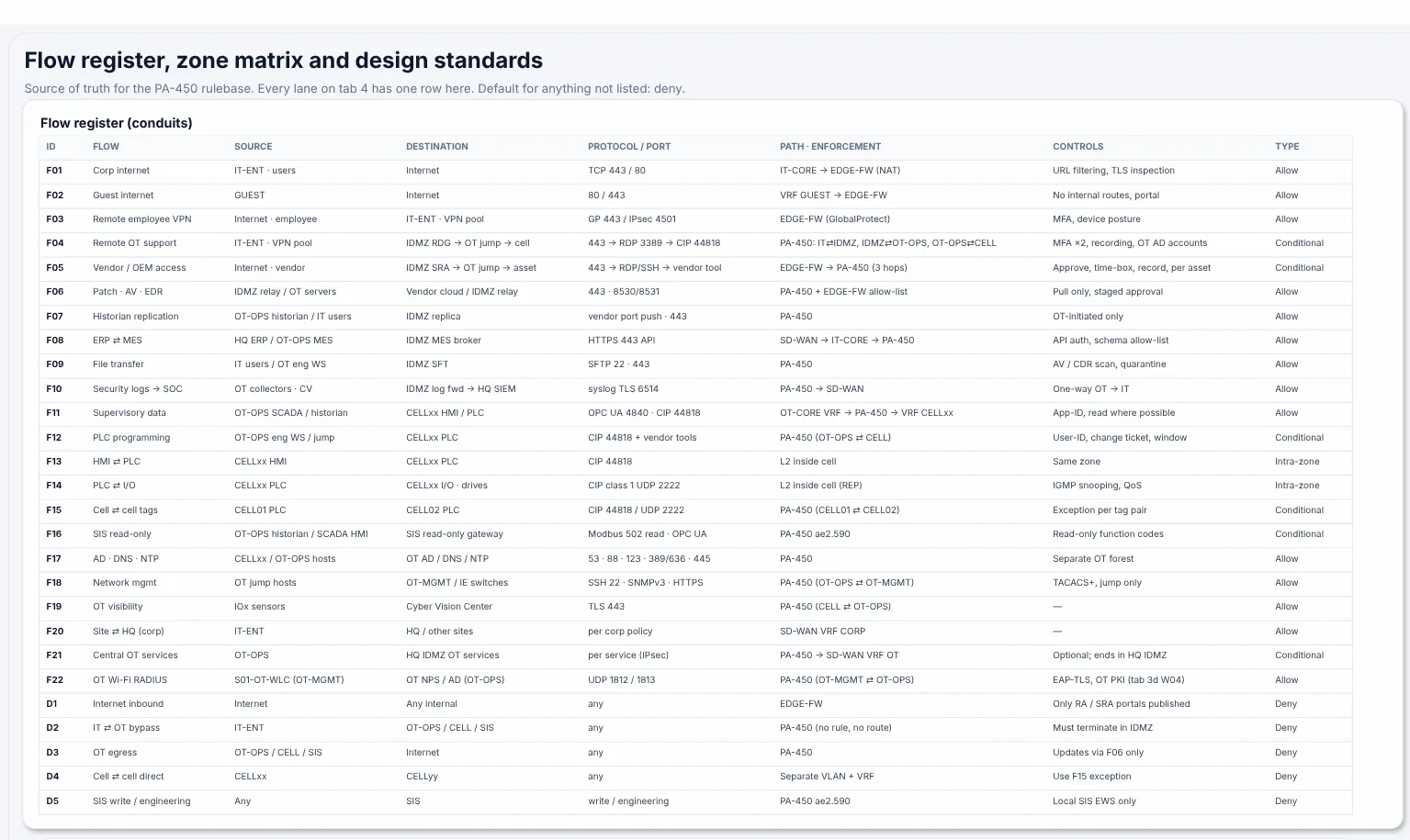
A flow register from the Plant A sample: every allowed conversation between zones, with its path and the default for anything not listed.
Drawing a network segmentation diagram
A segmentation diagram is the drawing an auditor asks for first. It doesn't need every cable. It needs to answer five questions for any device: which zone is it in, who routes it, which device guards its edge, when was this checked, and where is the record.
- Draw zones as outlined areas, ordered by trust, with the same names and colors on every page.
- Draw the enforcing device on the boundary, across the zone line, not inside a zone.
- Draw allowed flows as arrows from the side that starts the conversation, numbered to match rows in the flow register.
- Mark what you don't know. Draw an unverified link dashed and keep a list of open questions on the page.
- Date it and name the source. An undated segmentation diagram can't tell anyone whether it shows today's network.
Every industry draws its zones differently. Each book in the series has a free chapter on exactly that: schools, warehouses, retail and PCI, small offices, banks and credit unions, local government, hotels, corporate networks and car dealerships. For more drawings, see the network diagram examples.
If your network is in NetBox, the free NetDiagrams tool draws zones, VLAN tables and the flow register from it, one drawing per site.