The cold open
Three weeks before the holiday season, the remodel crew finishes the new checkout counter a day early. The marketing team has sent a digital menu board for the coffee corner beside lane 1, and it needs a network port. The installer looks under the counter, finds a small switch with two free ports, and plugs the board in. It lights up and starts showing the festive blend. Everyone is pleased.
The switch under the counter carries the registers and the PIN pads. The menu board now shares a wire closet, a switch and very possibly a VLAN with the payment lane, and it phones home to a content service on the internet every five minutes.
Nobody was reckless. The store's drawing showed one box labeled STORE LAN with a firewall on top. The box had no inside walls, so nobody had a reason to stop.
This chapter is about drawing those inside walls: zones, the boundary device between them, and the conversations allowed to cross. In a store, the zone that matters most is the one where card data lives. If your drawing can't show where that zone starts and stops, nobody can check it, including you.
What this chapter does, and what it doesn't
This book shows how to draw segmentation so that an assessor can test it. It does not tell you what is in or out of PCI DSS scope for your stores. That is the assessor's call (for most chains, a Qualified Security Assessor, or QSA), made on your evidence, your processor's requirements and your payment products. Nothing here interprets a PCI DSS requirement, and nothing here promises that a design choice shrinks scope.
What a good drawing does is make the scoping conversation short. Instead of "we think the tills are separate", you hand over a page that says which VLANs hold card data, which device guards their edge, and which conversations cross it or are refused. Then anyone can test each line before the assessor arrives.
The sample store
Every example in this chapter comes from a fictional chain that ships with NetDiagrams, a tool that draws network diagrams from NetBox, an open-source inventory of network devices, cables and addresses. The chain has one head office (site HQ1) and three stores. Run this to get the reference store:
netdiagrams sample --profile retail -o st014.drawio
It writes the R01 retail standard as drawn for ST014 · Store 014, a street store on two floors: three checkout lanes, four Wi-Fi access points, four cameras, a back office cabinet, broadband with a 4G backup line, and a store firewall that is also the SD-WAN edge. The file opens in draw.io.
Two other stores appear later: ST027, with a fourth lane, and ST031, a mall unit still being fitted out.
A tour of the store, from the register out
New hires at the sample chain get a walk-through on their first morning. Here is the network team's version. Start at the till, and keep your hands off the cables.
Stop 1: the register. Three of them, POS-01 to POS-03, each cabled to the counter switch on ports 1 to 3. They live on VLAN 20,
POS, subnet10.14.20.0/26. This is the cardholder data environment. It is the most guarded room in the building, and it is about four feet long.Stop 2: the PIN pad. PED-01 to PED-03, one per lane, on ports 5 to 7, powered over the cable. VLAN 21,
PIN-PAD. The card is tapped or inserted here, and the pad encrypts the card data inside the reader before anything else sees it (P2PE). It sends that encrypted data straight to the payment processor over TLS. The register asks it for an amount and gets back "approved" or "declined". The register never sees the card number. It isn't trusted with it.Stop 3: under the counter. A locked tray holds SW-02, a 12-port switch with its own small UPS. It carries VLANs 20, 21 and 22, plus 99 for its own management, and nothing else. This is where the menu board from our opening ended up. The tray is locked. Who holds the key is outside the scope of this tour.
Stop 4: the back office cabinet. A 12U wall cabinet, CAB-01. Inside: the firewall, the 4G router, the main switch, the camera recorder and the store POS server, POS-SRV-01, which holds the day's sales and stores them if the lines go down. Note the POS server. It sits in the back office with everything else, but it is in VLAN 22,
POS-SRV, and it belongs to the checkout's zone, not the room's. A zone is not a room. This catches people out.Stop 5: the manager's desk. The back office PC and the printer, on VLAN 10,
STORE-DATA. The staff handhelds and tablets join Wi-Fi and land on VLAN 30,STAFF-WIFI. Both are the store business zone. They reach head office for stock and email. They do not reach the registers. If the manager needs a till report, it comes from head office's systems, not from the till.Stop 6: the shop floor. Cameras on VLAN 40 (one of them watches the checkout), and on VLAN 41 the window signage player, the refrigeration monitor in the stockroom and the footfall counter by the door. Shelf labels and scales join the devices SSID, STORE-IOT, and land on VLAN 42. That's the store devices zone. The camera over the checkout can see every card in every hand. It still can't talk to a single PIN pad, because seeing and connecting are different things.
Stop 7: the customers. Their phones join the guest SSID and land on VLAN 50, a /23, with client isolation and 10 Mb/s each. Internet only. Guests are welcome to browse the website of the store they are standing in. They are not welcome anywhere else on the network, and the drawing says so with a red line.
Stop 8: the way out. The firewall, FW-01, is the gateway for every VLAN on this tour. Broadband is the primary line; a 4G router sits on a small transit VLAN, 98, as the backup. Store systems reach head office over an encrypted tunnel. Support partners come in through a jump host at head office, never directly. Nothing on the internet can start a conversation with anything in this store. It's the most boring stop, which is the point.
The walk took eight stops and covered six zones: CDE (registers, PIN pads, POS server), STORE (back office and staff devices), IOT (cameras, signage, refrigeration, door counter, shelf labels), GUEST (customer Wi-Fi), MGMT (switch and access point management, VLAN 99) and EDGE (the WAN side of the firewall). One device guards every edge between them.
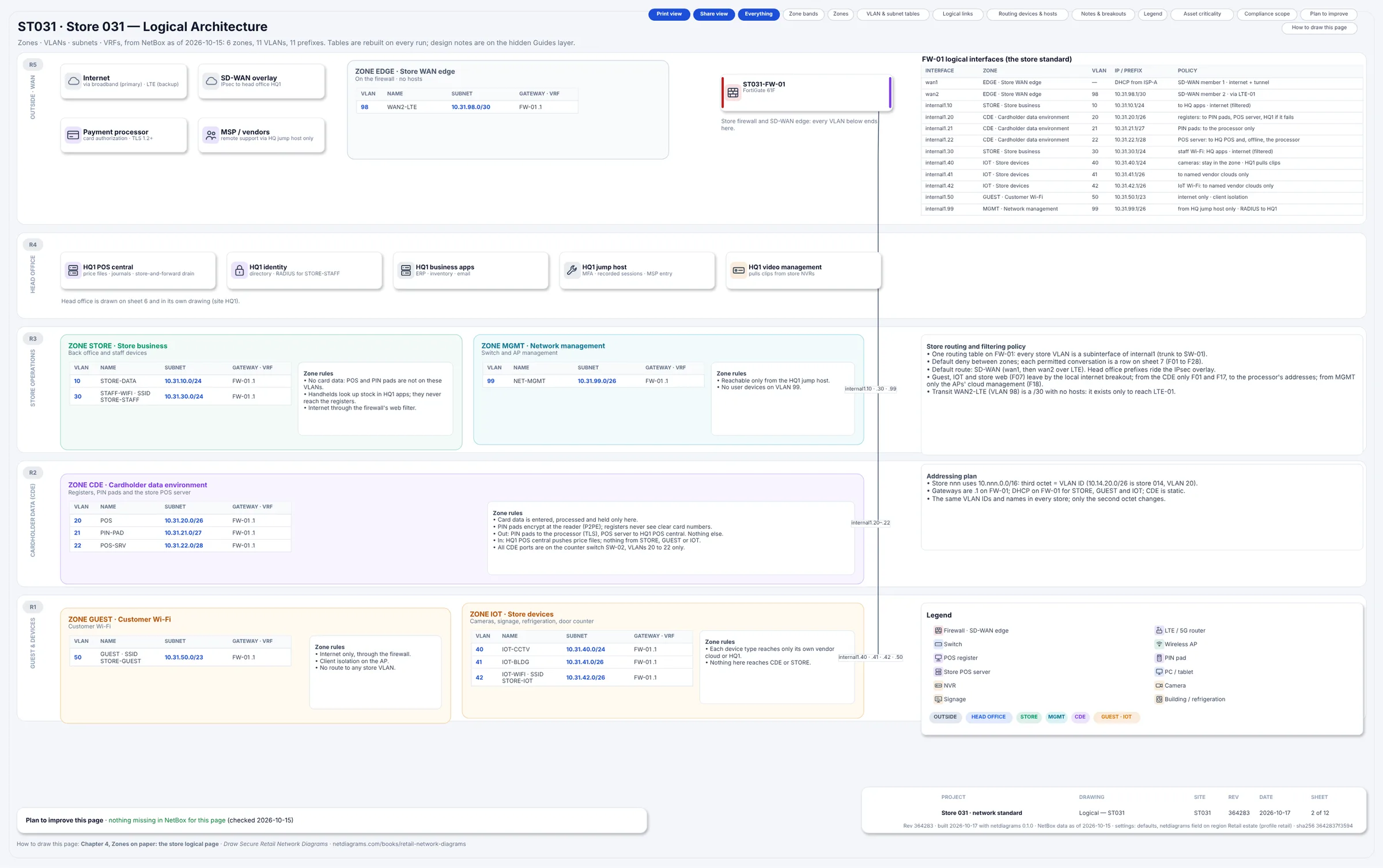
Figure 3.1. Sheet 2, "ST031 · Store 031 — Logical Architecture," built from NetBox: "6 zones, 11 VLANs, 11 prefixes." ZONE CDE holds VLANs 20 POS (10.31.20.0/26), 21 PIN-PAD and 22 POS-SRV, gateway "FW-01 .1." The FW-01 table gives internal1.21, the PIN pads, the policy "PIN pads: to the processor only." The plan card reads "nothing missing in NetBox for this page." The title block reads ST031, revision 364283, "2 of 12."
Figure 3.1 is the tour drawn as zones, for the mall unit. The VLAN IDs and names match Store 014's; only the second octet changes. Every gateway is FW-01, so every line between zones crosses one device. GUEST has VLAN 50 but no devices in NetBox: customer phones aren't inventory.
Read the routing note on the right as the CDE's exit list: "Guest, IOT and store web (F07) leave by the local internet breakout; from the CDE only F01 and F17, to the processor's addresses; from MGMT only the APs' cloud management (F18)." The PIN pads reach the processor, and the POS server drains offline sales there after an outage; nothing else in the CDE reaches the internet.
The rules
Rule 1. The CDE is a zone with an edge, not a color.
Shading the tills purple on a drawing is not segmentation. A zone is a set of VLANs and devices, an enforcement device on its edge, and a written list of what may cross. Draw all three, or the purple is decoration.
In the sample, ZONE CDE is three VLANs (20, 21, 22), seven devices and three firewall subinterfaces, internal1.20 to .22, each with a one-line policy. An assessor can test each part of that sentence. They can't test a shade.
Rule 2. Draw every device in exactly one zone, and draw the location separately.
The POS server is in the back office cabinet and in the CDE. The camera over the checkout is at the checkout and in the IOT zone. Rooms and zones are different questions, and a good drawing answers both: the zone by which box the device sits in, the room by a small label on its card (Checkout, Back office, CAB-01 · U6).
Can't decide a device's zone? That's a design question for the system's owner; don't let the device float between boxes.
Rule 3. Stack the zones in bands by trust.
The R01 standard uses five horizontal bands, top to bottom: R5 OUTSIDE · WAN, R4 HEAD OFFICE, R3 STORE OPERATIONS, R2 CARDHOLDER DATA (CDE), R1 GUEST & DEVICES. Zones sit in bands: STORE and MGMT share R3; GUEST and IOT share R1; the CDE has R2 to itself.
A line from R1 straight into R2 that misses the boundary device then looks wrong at a glance, which is the reaction you want from a reviewer.
Rule 4. One gate, drawn on the boundary.
In the sample, FW-01 is the default gateway for every store VLAN, so every conversation between zones crosses a firewall rule. Draw that device across the boundary, not tucked into one zone, with a small table of its interfaces and the zone each one faces.
If a switch routes some VLANs instead, draw that honestly. A layer 3 switch routing between back office and registers skips the firewall, and the drawing is the cheapest place to find it.
Rule 5. Guests and store devices get zones of their own.
"The shop floor" is not a zone. Customers' phones are strangers by definition. Cameras, signage and refrigeration monitors are usually managed by facilities or an outside vendor and talk to that vendor's cloud. Neither group has any business near the tills, and neither should share a zone with the manager's PC.
The sample puts GUEST and IOT side by side in R1, each with one-line rules: guests get "Internet only, through the firewall"; store devices get "Each device type reaches only its own vendor cloud or HQ1. Nothing here reaches CDE or STORE."
Rule 6. Draw the refusals, not just the permissions.
An assessor testing segmentation wants to know what is meant to fail. The sample draws five denied paths as red lanes ending in a cross: D01 guest Wi-Fi to the CDE, D02 store devices to the CDE, D03 back office to the CDE ("use HQ1 apps"), D04 internet to any store zone ("no inbound path at all"), and D05 Wi-Fi store devices (STORE-IOT SSID) to the back office and handhelds.
Each one is a test someone can run, under a change ticket and outside trading hours, from a test port on that VLAN; D04 is tested from outside, against the store's public address. A drawing that shows only what's allowed leaves the reader guessing, and guessing isn't testing.
Rule 7. Give every zone an owner.
Someone has to say yes or no when a new device or flow wants into a zone. The sample's sheet 7 lists them: EDGE and MGMT, the network team; STORE, store IT; CDE, the POS team; GUEST, marketing; IOT, facilities.
The menu board in the cold open belonged to marketing and needed a port in the POS team's zone. With owners on the drawing, that's a two-minute conversation before the install, not an awkward one after the assessor finds it.
Rule 8. Write down what would change the zone.
Some changes look small and redraw the CDE. The sample's wireless sheet says it outright: "No SSID lands in ZONE CDE. A wireless PIN pad would change the CDE: redraw sheets 2, 4 and 7 first." Mobile checkout, a self-checkout kiosk, a new payment app on the handhelds: each one belongs on a short list next to the zone, with "talk to the POS team and the assessor before buying".
What segmentation has to show on paper
Put the rules together and a drawing that supports a segmentation test answers six questions for the CDE, without anyone in the room explaining it:
| Question | Where the sample answers it |
|---|---|
| Which VLANs and subnets are in the zone? | ZONE CDE table: 20 POS, 21 PIN-PAD, 22 POS-SRV |
| Which devices are in it, and where are they? | Physical page: counter box, POS-SRV-01 in CAB-01 |
| What enforces the edge? | FW-01, interfaces internal1.20 to .22 |
| Which switches carry its VLANs? | SW-02 (20 to 22 and 99 only) and the trunk from SW-01 |
| What may cross, in each direction? | Flows F01 to F05, F26 and F27 on sheets 4 and 7, F28 under conditions, and F16 and F17 only on a named failure |
| What is refused? | D01 to D03 into the CDE, D04 from the internet |
Most drawings skip the fourth question. A VLAN trunked to a shop-floor switch is present on it, whatever the firewall rules say. List the trunks.
The sample's flow register also has a PCI column (CDE, connected, out) and a standards row that says the column records what the assessor confirmed and "this sheet never decides it." Treat a column like that on your own register as a pencil proposal for the scoping call. Which systems count as connected-to is a scoping question, and it's not yours to settle alone.
Why a flat store network leaves nothing to test
Plenty of stores still run one VLAN for everything: tills, PIN pads, the manager's PC, the cameras, sometimes guest Wi-Fi.
There is no edge to point at. If the guest phones and the registers share a broadcast domain, no rule anywhere says the phones can't reach the registers, so there is no segmentation to test. What that means for your scope is the assessor's decision. What it means for the drawing is simple: there is only one zone to draw, and every device in the store is in it.
Draw it anyway. One honest zone noting "everything is together, see change plan" beats a page of imaginary walls.
Head office: advice, not a drawing
The R01 standard draws one store. Head office appears on it three ways: as the R4 HEAD OFFICE band on the logical page, as a card on sheet 6 ("POS central · identity (RADIUS) · business apps · jump host · video management; two internet lines · SD-WAN hub · firewall pair", with a head office failover strip beside it), and as the far end of flows such as F04 (POS server to HQ1 POS central). The template doesn't draw HQ1 as a site of its own.
Your head office still needs zones. This book's advice for its own drawing is four: corporate (staff PCs and office systems), data center or cloud services (business apps, identity), head office CDE (the payment switch, the tokenization connector, POS central) and management (jump hosts and network management). Same rules apply.
Placing the awkward ones
These start arguments:
| Device | Where it usually goes | Why |
|---|---|---|
| Camera pointed at the till | IOT | It records the lane; it has no reason to talk to it. |
| Handheld that also takes payments | A redraw of the CDE | Rule 8: talk to the POS team and the assessor first. |
| The landlord's mall CCTV | Not your zone at all | Draw it as an outside party, with a note on who owns it. |
| Self-checkout kiosk | CDE, if it has a card reader | Draw it with the registers and list its flows. |
"Usually" is doing honest work in that table. Your design, your POS vendor's architecture and your assessor may all say otherwise, and the drawing should record the decision with its reason.
In NetDiagrams
NetBox has no built-in notion of a security zone, so NetDiagrams reads zones from where teams put them: a zone custom field, a zone-* tag, or the location tree. The retail standard uses tags.
Set NetBox up once. Run:
netdiagrams netbox-setup --profile retail
On the sample it printed "Wrote 6 import files … (69 objects)": choice sets, custom fields (audit ones too), zone tags, device roles, inventory item roles and the contact roles Asset owner and Custodian, each a numbered CSV for an Import button; README.txt says which.
--check compares your NetBox with what the template needs and changes nothing; --apply creates what is missing through the API, with a write token. Nothing else in NetDiagrams writes to NetBox, and it never connects to your network devices.
The zone tags it writes, with the names and colors the drawing uses:
| Tag | Name | Band |
|---|---|---|
zone-edge |
EDGE · Store WAN edge | R5 OUTSIDE · WAN |
zone-store |
STORE · Store business | R3 STORE OPERATIONS |
zone-mgmt |
MGMT · Network management | R3 STORE OPERATIONS |
zone-cde |
CDE · Cardholder data environment | R2 CARDHOLDER DATA (CDE) |
zone-guest |
GUEST · Customer Wi-Fi | R1 GUEST & DEVICES |
zone-iot |
IOT · Store devices | R1 GUEST & DEVICES |
Tag the devices, then the VLANs. Each device and each VLAN gets its zone tag. For a device, a tag on the device itself wins over its location. That matters in a store: the Checkout location holds the registers and PIN pads, and also the counter switch and the camera over the checkout. Tagging the room zone-cde would pull the camera into the CDE. Tag the payment devices one by one.
Set the profile once, for the whole estate. The sample puts {"profile": "retail"} in the netdiagrams JSON custom field on its NetBox region, "Retail estate", so every store builds to R01 without a flag. doctor confirms where it found that, and where it read zones from. For ST031, the mall unit:
Settings from: defaults, netdiagrams field on region Retail estate (profile retail).
...
Zones
  Read from: field security_zone, iec62443_zone, ot_zone on 0 devices, zone-* tags on 15, the location tree on 0, nothing on 1.
Fifteen devices zoned by tag; the fit-out contractor left the door counter untagged.
Draft a store to see its zones. Before a store has a proper drawing, draft lays one out from NetBox, placing each device in its zone's band:
netdiagrams draft --profile retail --site st031 -o st031-draft.drawio
It printed "Wrote st031-draft.drawio: 16 devices (15 zoned), 15 links, 6 zones."
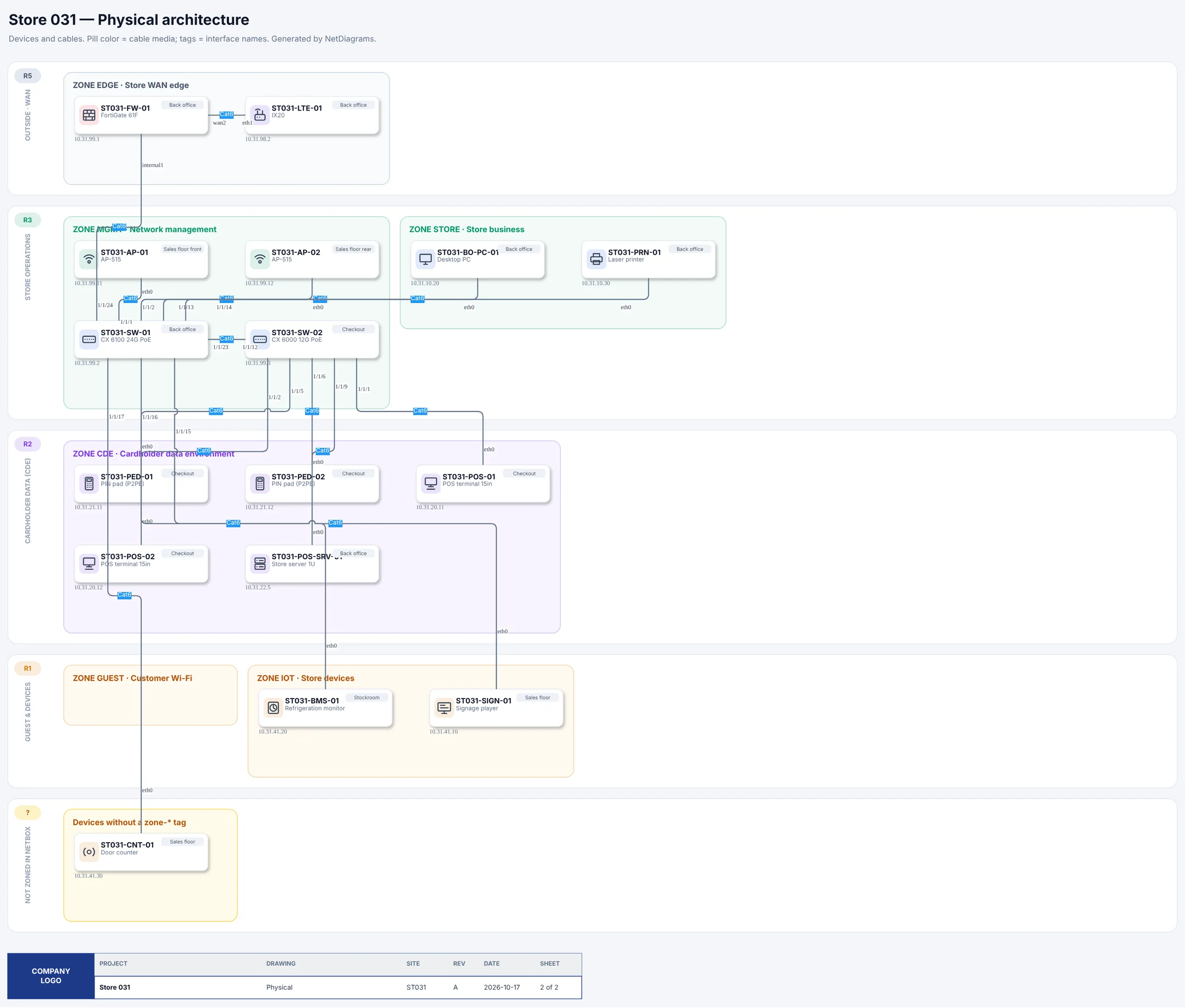
Figure 3.2. netdiagrams draft --profile retail for ST031. Zone boxes sit in their bands: ZONE EDGE with the firewall and 4G router in R5; ZONE MGMT (switches and access points) and ZONE STORE in R3; ZONE CDE with two registers, two PIN pads and the POS server in R2; ZONE GUEST (empty) and ZONE IOT in R1. A last band, "NOT ZONED IN NETBOX", holds one box, "Devices without a zone- tag", with ST031-CNT-01, the door counter, inside it.*
Read the bottom band first: it's the store's zone review, written by the data. Notice where the switches landed: the sample tags its switches and access points zone-mgmt, by their management address, while their ports carry other zones' VLANs. Whether a switch that carries CDE VLANs counts with the CDE is a scoping question for your assessor; the drawing's job is to show plainly which VLANs it carries.
The full build, netdiagrams build --profile retail --site st031, names the same gap first in its summary: "Fix first: ST031-CNT-01 (zone)".
No NetBox yet?
Add a zone column to the asset list you already have, and fill it using the six zone names in this chapter. Do it device by device for anything at the checkout; the camera over the lane is the classic slip. Add a second column for the room, so you never have to choose between them.
For the picture, netdiagrams blank --profile retail -o my-store.drawio writes empty zones already sitting in the five retail bands, each labeled "(rename me)", and netdiagrams sample --profile retail gives you the ST014 drawing to copy from. Load netdiagrams stencils in draw.io for zone tables and device shapes.
When you move to NetBox, the column becomes a tag, and the draft's "Not zoned in NetBox" band does the checking you are now doing by eye. Appendix F, "Getting your store estate into NetBox", walks through it.
Missing pieces?
The zone model needs very little to start: the zones you know of, in their bands, and the outside connections you know of. Owners, boundary interfaces and the exact list of trunks can follow.
If you know the tills are separated but can't yet say by what, draw the CDE box with UNKNOWN G-003 where the boundary device goes. If you've placed the self-checkout kiosks in the CDE on a reasonable guess, give them ? G-004 until the POS vendor confirms how they connect. Each gap ID is a row in WS-11, the gaps register, with an owner and a date.
Collect zones on Appendix G, worksheet WS-01 (site, areas and zones). For the checkout, ask the POS team and the POS vendor's support line for the list of devices and the ports they use. For the shop floor, ask facilities which box belongs to which vendor.
Monday morning
- Walk one store from the register out, writing down every device you pass and the zone you believe it is in. Anything you can't place goes on a list.
- Check what is under the counter. List every port on the checkout switch and what is plugged into each. A menu board or music player there is your first change request.
- Name the boundary device for every pair of zones, and list which switches carry the CDE VLANs.
- Write the four refusals for your store (guest, store devices and back office into the CDE; internet into anything) and book a test of each: under a change ticket, outside trading hours, from a test port on that VLAN (D04 from outside).
- Run
netdiagrams netbox-setup --profile retail, import the files and tag one store's devices. Runnetdiagrams draft --profile retailand read the "Not zoned in NetBox" band. No NetBox yet? Add the zone and room columns to the asset list for one store.
Quotable: If the drawing can't show where the card data zone ends, nobody can test it, and you'll learn where it really ends from the assessor.
Next: Chapter 4, "Zones on paper: the store logical page", where each zone gets its VLANs, its subnets and the one gateway they all share.