The cold open
A customer is in the lounge, two hours into a 60,000-mile service. She joins the lounge Wi-Fi, opens a folder, and her laptop helpfully lists the other things it can see on the network.
There is a printer called SERVICE-WRITEUP. There is one called FI-OFFICE. There is a scanner named DEALJACKET, a camera recorder with a login page, and something called KEYBOX that she decides not to think about. She closes the folder and goes back to her email. Nothing happens.
Nothing usually does. That is how a flat network survives for years: every device can reach every other device, and on most days none of them try.
Six weeks later the controller, who has just been named the store's Qualified Individual, is working through a written risk assessment. One question asks which systems hold customer financial information and what separates them from everything else. The answer, honestly written, is "the lounge Wi-Fi password."
Out on the lot, every car wears a window sticker that tells a complete stranger what it is, what came with it and what it can do. The network that sells those cars has no sticker at all. This chapter writes one for each part of it.
Seven words this chapter uses
The DMS (dealer management system) is the store's system of record: deals, repair orders, parts, accounting. It is usually hosted by its vendor and reached through an encrypted tunnel.
F&I (finance and insurance) is the office where the deal is financed: credit applications, credit bureau pulls, lender portals, contracts. It handles the most sensitive customer information in the building.
A zone is a group of devices that follow the same rules about who they may talk to. A VLAN (virtual LAN) is how a switch keeps groups apart on shared cables; each VLAN is its own small network with its own address range. The firewall is where zones meet and where the rules are enforced.
The Safeguards Rule is the FTC's rule under the Gramm-Leach-Bliley Act (16 CFR Part 314). The FTC's own guidance names auto dealers that arrange or provide financing or leasing among the businesses the rule covers; whether it covers yours is a question for your counsel.
The Qualified Individual is the person the rule says must run the store's written information security program. At many dealerships it is the controller, the IT manager or the managed service provider (MSP). If it's the MSP, the rule still leaves the dealer responsible: name a senior person at the store to direct and oversee them, and require the MSP to keep a security program of its own.
Kestrel Valley Motors, and its zones
The examples in this book come from Kestrel Valley Motors (site D01), a fictional franchised new-car dealership with about 120 staff. The main building holds the showroom, sales tower, F&I offices, upstairs back offices, service drive, parts, lounge and the main equipment room (the MDF). The shop sits in a separate service building with its own closet, IDF-SHOP.
Across town, Kestrel Valley Pre-Owned (D02) is a used-car store of about 12 staff. The DMS is hosted by its vendor, the manufacturer supplies its own router and circuit, and an MSP runs the network.
The design is one firewall pair and fourteen zones, stacked in five bands from the most exposed at the top of the page to the shared services at the bottom:
| Band | Zone | What lives there | The one-line rule |
|---|---|---|---|
| OUTSIDE · INTERNET, DMS & LENDERS | Internet, DMS and lenders | Two internet lines, the hosted DMS, lender portals and credit bureaus, SaaS, the MSP | Untrusted. Everything from here ends on the firewall. |
| EDGE · FIREWALL & REMOTE ACCESS | Firewall and remote access | The firewall HA pair, the DMS tunnel, the VPN pool | The one place zones meet. Every inter-zone packet is inspected here. |
| SALES, F&I & OFFICE | Finance and insurance | F&I desks, the deal-jacket scanner, the F&I printer | Reaches the DMS, the lenders and the bureaus. Wired only; nothing reaches into it. |
| Sales floor | Sales desks, the managers' tower, sales tablets on KV-STAFF | Reaches the DMS, the CRM and the manufacturer's sales portal. Not the credit tools. | |
| Back office | Accounting, title clerks, HR, the controller; the deal-jacket NAS | Reaches the DMS, the banks and payroll. The NAS answers office and F&I only. | |
| Card terminals | Card terminals at the service cashier, the parts counter and F&I | Talks to the payment processor only. Nothing else talks to it. | |
| SERVICE, SHOP & PARTS | Service drive | Service advisors, the cashier PC, write-up tablets on KV-SERVICE | Reaches the DMS, the manufacturer's warranty systems and the service printer. |
| Shop and technicians | Manufacturer diagnostic PCs, shop tablets on KV-SHOP | Reaches the manufacturer's network and its update servers. Never the front office. | |
| Parts | Parts counter PCs, the parts printer, warehouse scanners | Reaches the DMS and the manufacturer's parts systems. | |
| Manufacturer link | The manufacturer's router and its own circuit | The manufacturer's box. We give it one port and one VLAN, and filter what crosses. | |
| GUESTS, PHONES, BUILDING & MGMT | Customer Wi-Fi | Customers' phones and laptops on KV-GUEST in the lounge | Internet only. Clients can't see each other. |
| Phones | Desk phones and the service drive's paging | Talks to the cloud phone service only. | |
| Building and lot | Cameras, the NVR, the key cabinet, EV chargers | Cameras talk to the NVR only. The key cabinet reaches its vendor's cloud and nothing else. EV chargers reach their maker's cloud only. | |
| Network management | Firewall, switch, AP and UPS management; the console server | Reached only by the MSP and the IT manager, through the VPN with MFA. |
Read the last column alone and you have the store's security policy in fourteen sentences, short enough for a dealer principal to agree to and specific enough for an MSP to build. The order is deliberate: strangers on top, the departments that touch credit files right under the firewall, fixed operations next, and shared services at the bottom, where nothing drifts into the front office by accident.
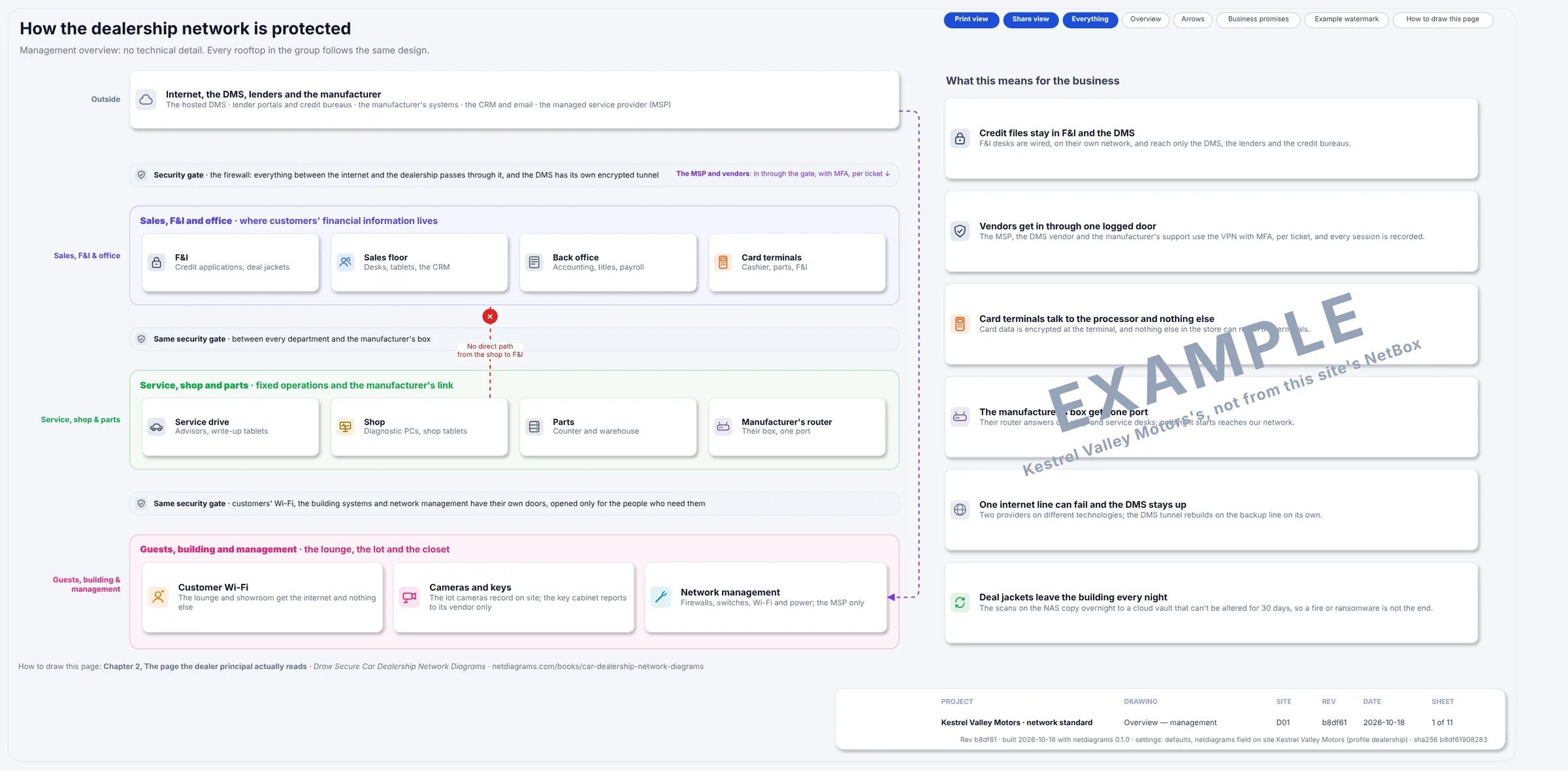
Figure 3.1. Sheet 1, "How the dealership network is protected", from a build of the sample. The same bands in plain words, with security gates between them, a red dashed "No direct path from the shop to F&I", and six business promises, marked EXAMPLE, on the right, from "Credit files stay in F&I and the DMS" to "Deal jackets leave the building every night".
Figure 3.1 has no VLAN numbers or addresses. The dealer principal reads this page, the MSP reads the logical page in Chapter 4, and both describe the same building.
Read the stickers
One window sticker per inside zone. As on the lot, the fine print is the part that matters.
ZONE: FI · Finance and insurance Standard equipment: F&I desks, deal-jacket scanner, F&I printer. Wired ports only. Connects to: the DMS through its tunnel; lenders and credit bureaus, named destinations, MFA on every portal. Not available on this model: Wi-Fi. Visitors. Any connection that starts somewhere else.
ZONE: SALES · Sales floor Standard equipment: sales desks, the managers' tower, tablets on KV-STAFF. Connects to: the DMS, the CRM, the manufacturer's sales portal. Does not include: the credit tools. They are in the next office, and they stay there.
ZONE: OFFICE · Back office Standard equipment: accounting, titles, HR, the controller, the deal-jacket NAS. Connects to: the DMS, the banks and payroll (named destinations, MFA). Storage package: the NAS answers office and F&I only, and copies itself to the cloud every night.
ZONE: CDE · Card terminals Standard equipment: three card terminals, at the service cashier, the parts counter and F&I. Connects to: the payment processor. That is the complete list. Note to buyer: smaller is better on this model. Every device added here joins the PCI assessment.
ZONE: SERVICE · Service drive Standard equipment: advisors' PCs, the cashier PC, write-up tablets on KV-SERVICE. Connects to: the DMS and the manufacturer's warranty systems.
ZONE: SHOP · Shop and technicians Standard equipment: manufacturer diagnostic and programming PCs in bays 2, 8 and 14; shop tablets on KV-SHOP. Connects to: the manufacturer's network, through the manufacturer's router only. Never connects to: sales, the office or F&I. The shop is built for rough conditions, and so is its zone.
ZONE: PARTS · Parts Standard equipment: counter PCs, the parts printer, warehouse scanners. Connects to: the DMS and the manufacturer's parts systems.
ZONE: OEM · Manufacturer link Standard equipment: one router and one 100M circuit, both supplied and managed by the manufacturer. Keys: not included. The dealership does not hold the password. Connects to: one switch port, one VLAN. It answers; it never starts a conversation inward.
ZONE: GUEST · Customer Wi-Fi Standard equipment: KV-GUEST, captive portal, client isolation, 25 Mb/s per client. Connects to: the internet. Range: does not reach the service printer, the F&I office or the next customer's laptop.
ZONE: VOICE · Phones Standard equipment: desk phones and the service drive's paging. Connects to: the cloud phone service.
ZONE: BUILDING · Building and lot Standard equipment: eight cameras, the video recorder, the vehicle key cabinet, EV chargers. Connects to: cameras to the recorder; the key cabinet and EV chargers to their makers' clouds. Nothing else, in either direction.
ZONE: MGMT · Network management Standard equipment: the management side of the firewall, switches, access points and UPSs; the console server. Connects to: nothing on its own. Reached only by the MSP and the IT manager, through the VPN, with MFA, logged.
The internet and the edge get no sticker. One is the open road and the other is the gate in the fence.
The rules
Rule 1. Follow the credit file. The zones follow it too.
Departments in a dealership sit side by side and all talk to the same DMS, so zoning by floor or building gets you nowhere: the showroom and the F&I office are twenty feet apart and very different places.
Start instead from the most sensitive information on site: the credit application, the bureau pull, the signed contract. At Kestrel Valley it lives in F&I, in the DMS and on the deal-jacket NAS in the back office, and it travels to the DMS through the tunnel and to lenders over HTTPS.
Those places get the tightest zones, directly under the firewall. Everything else is defined partly by what it must never reach: "not the credit tools" on the sales sticker and "never the front office" on the shop sticker are written from the credit file's point of view.
Rule 2. The firewall routes every VLAN.
A VLAN keeps traffic apart only until something routes between VLANs. Whatever does the routing decides whether the zones are real.
Most closet switches can route. Give the F&I and shop VLANs gateways on the core switch and a diagnostic PC reaches an F&I desk without ever meeting the firewall. The firewall's perfect "shop to F&I: deny" rule is then never tested, because nothing goes through it.
At Kestrel Valley every VLAN's gateway is the firewall HA pair's shared address, .1 on that VLAN. The core and access switches carry the VLANs and keep only their own management addresses. So every conversation between zones crosses a policy, including the one the overview page draws in red.
Inside one zone the firewall sees nothing, which is why the guest Wi-Fi isolates clients from each other. And the firewall carries internal traffic too, such as F&I's file traffic to the NAS, so at D01 each firewall reaches the core over two 10 Gb/s links bundled together.
If your core switch routes today, draw it as a boundary device whose access lists are part of the policy. A routing decision nobody drew is one nobody reviews.
Rule 3. Give a zone to anything you don't fully control.
For each kind of device, ask who looks after it and whether you would trust it next to a credit application. Five kinds fail that test in nearly every dealership.
The shop. Diagnostic PCs are specified and updated by the manufacturer and used by many hands. Shop tablets often can't do 802.1X, so KV-SHOP uses a shared key rotated quarterly: reasonable for the shop, wrong anywhere near F&I. Hence its own zone, with a rule that points outward to the manufacturer.
The manufacturer's link. The manufacturer owns and manages its router and circuit, and the store doesn't hold the password. A device on your premises that you can't log in to gets one port, one VLAN and a firewall between it and everything else.
Guests. Customers' devices get the internet, a speed limit, a DNS filter and client isolation, with addresses from a different private range (172.16.70.0/23) from every internal zone, so a guest stands out in any log.
Card terminals. Three terminals in three departments share one zone that talks only to the payment processor. PCI DSS applies to them, and the zone keeps the scope as small as the terminals. Book 4 covers card environments in depth.
Building and lot systems. Cameras, the recorder, the key cabinet and the EV chargers usually come with outside installers. The cameras need the recorder; the key cabinet and the chargers need their makers' clouds. Neither needs anyone's desk.
Management gets its zone for the opposite reason: it holds the keys to every other zone, so it is reached only through the VPN, with MFA, and every session is logged.
Rule 4. The DMS is outside. Draw it there.
Old drawings put the DMS in the middle of the building, because that is where it used to be. A hosted DMS lives in its vendor's data center, so draw it in the OUTSIDE band with a tunnel to the firewall. At Kestrel Valley that tunnel is ipsec-dms, and every department's DMS traffic uses it.
In 2024 a ransomware attack on a major DMS provider put thousands of dealerships on paper for days or weeks. A store that draws the DMS as an outside service can see at once what stops when it goes dark. Chapter 7 draws that morning.
Lenders and credit bureaus sit in the same band, reached from F&I over HTTPS, named destinations only, MFA on every portal. Drawn outside, they are something you control access to. Drawn inside, they look like something you own.
Rule 5. The edge belongs to no zone.
The firewall pair isn't part of sales, management or any other inside zone. It's its own zone, the edge, together with the DMS tunnel and the address pool that remote connections land in.
Land the MSP's VPN sessions in an inside VLAN, and a remote laptop gets everything a desk in the building gets. At Kestrel Valley the MSP and vendor support land in the VPN pool, in the edge zone, with MFA. The MSP reaches network management and nothing more. A vendor gets a session per ticket, to a named desk or device, recorded and closed afterward.
That answers the request every dealership hears weekly, "just a quick remote session." Yes: through the one door, for that ticket.
Rule 6. A smaller store has fewer zones, never looser ones.
D02, the pre-owned store, has one firewall with cellular backup, one switch, two access points, a closing-office printer and one card terminal. It has five VLANs: sales, F&I, card terminals, guests and management.
It has no shop, parts, service or manufacturer zone because it has none of those devices, and no office zone because the back office and the NAS are at D01, over an IPsec tunnel. A zone goes away when its devices do, never because two zones seem close enough. If D02 adds a detail bay with a diagnostic PC, it gets a shop zone that week.
A bigger rooftop grows the other way, mostly by adding VLANs inside zones. At D01, sales has a wired and a Wi-Fi VLAN, the back office has one for desks and one for the file share, and the building zone splits cameras from the key cabinet. Two VLANs, one zone, one sticker.
Choosing your zones: one walk from the showroom to the back lot
If your store is one flat network today, draft its zones in one walk with whoever runs IT and whoever knows the building.
- Walk from the front door to the back fence and list every kind of device in each room, the closets and the lot.
- Find the credit file: every desk, printer, scanner and share that touches credit applications or deal jackets.
- Ask Rule 3's question of everything else, and write one sticker per zone.
- List the outside (internet lines, the DMS, lenders, SaaS, the MSP, vendors) and collect the strays: the lot gate controller, the lounge TV, the closet box with a vendor's sticker. Each gets a zone or a note saying whose it is.
You'll come back with a zone table, some questions and at least one device nobody can explain. All three go on the drawing.
What the zones give the Qualified Individual
The zone design gives a reviewer evidence to check for several parts of the Safeguards Rule's written program:
| What the program needs | What the zone design shows |
|---|---|
| Inventory of systems and where customer information lives | The F&I, office and file VLANs, and the devices in them |
| Access controls | Every zone's one-line rule, enforced at one firewall |
| Encryption in transit | The DMS tunnel and HTTPS to lenders and bureaus |
| Oversight of service providers | One door for the MSP and vendors, MFA, per ticket, logged |
| Logging and monitoring | Management reached only through the logged VPN. User activity in the DMS, portals and NAS is logged by those systems; write where each log lives. |
No drawing makes a store compliant. It makes the program's claims visible, so the risk assessment and the annual report can point at something specific.
In NetDiagrams
NetDiagrams is a command-line tool that draws network diagrams from NetBox, the open-source system many IT teams use to record their network. NetBox has no built-in idea of a security zone, so NetDiagrams reads zones from zone-* tags, and it can write the NetBox import files to add them.
Set up NetBox for a dealership. Run:
netdiagrams netbox-setup --profile dealership
It writes numbered CSV files to a netbox-setup/ folder for NetBox's Import buttons: the fourteen zone tags (zone-internet, zone-edge, zone-fi, zone-sales, zone-office, zone-cde, zone-service, zone-shop, zone-parts, zone-oem, zone-guest, zone-voice, zone-building, zone-mgmt), the device roles (among them card-terminal, diag-tool, key-cabinet and router) and the custom fields.
When NetDiagrams can read your NetBox, it leaves out what is already there. netbox-setup --check lists each item as present or missing and changes nothing. netbox-setup --apply creates what is missing through the NetBox API with a token that can write. It only adds, never updates or deletes; everything else in NetDiagrams only reads.
Tag where the zone really is. NetDiagrams takes the first match: a security_zone custom field on the device, then a zone-* tag on the device, then the nearest location up the tree that carries a zone. VLANs and prefixes carry their own tags.
Dealership rooms rarely hold one zone. D01's F&I offices hold the F&I printer, a card terminal and a ceiling access point: three zones. So tag a location only when everything in it shares a zone. At Kestrel Valley that is the Lot: tag it zone-building and its four cameras inherit the zone. Tag the rest on the devices themselves.
Don't tag the whole main building zone-sales to get it done: a forgotten card terminal would inherit "sales" and look correct. Left untagged, it is counted under "Devices without a zone", where someone will ask.
Tell NetDiagrams the site is a dealership. Pass the flag:
netdiagrams build --profile dealership
or record {"profile": "dealership"} once in netdiagrams.json, or in the netdiagrams JSON custom field on the NetBox site. The dealership set has eight sheets, and their bands follow this chapter's model. Each sheet ends with a gray line naming the chapter of this book that explains it.
Before the first build, netdiagrams doctor draws nothing and prints, among other things, where it read each zone from. On the day-one Kestrel Valley data (below), in part:
$ netdiagrams doctor --profile dealership --input dealership-starter.json
Zones
  Read from: field security_zone, iec62443_zone, ot_zone on 0 devices, zone-* tags on 38, the location tree on 0, nothing on 8.
...
Data quality: 82/100
  Needed to draw the site
    Devices without a zone                       8 of 46 missing
The zones stay a decision. NetDiagrams can't tell you the lot gate controller deserved a sticker of its own.
No NetBox yet? Add a zone column to your device list and fill it with this chapter's zone names, by room where a room is one zone and device by device elsewhere: the same order NetDiagrams uses.
Then netdiagrams blank --profile dealership -o my-store.drawio writes an empty drawing with the five bands, netdiagrams stencils --profile dealership saves the dealership shapes for draw.io, and netdiagrams sample --profile dealership -o kestrel-valley.drawio writes the Kestrel Valley set to copy from.
Missing pieces?
The zone design needs very little on day one: the zones you know of, in their bands, and the devices you're sure of in each.
A zone you know you need but can't fill yet, such as building and lot when nobody has the camera installer's list, still gets its box on a hand-drawn page, labeled UNKNOWN G-001.
A device placed on a hunch, like the closet box that is "probably the key cabinet", gets ? G-002 beside it. Each gap ID is a row in WS-11, the gaps register.
Collect the zones themselves on worksheet WS-01 (site, areas and zones); Appendix G walks through it for a dealership.
A NetDiagrams build uses no gap IDs; it counts NetBox gaps instead. The day-one Kestrel Valley data has eight cameras with no zone tag.
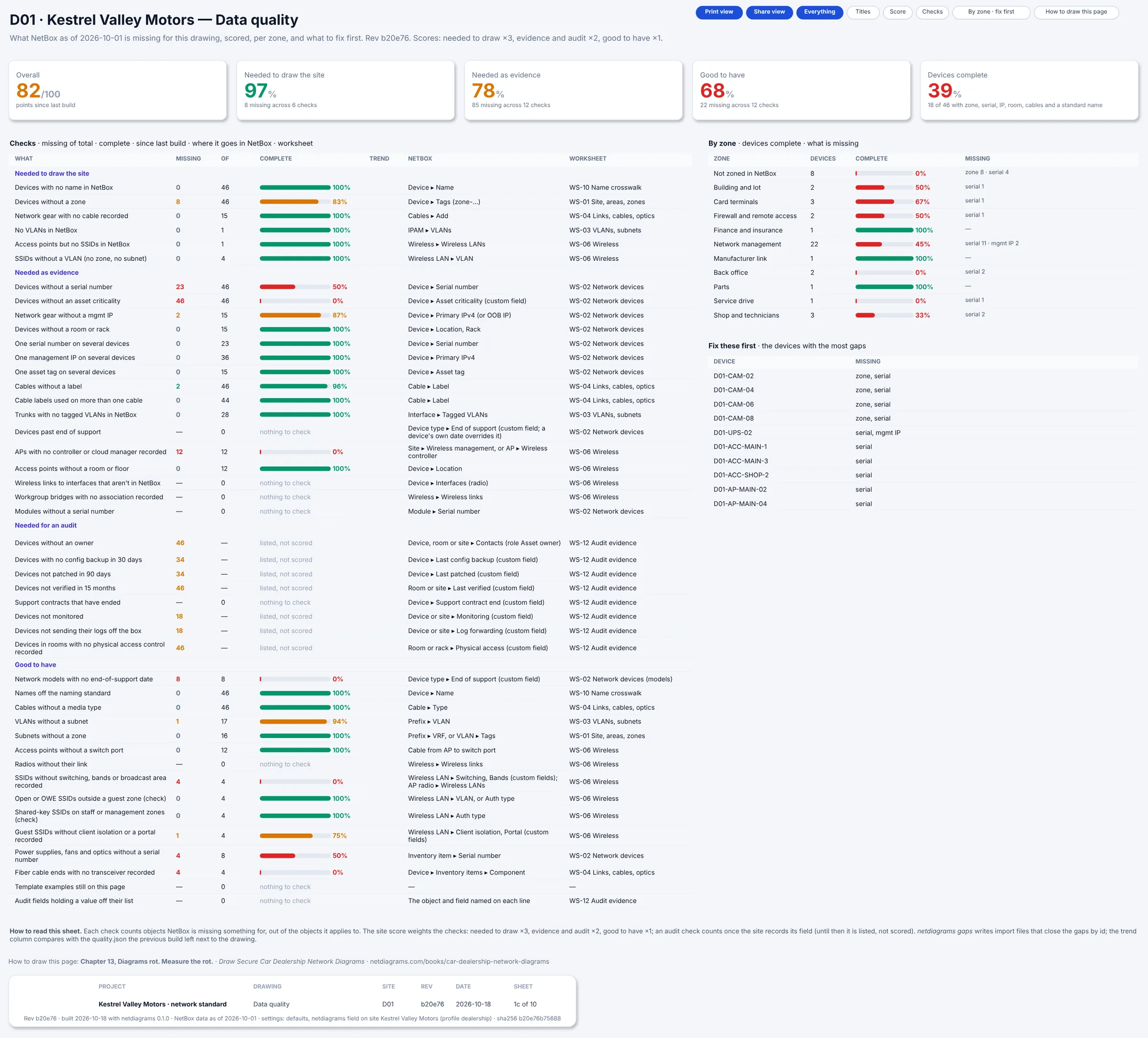
Figure 3.2. Sheet 1c, Data quality, from the day-one build (dealership-starter). The overall score is 82/100. "Devices without a zone" reads 8, and the "By zone" list starts with "Not zoned in NetBox 8". "Fix these first" names four cameras, D01-CAM-02, -04, -06 and -08, for their zone and serial.
To try it:
python3 scripts/make_dealer_sample.py --site starter -o dealership-starter.json
netdiagrams build --input dealership-starter.json
Monday morning
Five things to do with your own store this week:
- Write your zone table. Start from the fourteen rows in this chapter, delete the zones whose devices you truly don't have, and write a one-line rule for each zone you keep.
- Find the credit file. List every desk, printer, scanner and share that touches credit applications or deal jackets, and check which VLAN each one is on today.
- Join the lounge Wi-Fi from your phone and try to reach the service printer's web page. If it answers, the guest zone is a password, not a zone.
- Ask who holds the password to the manufacturer's router and every vendor-installed box in the closet. Anything you can't log in to gets a zone of its own.
- Run
netdiagrams netbox-setup --profile dealership, import, tag and build, then read "Devices without a zone". No NetBox yet? Fill a zone column for the F&I offices first.
Quotable: Every car on the lot has a window sticker. The network that sells them deserves one per zone.
Next: Chapter 4, "Dealership VLANs on paper: the logical page", where every zone gets its VLANs, subnets and gateways.