For a multi-site network, draw every site to one standard from NetBox: group sites into regions, set the profile once on the region, and use the same zone tags everywhere. netdiagrams with no --site writes one draw.io drawing and drift report per site, marks what changed since the last build, and netdiagrams share makes a copy without addresses for a branch vendor. The WAN page stays a worked example until you draw your own routing design.
Who this page is for
A head office and branches, a chain of stores, a bank with twenty branches, a district of schools, a company with plants in three countries. NetBox already has the sites, probably grouped into regions, and several people edit it. The problem is no longer drawing one site. It is keeping fifty drawings consistent, current and comparable, without a person redrawing each one.
What changes past one site
- One standard, many sites. Every branch drawing should use the same zones, page order, shapes and cable labels, so an auditor who has read one can read them all.
- Typicals, not snowflakes. Most estates have a few branch types (small, medium, large). Each site should be drawn as its type, with its exceptions visible rather than hidden.
- The WAN page. Hubs, the data center or cloud, SD-WAN or MPLS, the internet breakouts and home workers, with a site table. This is the one page that spans sites.
- Drift across the estate. At fifty sites something is always out of date. You need a list of what each site's NetBox is missing, not a feeling.
- Who reads what. Head office security wants the whole estate. A branch vendor should see one site, with addresses removed.
NetBox setup for an estate
- Regions and site groups that match how you run the estate: by country, by branch type, by business unit.
- One profile per estate, set once. NetDiagrams reads a JSON custom field named
netdiagramson a region, site group or site, applied outermost region first, then the site group, then the site. Put{"profile": "retail"}on the stores' region and every store builds to the retail standard; override one site where it differs. - The same zone tags everywhere.
netdiagrams netbox-setup --profile corporate(orretail,bank,education) writes the zone tags, roles and custom fields once for the whole NetBox. - Consistent cable labels. The retail profile labels cables by their A-side port (
ST014-SW01-P05), so every store's cables match the template's. - Per-site page lists. A text custom field
netdiagrams_pageson a site adds or removes pages for that site only (-multisite,+wireless).
Build every site at once
pip install netdiagrams
netdiagrams
With no --site, NetDiagrams writes one drawing per NetBox site that has devices, each with its own drift report. In a scheduled job or CI, set NETBOX_URL and NETBOX_TOKEN instead of logging in, and keep the output in a repository so every change to every site is a diff.
Each build also leaves a <site>.state.json. The next build marks devices new in NetBox with a green NEW pill and changed ones with an amber CHANGED pill, and the drift report lists what moved since the last revision. For an estate, that is the weekly review: read what changed, not fifty drawings.
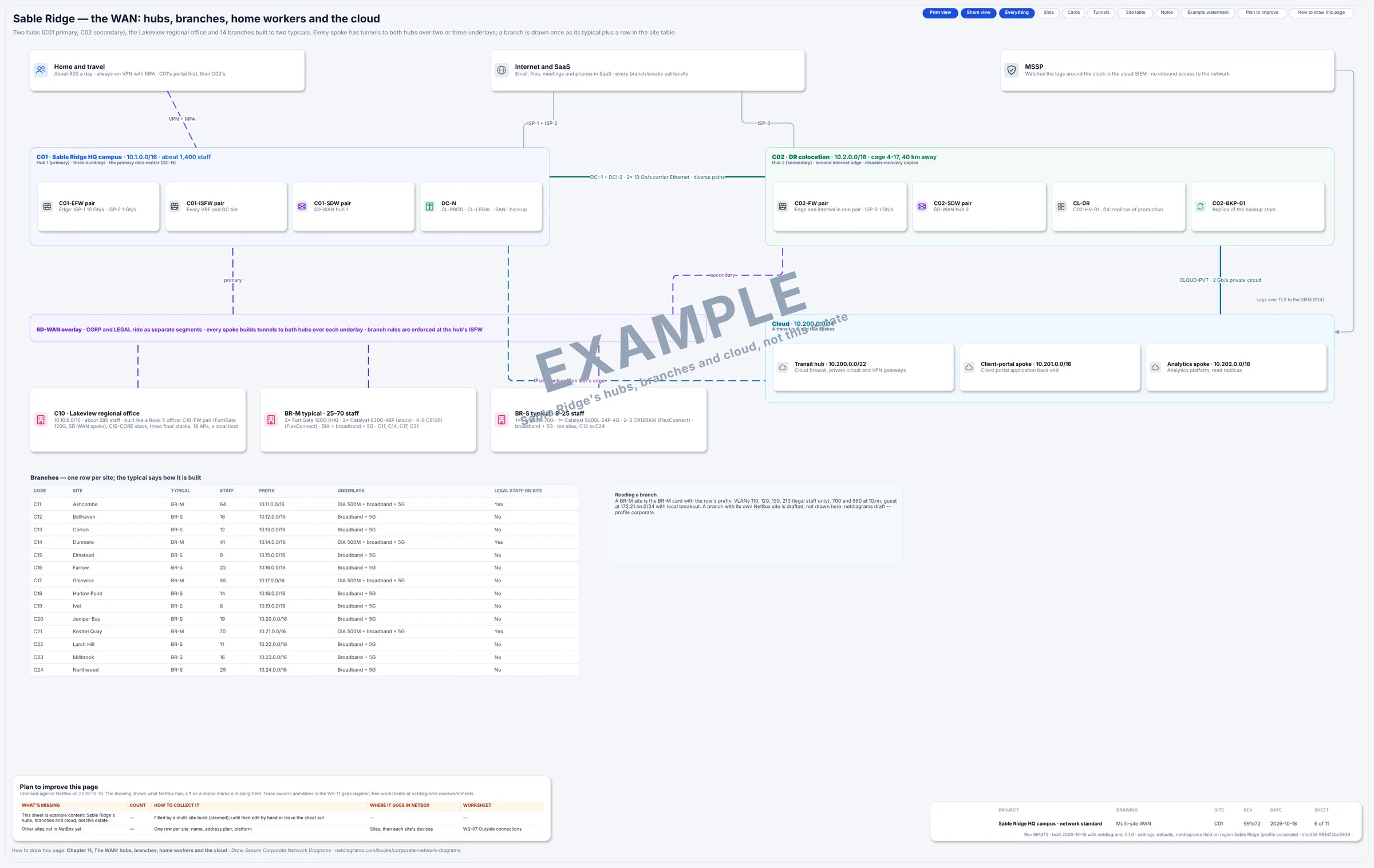
Sheet 6 of Book 9's corporate sample: the hubs, the regional office, the small and medium branch typicals, the cloud, home workers and the site table.
Be clear about what is generated. Each site's overview, logical, physical, hardware and wireless pages are built from that site's NetBox data. The multi-site WAN sheet, like the flows and failover pages, is a worked example watermarked EXAMPLE until you replace it with your own: NetBox records sites and circuits, not your routing design, so the tool won't pretend to know it. Branches that don't fit the HQ sheets are better drafted: netdiagrams draft --profile corporate --site c11 lays one out in the corporate bands.
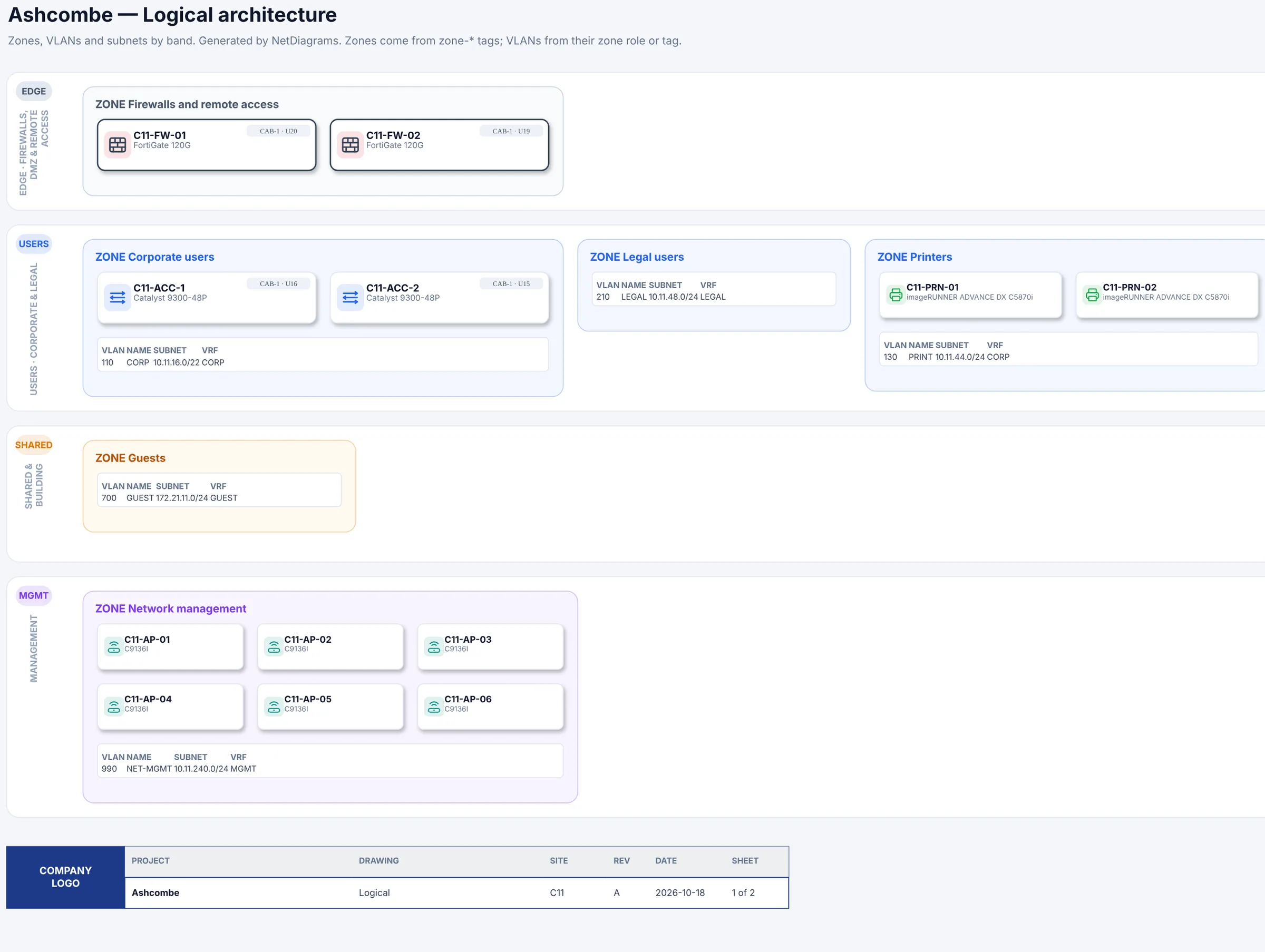
C11 Ashcombe, a medium branch in Book 9's sample estate, drafted from its NetBox data.
Sharing across the estate
netdiagrams share writes a copy of a drawing without IP addresses, serial numbers, circuit IDs or NetBox links, so a branch's vendor gets their site and nothing else. Head office keeps the full set.
About the sample data
The corporate, retail and bank profiles each come with fictional sample sites (netdiagrams sample --profile corporate) to show the finished result. It is never the default: the normal build reads your NetBox only.
Mistakes estates make
- A different drawing style per site, because each was drawn by whoever was there. Set the profile on the region.
- One huge drawing of everything. Nobody can read it. One drawing per site plus one WAN page.
- Copying the HQ firewall rules into every branch drawing. Each branch's flow register should match that branch's firewall, and branches drift first.
That last point is where most estate findings come from. SegAudit reads each site's firewall export on your own machine and lists the rules that cross the zones you drew, so fifty branches get the same check.
Where to go next
- Draw Secure Corporate Network Diagrams, Book 9: VRFs and internal firewalls, the data center, SD-WAN branches built to typicals, and the WAN page. Its free chapter covers segmentation at company scale.
- Running stores or bank branches? Book 4, retail and Book 6, banks and credit unions draw the estate for PCI and the examiner.
- NetBox diagrams for a small network, for a single branch on its own.
- Best NetBox diagram tools compared.
NetBox is a trademark of its owner and is named here only to describe compatibility.