To verify that firewall rules match your segmentation policy, write the policy as a flow register (one row per allowed conversation between zones, default deny for the rest), map every firewall interface and address object to a zone, and read each rule as a zone-to-zone flow. Every rule should match a row and every row should be backed by a rule: a rule with no row is a finding. Then confirm with traffic logs or a test from each zone, and repeat after every significant change and at least once a year.
Why drawn segmentation and enforced segmentation drift apart
Every network has two versions of its segmentation. One is on paper: the zones on the diagram and the list of what may cross between them. The other is in the firewall: the rules that actually decide. They start out the same and drift apart one change at a time. A vendor needs access for a weekend and the rule stays. A new application gets an "any" port because nobody knew which one it used. An object called OT-Servers quietly gains an office subnet.
Nobody sees the gap until an assessor, an insurer or an incident finds it. The only fix is to compare the two on purpose, rule by rule.
Step 1. Write the policy as a flow register
You can't check rules against a policy that lives in someone's head. Write it as a flow register:
- Default deny at the top, in words.
- One row per allowed conversation: source zone, destination zone, who starts it, protocol and port, purpose, owner, review date.
- Zones, not hosts, in the source and destination columns, so one row covers a whole class of traffic.
If your diagram doesn't show zones yet, start there. The free chapter for your industry shows how to choose them: plants, stores, banks, schools and every other kind of site.
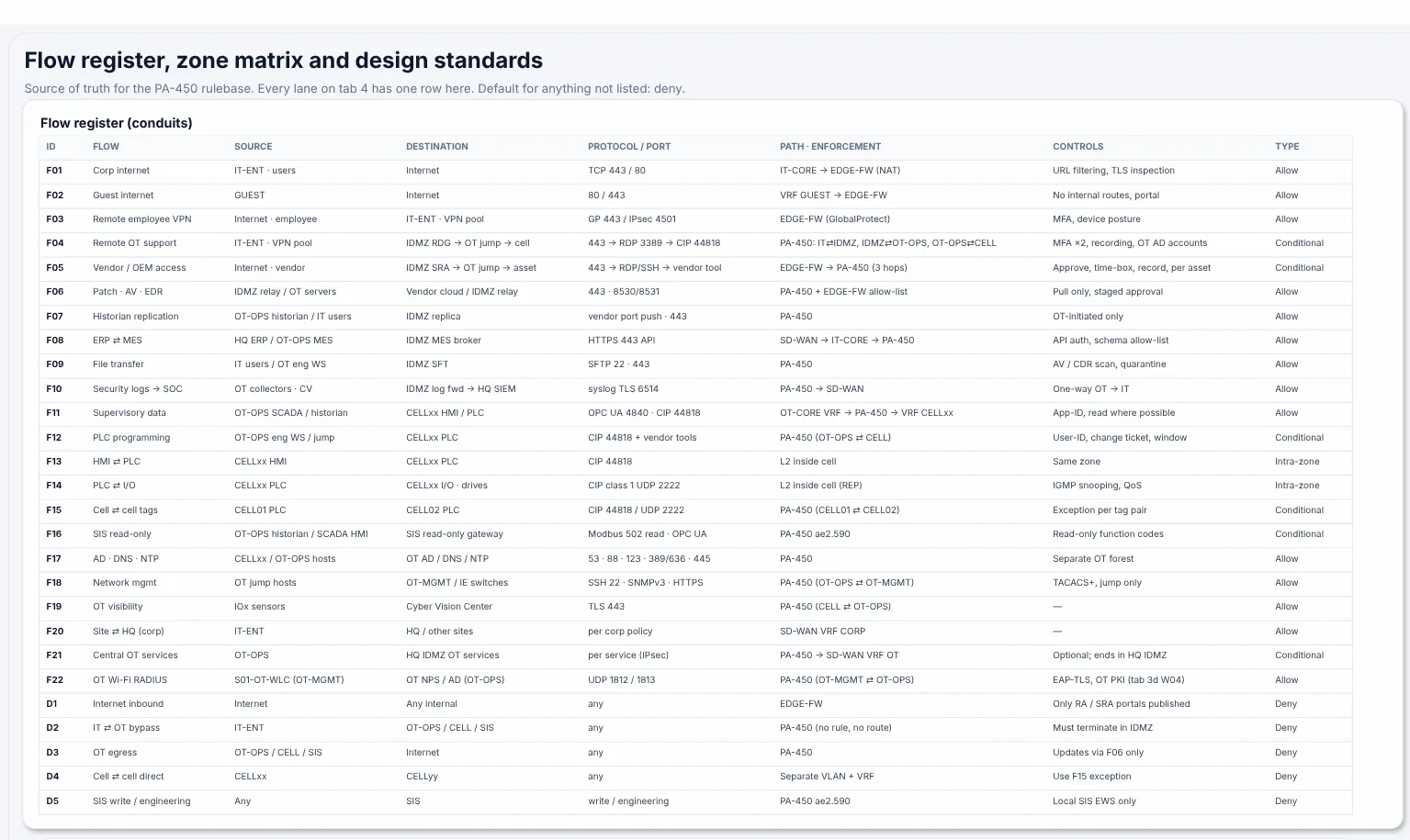
A flow register from the Plant A sample: every allowed conversation between zones, with its path and the default for anything not listed.
Step 2. Map the firewall's world onto your zones
Firewalls don't know your zones. They know interfaces, security zones of their own, address objects and groups. Build a short map from each of those to one of your zones. Anything that maps to two zones at once is your first finding: an interface or object that straddles a boundary.
Step 3. Export the rules and read each one as a zone-to-zone flow
Export the configuration, not a screenshot: the security rules, NAT rules and the objects they use. Then rewrite each rule in the register's terms: from zone, to zone, service, direction. A rule from inside to dmz on tcp/443 becomes "corporate users to IDMZ web proxy, HTTPS, users start it".
Step 4. Compare in both directions
- A rule with no register row is a finding. Either the register is missing a real need, or the firewall allows something nobody approved. The second is more common.
- A register row with no rule is dead documentation, or a broken application someone worked around.
- Broader than the row: the row says one port and the rule says
any, or the row names one zone and the rule's object covers two. - Rules that never match: shadowed by an earlier rule, or with zero hits for a year. They hide intent and get copied into the next firewall.
Step 5. Confirm with traffic
A rule base shows what is allowed, not what happens. Check it against what really crosses: hit counts, a few weeks of traffic logs, or a test from a host in each zone toward the things it should be refused. If you use segmentation to shrink PCI DSS scope, requirement 11.4.5 asks for penetration tests of the segmentation controls at least once every 12 months and after any change to them.
Step 6. Fix, record and repeat
Turn each finding into a proposed rule change with a way back, agree it with the owner, and record the date of the review on the drawing and the register. Repeat after every significant change and at least once a year. PCI DSS asks for network security control configurations to be reviewed at least every six months (requirement 1.2.7).
Tools that audit network segmentation
| Kind of tool | Examples | What it does well |
|---|---|---|
| Your drawing and register | NetDiagrams (free, open source) | Draws the zones from NetBox and gives you the register's structure: the reference everything else is compared with |
| Segmentation audit for IT/OT firewalls | SegAudit | Reads a Palo Alto, FortiGate, Cisco ASA, Cisco FTD or Check Point config, with a traffic log when you have one, shows where rules and traffic depart from your zones and conduits, and proposes rule changes with a rollback. Runs offline |
| Configuration modelling | Batfish (open source) | Models device configurations and answers reachability questions, such as "can anything in zone A reach port 502 in zone B?" |
| Firewall policy management suites | AlgoSec, Tufin, FireMon | Rule base analysis, change workflow and compliance reports across many firewalls, for large estates |
| Active testing | nmap from each zone | Proves what really crosses, one source at a time |
No tool replaces Step 1. Each of them compares the firewall with something, and if that something is a vague idea of the network, the result is a vague finding.
Try SegAudit's free Quick Check: drop a firewall config and see which rules open paths into your control network. Nothing is uploaded.
Where to go next
- Free: the flow register chapter, Chapter 10 of Book 1, writes the register row by row and folds it into a zone matrix.
- OT network segmentation best practices: ten rules, each with what it means for the drawing.
- Network segmentation, explained: zones, DMZs and why VLANs alone don't segment.
- Network Diagrams by Industry: every book ends with a chapter on taking the drawing from drawn to enforced.