For a small network or a single site, you need four pages: a plain-language overview, a logical page with one box per security zone and its VLAN, a physical page of the comms cabinet, and a flow register. In NetBox, record one site, device roles, uplink cables, a VLAN and prefix per zone, and a zone- tag on each device. Then pip install netdiagrams and netdiagrams build --profile office draws the set and lists what NetBox is missing.
Who this page is for
One site, one firewall (or a pair), a few switches, some access points, perhaps forty to two hundred devices. An office, a clinic, a single store, a school, a small plant. One or two people run the network, and NetBox is either new or half filled in.
At this size the diagram has two jobs: let the next person understand the network without you in the room, and answer the questions an insurer, an auditor or a customer's security team sends. It doesn't need to be clever. It needs to be true and current.
What a small network's drawing set needs
You don't need eleven pages. You need these, and each can be one sheet:
- An overview in plain words. What is protected, from what, by which box. The page the insurer or the owner reads.
- A logical page. One box per security zone (staff, servers, phones, printers and cameras, guests, management), each with its VLAN, subnet and gateway, and the firewall between them.
- A physical page. The comms cabinet: providers, firewall, switches, the UPS, and one counted card per kind of end device ("AP ×6", "Camera ×10") rather than every phone.
- A flow register. One row per allowed conversation between zones, with default deny at the top. Even a short one turns "the firewall is configured" into something checkable.
Wireless, failover and a branch page come later, if the site has them.
NetBox setup that is enough
Small networks stall on NetBox because it looks like a big tool. You need a small part of it:
- One site, with devices given a role, a device type and a rack or location.
- Interfaces and cables for the uplinks and the firewall. You can skip desk ports on day one.
- VLANs and prefixes, one each per zone.
- A security zone on each device, as a
zone-tag (zone-staff,zone-guest,zone-building). This is the field most small NetBox installs are missing, and without it no tool can draw segmentation.
netdiagrams netbox-setup --profile office writes NetBox import files for the office zone tags, roles and custom fields, so you click Import instead of typing. Starting from a spreadsheet? The network documentation template uses NetBox's own import columns.
Build it from NetBox
pip install netdiagrams
netdiagrams build --profile office
The first run asks for your NetBox URL and a read-only token, then writes <site>.drawio and <site>.drift.md. The office profile is eight sheets built around one firewall pair, with zones banded by who uses them. Pages your site has no data for drop out: a site with no access points in NetBox gets no wireless page, and the drift report says so. Leave out others yourself with netdiagrams build --profile office --leave-out failover.
Read the drift report first. On a first import it is usually a short list: missing serial numbers, an uplink with no cable, cameras with no zone, a VLAN with no prefix. Fix them in NetBox and run the command again.
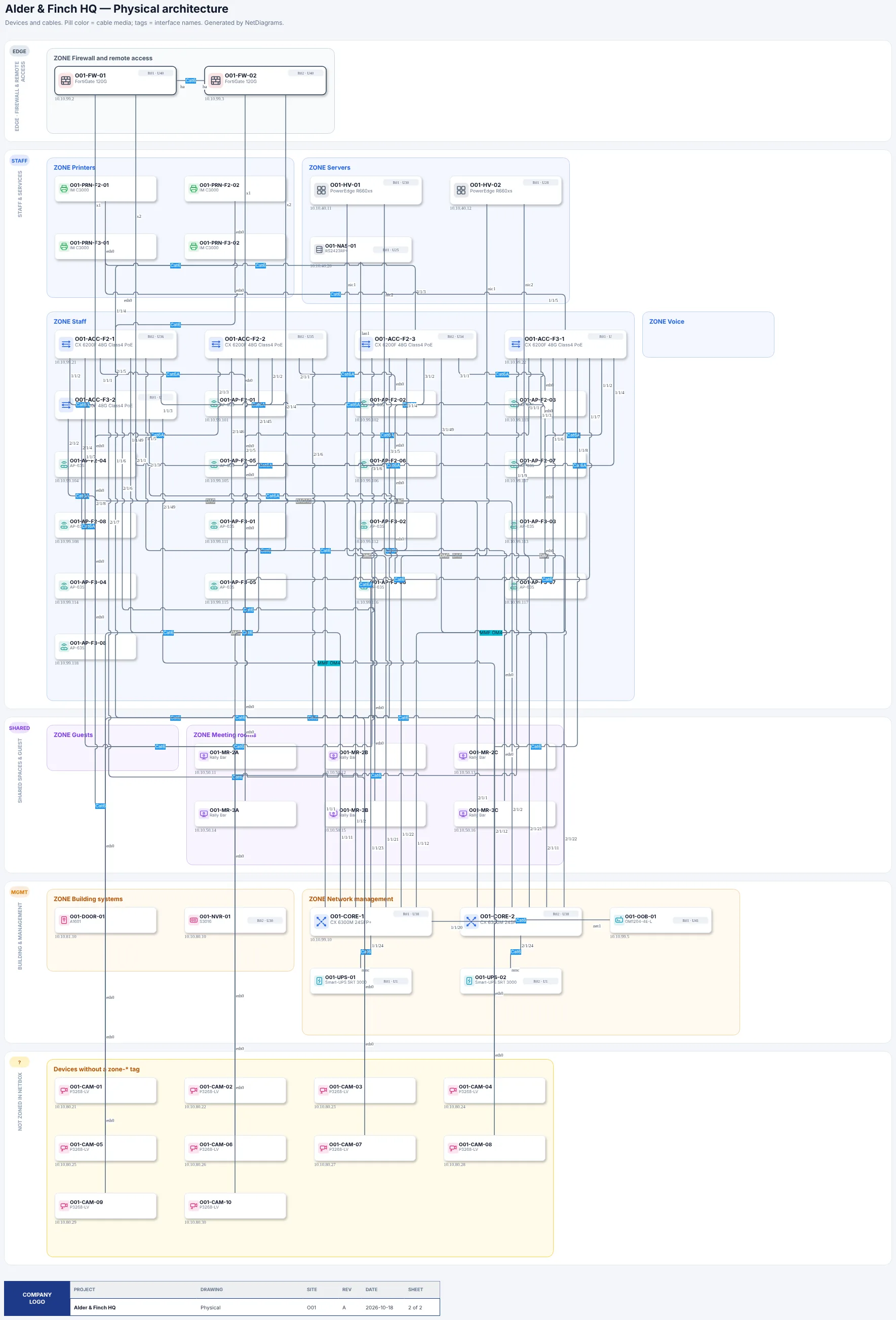
A day-one office from Book 5, drafted from a first NetBox import. The cameras with no zone tag are set aside, not guessed.
If the site doesn't fit the template at all, netdiagrams draft --profile office lays the devices out in the same bands for you to arrange by hand.
Other kinds of small site have their own profiles: --profile retail for a store, --profile education for a school, --profile dealership, --profile bank for a branch, --profile hotel, --profile municipal, --profile warehouse, or the default plant template.
About the sample data
netdiagrams sample --profile office writes a finished set for a fictional office so you can see the result before loading anything. It is only an example. NetDiagrams never uses sample data unless you ask for it: the normal build reads your NetBox and nothing else.
Mistakes small networks make
- Drawing every device. Fifty phones on one page hide the three things that matter. Count them on one card.
- VLANs as zones. A VLAN is a label until a firewall or ACL sits between it and the next one. Show which device enforces each edge.
- No owner for the drawing. Put a name and a review date on it. NetDiagrams writes the revision and the NetBox data date into every title block.
- Trusting the firewall from memory. The drawing says guests can't reach the servers. The rule base decides.
That last check is what SegAudit does: it reads your firewall export on your own machine and lists rules that cross the zones you drew.
Where to go next
- Draw Secure Small Office Network Diagrams, Book 5: the whole method for one office and its branches, with the sample office, worksheets and a scorecard. Its free chapter zones a small office behind one firewall.
- NetBox diagrams for multi-site networks, for when one site becomes several.
- Best NetBox diagram tools compared, if you want an interactive map as well.
NetBox is a trademark of its owner and is named here only to describe compatibility.