OT network segmentation splits a plant into zones by consequence and owner and lets traffic cross only through named, enforced conduits. The practices that matter most: separate business IT from control systems with an industrial DMZ of brokers, give safety systems their own zone, isolate wireless, temporary and vendor connections, write default deny and one row per allowed conversation, set a target security level per zone, and check the firewall against that list at least once a year. IEC 62443-3-2 asks for most of these by name (ZCR 3.2 to 3.6).
Why OT segmentation is different
In an office network, segmentation protects data. In a plant it protects the process: a worm that reaches one line's PLCs can stop production, damage equipment or hurt someone. That changes three things:
- You can't patch your way out. Controllers run for fifteen years, and many can't take an update without a shutdown. The wall around them does the work a patch would do elsewhere.
- Availability comes first. A rule that blocks the historian's polling is an outage. Every boundary has to be designed with the conversations that must cross it.
- The people are different. Controls engineers, integrators and machine builders all touch the network, often from outside. Segmentation has to give each of them a door instead of a shared password.
The standards say the same in their own words. IEC 62443-3-2 sets out how to partition a system into zones and conduits (its requirement ZCR 3) and asks for zone and conduit drawings as part of the documentation (ZCR 6.3). NIST SP 800-82 Rev. 3 recommends segmenting OT networks and uses the Purdue model as its example architecture. The ten rules below are where those documents meet the drawing.
The ten rules
1. Choose zones by what you could lose, not by VLAN or building
A zone is a group of assets with the same security needs: the same consequence if they fail and the same owner. Start with a list of the things whose loss would be a separate bad day (a line, a cell, a utility, the safety system) and group from there. IEC 62443-3-2 calls this establishing zones and conduits (ZCR 3.1).
On the drawing: one box per zone, named in plain words for what it protects, not "VLAN 30".
2. Separate business IT from control systems, with an industrial DMZ between them
Nothing on the enterprise network should talk directly to level 3 or below. ZCR 3.2 asks for business and control system assets to be separated.
On the drawing: the industrial DMZ (IDMZ) as its own band between enterprise and site operations, and no line from the office side that skips it.
3. The IDMZ holds brokers, never pass-throughs
The IDMZ works only if every conversation stops there: a historian replica the business reads, a patch and antivirus relay, a remote access gateway, a file transfer point. A firewall rule from the enterprise straight to a level 3 server turns the IDMZ into decoration.
On the drawing: each IDMZ service named, with arrows that end at it on both sides.
4. Safety systems get a zone of their own
A safety instrumented system protects people and equipment when everything else has failed. ZCR 3.3 asks for safety-related assets to be separated, and the usual design lets the safety zone send status out while nothing writes in.
On the drawing: a safety zone with its own edge, and its outbound-only flows labelled as such.
5. One cell per thing you could lose on its own
A single zone called "OT" satisfies nobody: one infected engineering laptop reaches every line. Split production into cell and area zones so an incident on line 1 stays on line 1.
On the drawing: line 1 and line 2 in separate boxes, even when they share a switch room.
6. Wireless gets its own zone
Radio leaves the building. ZCR 3.5 asks for wireless devices to be separated. Handhelds, AGVs and wireless bridges belong in zones of their own, with a boundary where they join the wired network.
On the drawing: every SSID and every point-to-point bridge inside a zone, never floating between two.
7. Temporary and outside connections get a door, not a cable
Maintenance laptops, vendor remote sessions and links to outside networks are where most plant incidents start. ZCR 3.4 and ZCR 3.6 ask for temporarily connected devices and devices connected through external networks to be separated.
On the drawing: the vendor's path drawn in full, from the internet through the remote access gateway in the IDMZ to the one asset it may reach, and a maintenance zone for laptops.
8. Default deny, and write every allowed conversation down
A boundary is only as good as the list of what may cross it. Write "default deny" at the top, then one row per conversation: source zone, destination zone, who starts it, protocol and port, purpose, owner and review date. That list is a flow register, and it is usually the first thing an auditor asks for.
On the drawing: arrows numbered to match the register, drawn from the side that starts the conversation.
9. Give every zone a target security level
IEC 62443 assigns each zone and conduit a target security level (SL-T) from 1 to 4, decided by risk assessment (ZCR 5.6). It is the number that says how strong each wall must be, and it makes mismatches visible, such as an SL 3 zone that an SL 1 conduit protects.
On the drawing: SL-T written on every zone box.
10. Check the firewall against the drawing, at least once a year
The drawing says what should be allowed. The firewall decides what is. Rules added for a commissioning job or a vendor visit outlive the job, and the two drift apart quietly. Compare the rule base with the flow register after every significant change and at least yearly.
On the drawing: each conduit names the device that enforces it, and the drawing carries the date and the source it was drawn from.
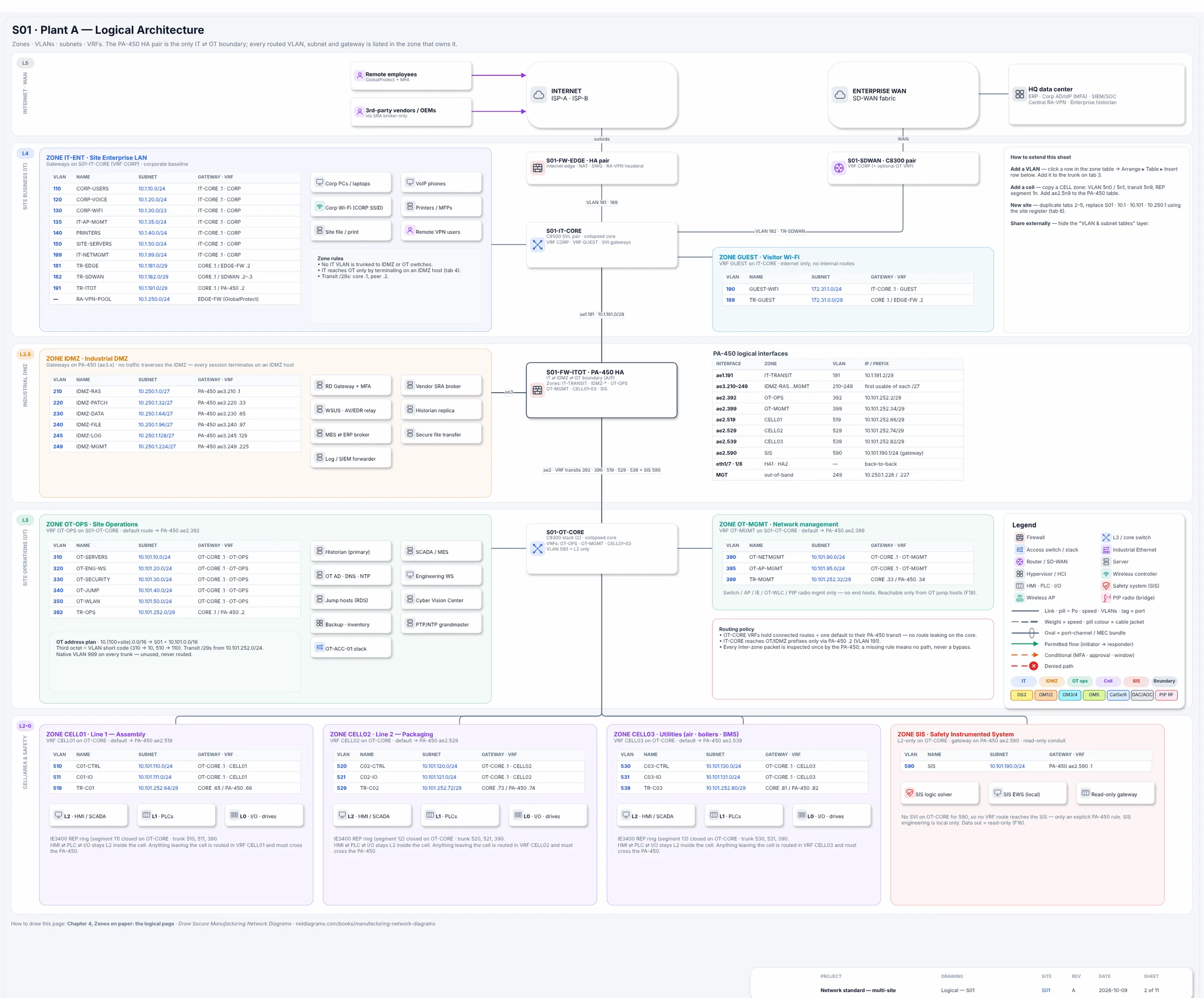
The logical page from Book 1's sample plant: each zone's VLANs, subnets, gateways and VRF, so segmentation can be checked rather than assumed.
Common mistakes
- Calling a VLAN a zone. A zone can hold several VLANs, and a VLAN must never span two zones. A switch is not a boundary because it has a trunk.
- Segmenting on the core switch with ACLs nobody reviews. It works on day one. Use a firewall at each zone boundary, so every rule sits in one reviewed place.
- Permanent "temporary" rules. Give every rule an owner and a review date, and remove what nobody claims.
- Drawing the plan, not the plant. If the drawing is typed by hand, it stops matching within a year. Keep the network in NetBox and draw from it.
Where to go next
- Free: the Purdue model network diagram, Chapter 3 of Book 1, decides the zones for a small plant in one afternoon.
- Free: IEC 62443 zones and conduits, drawn, and the flow register chapter.
- Firewall side: SegAudit's OT network segmentation guide goes from the asset list to the firewall rules.
- Manufacturing Network Diagrams, Book 1, takes a plant from a blank page to a zone and conduit drawing set, with a sample plant you can copy.
This guide explains concepts from ISA/IEC 62443 and NIST SP 800-82 in our own words. It is not a substitute for the standards.