The cold open
Transcript, internal audit hearing. The witness is firewall rule 112, named tmp-vendor-allow. It has been sworn in, which took a while, because it kept accepting the oath from any source.
Counsel: Please state your name for the record.
Rule 112: tmp-vendor-allow.
Counsel: "Tmp." Temporary. When were you created?
Rule 112: I don't have a creation date field. The change log says March. It does not say which March.
Counsel: What is your source zone?
Rule 112: Any.
Counsel: Your destination?
Rule 112: The cell zones. All of them. It saved time.
Counsel: Your service?
Rule 112: Any. The vendor's tool used a port nobody could remember, so we covered the possibilities.
Counsel: Who asked for you?
Rule 112: A ticket. The ticket system was migrated. The ticket was not.
Counsel: Is there a written document, anywhere at this plant, that says traffic from any zone to every cell on any port is intended?
Rule 112: (long pause) There is a diagram with an arrow on it.
Counsel: Does the arrow have a port number?
Rule 112: It has a color.
Counsel: No further questions.
Most plants have a rule like this. The problem is not that it exists. Temporary rules happen; a line goes down and a vendor needs in. The problem is that nothing written down says what should exist, so nobody can prove rule 112 is wrong, and it lives forever because deleting it might break something.
This chapter is about that missing document: the flow register. It is a table of every conversation that is allowed to cross a zone boundary, with a reason and a name next to each one. Everything not in it is denied. It is the page auditors ask for first, and the page most plants can't produce.
We email a link to confirm, then the download and a note when a new book or tool release ships. Unsubscribe anytime.
What the register is, in plain words
In Chapter 9 you drew the conversations as lanes: who starts, who answers, which device enforces it. The flow register is the same information as rows, written so it can be checked against a firewall line by line.
Three ideas hold it up.
Zones are groups of assets with the same security needs. You built them in Chapters 3 and 4: enterprise, industrial DMZ (IDMZ), site operations, network management, one zone per cell, safety.
Conduits are the approved paths between zones. IEC 62443 uses the term for the grouping of communication channels that connect zones and share the same protection. On the drawing, a conduit is a boundary device plus the flows it is allowed to carry. In the register, it is the set of rows between a given pair of zones.
Default deny is the rule for everything else. If a conversation is not in the register, the firewall should drop it, and the drop should be logged. The register is a list of exceptions to silence.
That third idea is the one that changes behavior. A register that lists what is allowed, under a default of "allowed unless someone remembered to block it", is a wish list. A register with default deny is a specification.
The page itself
Here is page 7 of the S01 standard in the Plant A sample. Figure 10.1 shows the flow register, which fills the left of the page. Figure 10.2 shows the right-hand side: the zone-to-zone matrix and the plant's design standards.
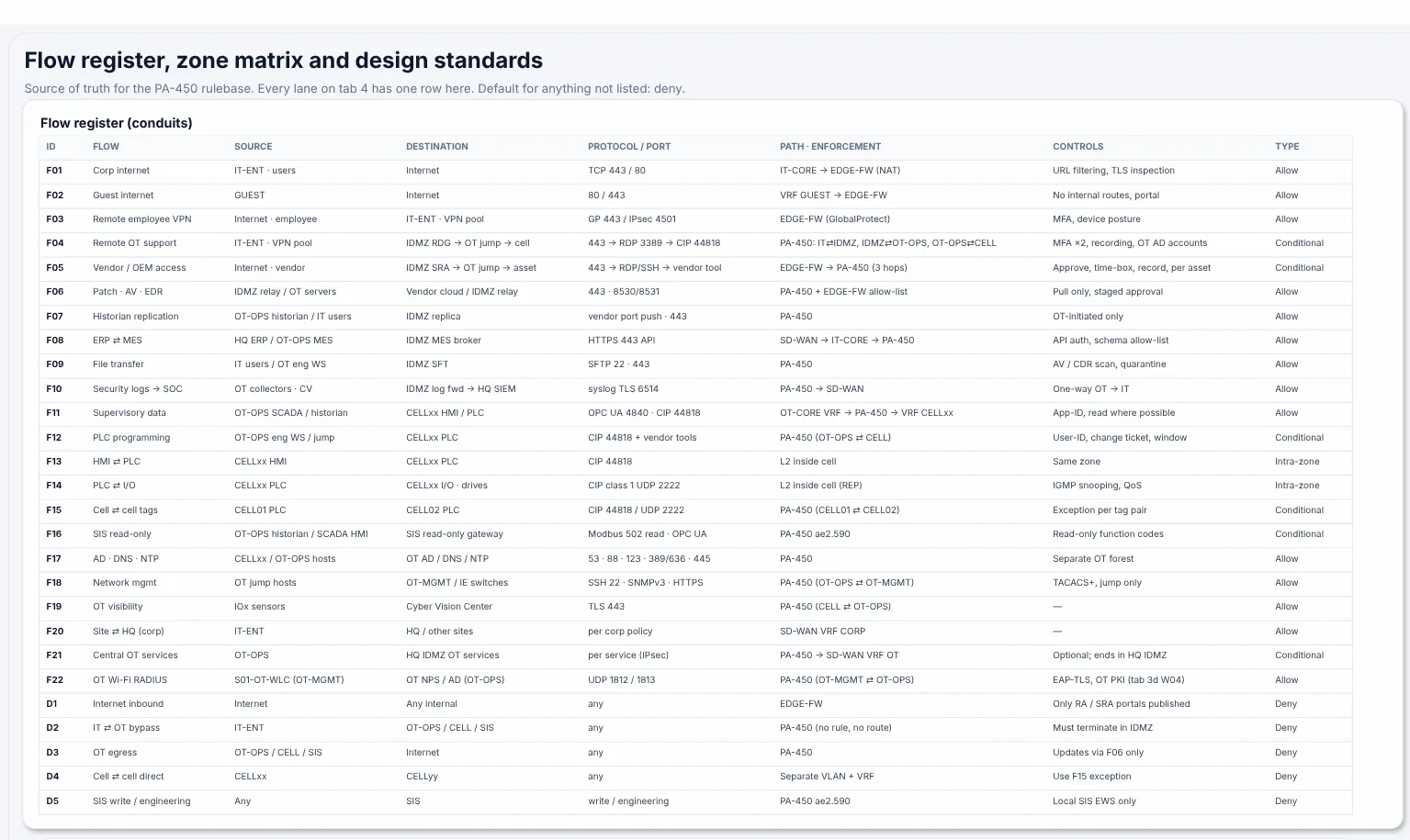
Figure 10.1. Page 7 of the S01 standard for the Plant A sample, written by netdiagrams sample. The flow register lists flows F01 to F22 and denied paths D1 to D5. The line under the title reads: "Source of truth for the PA-450 rulebase. Every lane on tab 4 has one row here. Default for anything not listed: deny."
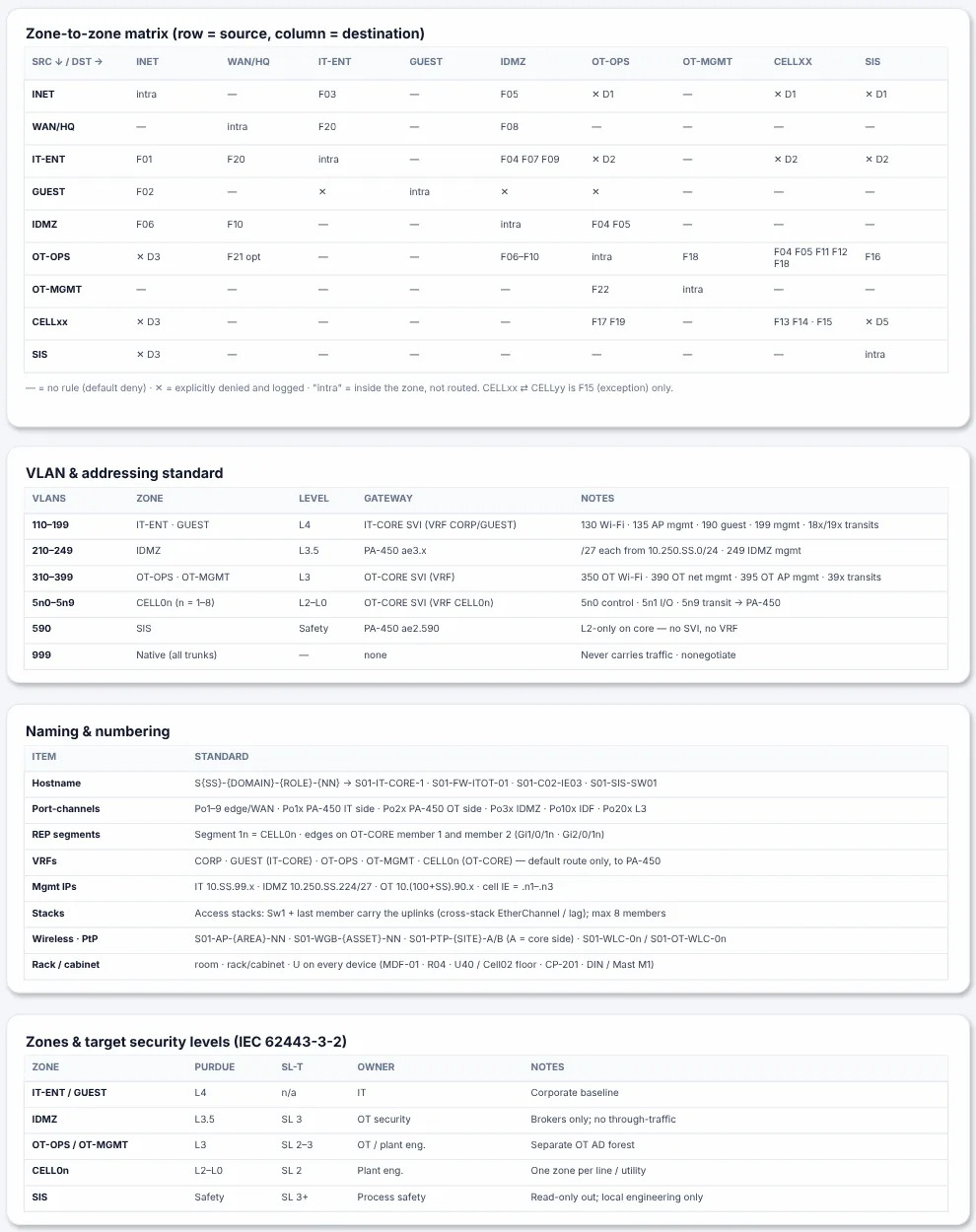
Figure 10.2. The right-hand side of the same page: the zone-to-zone matrix (row = source, column = destination) cross-references the flow IDs, followed by the VLAN and addressing standard, naming and numbering rules, and zones with their target security levels (IEC 62443-3-2).
That subtitle is the whole chapter in one sentence. Read it twice.
Each register row in the sample has eight columns: ID, Flow (a short name), Source, Destination, Protocol / port, Path · enforcement (which devices it crosses and where it is enforced), Controls (what makes it safe: multi-factor authentication or MFA, recording, read-only function codes) and Type (Allow, Conditional, Intra-zone or Deny).
A few rows, to get the feel of it:
| ID | Flow | Source | Destination | Protocol / port | Type |
|---|---|---|---|---|---|
| F04 | Remote OT support | IT-ENT · VPN pool | IDMZ RDG → OT jump → cell | 443 → RDP 3389 → CIP 44818 | Conditional |
| F11 | Supervisory data | OT-OPS SCADA / historian | CELLxx HMI / PLC | OPC UA 4840 · CIP 44818 | Allow |
| F16 | SIS read-only | OT-OPS historian / SCADA HMI | SIS read-only gateway | Modbus 502 read · OPC UA | Conditional |
| D2 | IT ⇄ OT bypass | IT-ENT | OT-OPS / CELL / SIS | any | Deny |
Notice that the denies get rows too. D2 says, in writing, that the enterprise network never reaches operations or the cells directly, and its controls column says why: "Must terminate in IDMZ". A deny row is a decision someone made on purpose. Writing it down stops the next person from "fixing" it.
What about the wireless flows? Page 3d keeps its own list, W01 to W06, and most of it already points here: W04 is F22 and W05 is F18. W01 and W02, the controller tunnels, stay inside one zone and need no row.
W03 is the odd one out. It carries Corp Wi-Fi RADIUS from S01-WLC to the Corp ISE at HQ over SD-WAN, so it crosses from IT-ENT to WAN/HQ, and today it hides under F20's "per corp policy". By this chapter's own test it gets an F-number: give it a row with UDP 1812/1813 in the port column, and write the number next to W03 on page 3d.
And the plumbing. Default deny also drops what the network itself needs, so check that it has rows. Plant A's register covers directory, DNS and time for hosts (F17), management from the jump hosts (F18) and logs leaving OT (F10). It has no row for the switches and access points in OT-MGMT sending syslog and SNMP traps to the OT collectors, asking for NTP, or reaching the TACACS+ server that F18 relies on. Give each one a row: without them the network devices go quiet in the SIEM, drift in time and fall back to local accounts, at exactly the moment you need them.
The zone matrix: the register, folded
Twenty-seven rows is readable. Two hundred is not. The zone-to-zone matrix is how you see the register's shape at a glance.
Rows are source zones, columns are destination zones. Each cell lists the flow IDs that go from that row to that column. In the sample the zones are INET, WAN/HQ, IT-ENT, GUEST, IDMZ, OT-OPS, OT-MGMT, CELLxx and SIS, and the key underneath reads: "— = no rule (default deny) · ✕ = explicitly denied and logged · 'intra' = inside the zone, not routed."
Run your eye along the IT-ENT row in Figure 10.2. It reaches the internet (F01), HQ (F20) and the IDMZ (F04, F07, F09). Under OT-OPS, CELLxx and SIS it says ✕ D2. That row is the entire IT/OT separation story, and a plant manager can read it in five seconds.
Now read down the SIS column. Apart from "intra" on the diagonal, every cell is a dash or a ✕ (including ✕ D5 from the cells), except one: OT-OPS, which carries F16, the read-only flow. The cell HMIs don't read the SIS themselves; the historian and the SCADA HMIs in OT-OPS do, so the CELLxx row stays ✕ D5. The safety zone has one way in, it is read-only, and the matrix shows it without anyone having to explain Modbus function codes.
The matrix is also where bad designs show up first. A cell full of flow IDs between two zones that were supposed to be strangers is a conversation worth having. A row with no dashes in it means a zone that talks to everything, which usually means it isn't really a zone.
What auditors and insurers ask for
The wording varies, but the questions converge. Whether it is an internal audit, a customer's supplier questionnaire, an IEC 62443 assessment or a cyber insurance renewal form, you will be asked some version of these:
- Is the OT network separated from the business network? Show the boundary device, and show the rows that cross it.
- Is there a documented list of allowed traffic between zones? That is the register, by name.
- Is everything else denied by default? Say so on the page, and show the deny rows.
- How does remote access reach the plant? Point at the remote support and vendor rows (F04 and F05 in the sample), with their controls column: MFA, approval, time limit, recording.
- Who approves changes, and how often is the list reviewed? This is where most registers go quiet, and it is what the last two columns in the next section are for.
- For each asset: who owns it, what is it in scope for, and is it backed up, patched, supported, monitored and logged? The register can't answer this one. A NetDiagrams build can, on sheet 3f, described at the end of this chapter's NetDiagrams section.
An auditor does not need to understand CIP to read a register. They need to see that every allowed path has a reason, an owner and a date, and that the firewall is supposed to match it. That is a checkable claim. "Our network is segmented" is not.
Insurers in particular tend to ask yes-or-no questions on a form. A register lets you answer "yes" and attach the evidence, instead of answering "yes" and hoping nobody follows up.
The rules
Rule 1. Write "default deny" at the top of the register, in words.
Not implied, not assumed, not "everyone knows". The sample puts it in the subtitle. The sentence turns the register from a description into a contract: anything the firewall allows that isn't here is a defect, not a difference of opinion.
Rule 2. One row per conversation, numbered for life.
Give every flow an ID that never changes and is never reused: F01, F02 and so on, with D1, D2 for the denies. Retired flows keep their number, struck through or marked "retired", so old tickets and old drawings still make sense.
The ID is what ties the system together. The lane on the traffic flow page carries it. The firewall rule's name or description carries it. The change ticket carries it. When someone asks "why does this rule exist?", the answer is a number.
Rule 3. Name zones, not hosts, in the source and destination columns.
Write OT-OPS SCADA / historian and CELLxx HMI / PLC, not a list of IP addresses. The zone is what the conduit is about; the host gives a reader something to find on the logical page. Addresses belong in the firewall's address objects and in NetBox (or your address spreadsheet, if NetBox isn't there yet), where they can change without rewriting the register.
The CELLxx shorthand in the sample is worth copying. Supervisory data to each cell is the same flow repeated per cell, so one row with xx covers them all. Where a cell genuinely differs, give it its own row.
Rule 4. Say who starts the conversation.
The source column is the initiator: the side that opens the connection. The destination is the responder. This matters because stateful firewalls allow return traffic for sessions they have seen open, so the direction you write is the direction you allow (Chapter 9, Rule 1).
The sample is explicit about this where it counts. F07, historian replication, says "OT-initiated only" in its controls. F10, security logs to the security operations center (SOC), says "One-way OT → IT". If a row could plausibly be read in either direction, the register has failed at its one job.
Rule 5. Ports are specific, or the row says why not.
CIP 44818, OPC UA 4840, syslog TLS 6514, UDP 1812 / 1813. A port column that says "any" belongs on a deny row, and nowhere else.
Sometimes a vendor tool really does use a range, or a list too long for the cell. Then write the vendor tool's name and point to where the full list lives. The sample does this for F12, PLC programming: "CIP 44818 + vendor tools". It is honest, and it tells the reviewer exactly which row to examine hardest.
Rule 6. Every row has a purpose, an owner and a review date.
This is where the sample stops short and you should go further. Its register has a short flow name and a controls column, and the "Zones & target security levels" table further down the page gives each zone an owner (IT, OT security, plant engineering, process safety). That is a solid start.
Add three columns to each row: Purpose, one sentence on why the plant needs the flow; Owner, the person or team who can say whether it is still needed; and Review by, a date. A row whose review date has passed is not deleted automatically, but it goes to the top of the next review. That one column is what keeps tmp-vendor-allow from celebrating its fifth birthday.
Rule 7. Conditional is a type, not a mood.
The sample splits allowed flows into Allow and Conditional. A conditional flow needs something extra each time: a second MFA prompt, an approved change window, a recording, a time box. F04, F05, F12, F15, F16 and F21 are conditional in the sample.
Make the condition concrete in the controls column. "Approve, time-box, record, per asset" can be checked. "With care" cannot. A reviewer should be able to read the column and ask for the evidence: the approval record, the session recording, the window.
How to write a register row
Here is the recipe, applied to a flow every plant has: the engineering workstation in site operations programming PLCs in a cell.
| Column | What to write | Example |
|---|---|---|
| Flow ID | Next free number, never reused | F12 |
| Flow | Two to four words a manager would understand | PLC programming |
| Source zone (initiator) | Zone, plus the kind of host | OT-OPS · eng WS / jump host |
| Destination zone (responder) | Zone, plus the kind of host | CELLxx · PLC |
| Protocol / port | Specific ports; name any vendor tool | CIP 44818 + vendor tool |
| Path · enforcement | Boundary device and interfaces it crosses | PA-450 (OT-OPS ⇄ CELL) |
| Controls | What makes it acceptable | User-ID, change ticket, window |
| Type | Allow, Conditional, Intra-zone, Deny | Conditional |
| Purpose | One sentence, why the plant needs it | Logic changes and diagnostics during approved windows |
| Owner | Who can say it is still needed | Plant engineering |
| Review by | A date | 2027-04-01 |
The first eight columns match the sample's register. The last three are the additions from Rule 6. If the page gets crowded, keep purpose, owner and review date in a second table keyed by flow ID. What matters is that every ID has them somewhere on the page.
Two habits make rows easier to write.
Start from the lanes. If you drew Chapter 9's traffic flow page, every lane already has a badge, an initiator and a responder. Each lane becomes one row. The sample's page 4 says so in its own instructions: duplicate a lane, give it the next F-number, and add the same row to the flow register.
Write the denies after the allows. Once the allowed rows are down, look at the matrix. Every empty cell is a default deny. Pick the ones that people will try to open (IT straight to OT, cells to the internet, anything writing to the safety system) and give them explicit deny rows with a reason. In the sample those are D1 to D5.
Reviewing the matrix, cell by cell
When you review a matrix, each kind of cell has a job for the reviewer:
| In the matrix | What to do |
|---|---|
| A dash (—) | Nothing. Default deny covers it. |
| ✕ with a D number | Confirm the deny row has a reason, then test it (Chapter 16). |
| "intra" on the diagonal | Confirm the traffic stays inside the zone and isn't routed: inside a cell, HMI to PLC to I/O. |
| Five flow IDs in one cell | Check every one has an owner and a review date. |
| A flow ID in a cell that should be empty | Find out whether the design changed or the register did, before the auditor does. |
| A zone whose row has no dashes at all | Consider splitting it. A zone that talks to everything is usually two zones wearing one name. |
In NetDiagrams
The flow register is the one page in the S01 standard that NetBox can't write for you, and that is by design. NetBox holds facts about the plant: devices, cables, VLANs, prefixes. The register holds intent: what the plant is allowed to do. Page 8 of the standard says it plainly: NetBox owns asset, rack, cabling, VLAN and IP facts; the drawing owns layout, zones, flows and conduits.
So NetDiagrams gives you the structure, and you write the rows.
Start from the finished example. Run:
netdiagrams sample -o plant-a.drawio
Open it in draw.io and go to page 7 (Figure 10.1). The register, the zone matrix, the VLAN and addressing standard, the naming table and the zones-and-security-levels table are all there, filled in for Plant A, as a pattern to copy.
Keep your register in your own template. When you run netdiagrams against NetBox, it fills a template and writes a fresh drawing. Edits you make in that output drawing are replaced on the next build. So the register belongs in a template you own: start from the sample file above, change page 7's rows (and page 4's lanes) to match your plant, save it, and build from it:
netdiagrams --template my-standard.drawio
NetDiagrams leaves the layout and anything it doesn't fill from NetBox as you drew it, so your flow rows come through each build unchanged, while the VLAN tables, registers and title blocks on the other pages follow NetBox.
Rows are table rows. The register is an ordinary draw.io table. To add a flow, select a row and insert one below it (Arrange ▸ Table ▸ Insert row below, as the sample's "How to use this template" note on the same page says). Then update the matching cell in the zone matrix. Nothing keeps the two in step automatically; checking them against each other is part of the review.
Use layers to share the right parts. The register is the page you will send to auditors and insurers most often. Before sharing, hide the layers you don't want to leave the building (Chapter 14 covers which), then export.
Add the two columns the sample leaves out. Owner and Review by go in the same way as rows: select a column and insert one to its right (Arrange ▸ Table). With the middle columns trimmed for space, three rows of your own page 7 might then read:
| ID | Flow | Type | … | Owner | Review by |
|---|---|---|---|---|---|
| F04 | Remote OT support | Conditional | … | OT security lead | 2027-01-15 |
| F11 | Supervisory data | Allow | … | Plant engineering | 2027-04-01 |
| F16 | SIS read-only | Conditional | … | Process safety engineer | 2026-12-01 |
An empty Owner cell is a flow nobody will defend at the next review, which makes it the first candidate for removal.
Sheet 3f: the asset half of the auditor's spreadsheet
The register answers the questions about conversations. The rest of the auditor's spreadsheet is about assets, asked of every one: who owns it, which compliance regime it falls under, how sensitive its data is, how its room is secured, and when it was last backed up, patched and checked. Then whether its support contract is current, whether anyone gets an alert when it fails, and where its logs go. Those are facts, so they belong in NetBox, and a NetDiagrams build turns them into a generated sheet, 3f · Audit evidence.
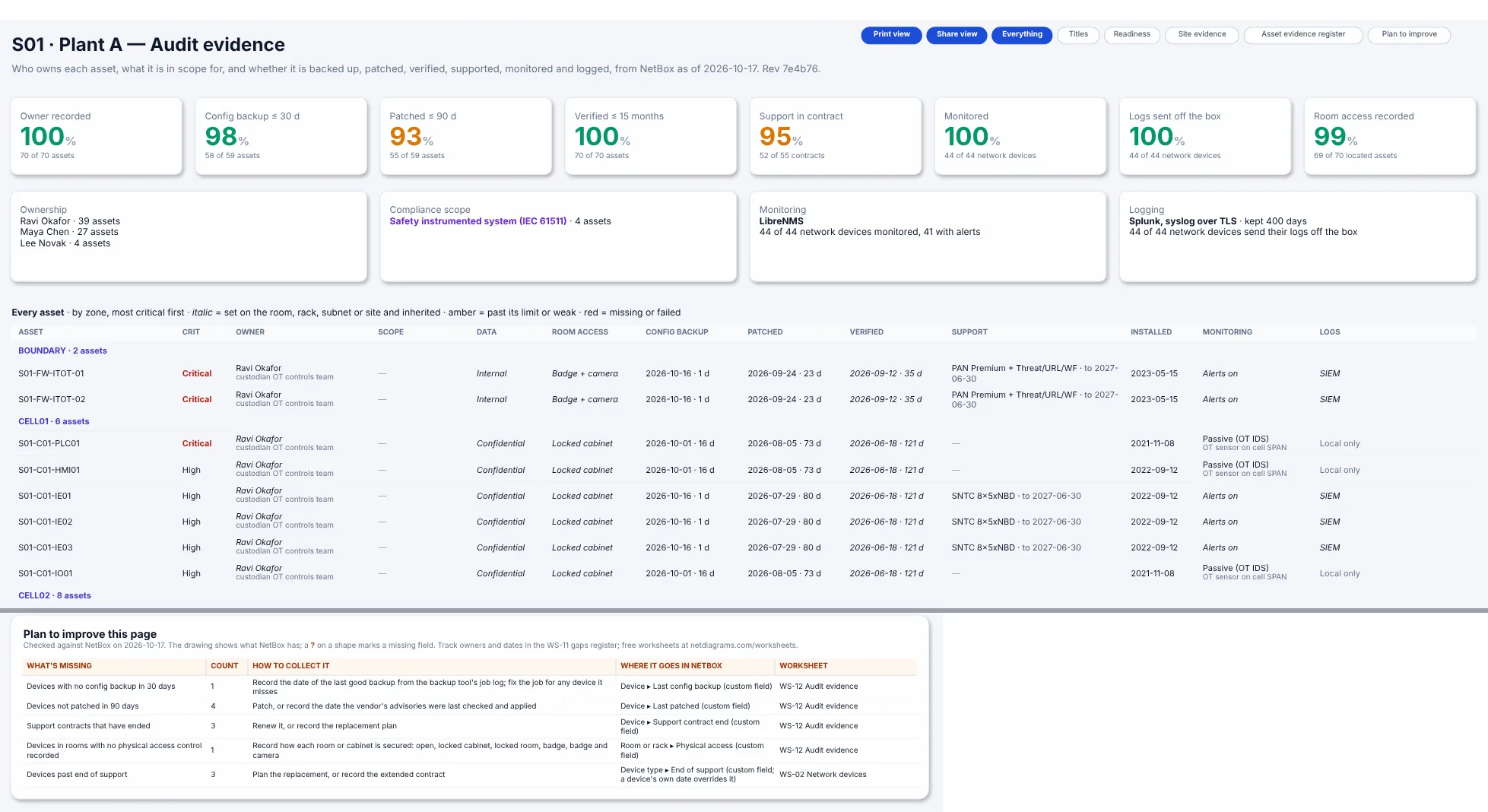
Figure 10.3. Sheet 3f, built from the Plant A sample's NetBox data. The tiles count how many assets have each piece of evidence: an owner recorded, a config backup in the last 30 days, a patch in the last 90 days, a check against NetBox in the last 15 months, a support contract in force, monitoring, logs sent off the box, and room access recorded. A tile turns amber below 95 percent and red below 70. The cards below name the owners, the compliance scope (the four safety system devices), the monitoring system and the log destination with its retention. The register lists every asset by zone, most critical first. Italic values are inherited from the room, rack, subnet or site, and dates show their age in days. Below the gray line is the plan card from the bottom of the same sheet: one device with no config backup in 30 days, four not patched in 90, three support contracts that have ended and one device in a room with no access rating, each pointing at worksheet WS-12, and three devices past end of support, pointing at WS-02.
The sheet appears only when NetBox holds some evidence, and a tile reads "not recorded at this site yet" until the site records that field, so a site that has started with owners alone isn't marked down for everything else. Where the facts come from:
| Evidence | In NetBox | Set it on |
|---|---|---|
| Owner and custodian | A contact assigned with the role Asset owner or Custodian, else the device's tenant | The device, its room or the site |
| Compliance scope | compliance_scope (PCI, NERC CIP, safety, GxP, HIPAA, SOX, CUI, FERPA) |
The device, its room or its subnet |
| Data classification | data_classification (public, internal, confidential, restricted) |
The device, its room or its subnet |
| Room access | physical_access (open, locked cabinet, locked room, badge, badge and camera) |
The room or the rack |
| Config backup, patch | last_config_backup, last_patched (dates) |
The device |
| Last verified | last_verified (date of the last walk-down) |
The device, its room or the site |
| Support, install | support_contract, support_contract_end, install_date |
The device |
| Monitoring | monitoring (alerting, polling, passive OT IDS, none) and monitored_by |
The device, its room or the site |
| Logging | log_forwarding (SIEM, syslog, local, none), log_destination, log_retention_days |
The device or the site |
A value set on a room, rack, subnet or the site applies to every device in it, and a value on the device wins. That is what keeps the sheet cheap to fill. Plant A records its monitoring system and log destination once, on the site, and an owner and an access rating on each room, and seventy assets inherit them. Compliance scope adds up instead: a device is in every scope its room, its subnet or itself is in.
On the other sheets, a device in a compliance scope gets a purple stripe down the right edge of its card, on its own "Compliance scope (hide before sharing)" layer. In Plant A that marks the four safety system devices.
The plan card at the bottom of 3f (the foot of Figure 10.3) lists what to fix, in the same form as every other page's: devices with no backup in 30 days, not patched in 90, support contracts that have ended, rooms with no access rating. Each row points at worksheet WS-12, Audit evidence, in Appendix G. The same checks feed the data quality score on sheet 1c. Appendix F, Step 14 shows how to import the fields, and netdiagrams gaps writes ready-to-fill import files for them.
Two cautions. The dates are only as honest as whoever records them, so take them from the backup tool's job log and the patch records, not from memory. And 3f is the most sensitive sheet in the set: it names owners and lists what is unpatched. Chapter 14 covers who gets it.
No NetBox yet?
The register is hand-written in every case, so all of this chapter works today. Copy page 7 from netdiagrams sample into your own drawing, or start the register as a spreadsheet with the eleven columns from the recipe above, one row per flow ID. A pivot of source zone against destination zone shows which matrix cells should hold flow IDs and which should be dashes.
When the rows settle, keep one copy as the working register and treat the other as its print. Say in the title block which one wins. Two live registers is the Chapter 0 problem in a new outfit.
NetBox won't write a row of this register either. It earns its place one step away, under Rule 3: the zones and hosts each row names map to records that hold the addresses, so the register never has to.
Checking the firewall against the register
A register says what should be allowed. The firewall decides what is. SegAudit catches firewall rules that let traffic cross zones your design keeps apart, such as a path that skips the IDMZ, including rules nobody has used yet, and rules shadowed by broader ones above them. It reads the firewall configuration exports you collect, and it never touches the network.
NetDiagrams and this book are made by SegAudit LLC.
Missing pieces?
The register's minimum matches page 4's: a row for remote access and for every conversation that crosses the IT/OT boundary. The other columns can arrive later. Rule 5 already lets a row say why its ports aren't specific, and on day one the honest reason is often "not known yet", so write UNKNOWN G-071 in the port column and let the gaps register carry the plan. An owner you've guessed gets ? G-072 until they agree they own it.
The rows are collected on Appendix G, worksheet WS-08 (flows), the same sheet that feeds page 4. For ports, the most direct source is the firewall's rule export with its hit counts, which the firewall administrator can pull. For purpose and owner, ask the people who would notice first if the flow stopped.
Monday morning
Five things to do with your flow register this week:
- Write the sentence. Put "Default for anything not listed: deny" at the top of a page, even if the page is otherwise empty.
- List the five conversations that keep production running (supervisory data, PLC programming, historian, remote support, time and name services). Give each an ID, a source zone, a destination zone, an initiator and ports.
- Fill in the zone matrix for your zones, with flow IDs, dashes and ✕ marks. Circle any cell that surprises you.
- Add purpose, owner and review-by columns, and put a name in every row. Rows nobody will own go on a list for the next change meeting.
- Pick one firewall rule with "any" in it and cross-examine it. Can you match it to a row? If not, write the row or schedule the rule's retirement.
Quotable: Write down what's allowed, deny everything else, and give rule 112 a court date.
Next: Chapter 11, "More than one site", where the same standard has to survive a trip down the WAN.