What IEC 62443 is
ISA/IEC 62443 is the family of standards for securing industrial automation and control systems (IACS). It was written by the ISA99 committee and adopted by the IEC, so you will see it called ISA 62443, IEC 62443 and ISA/IEC 62443. They are the same series.
The series is split by who it is for:
| Part | For | What it asks |
|---|---|---|
| 62443-1-x | Everyone | Terms, concepts and models, including zones, conduits and security levels |
| 62443-2-x | The asset owner | A security program for running the plant: policies, patching, service providers |
| 62443-3-2 | The asset owner and integrator | A risk assessment that partitions the system into zones and conduits and sets a target security level for each |
| 62443-3-3 | The integrator | System security requirements, grouped under seven foundational requirements, with the level each one reaches |
| 62443-4-x | The product supplier | A secure development lifecycle and requirements for individual components |
If you look after a plant network, 3-2 and 3-3 are the parts that turn into a drawing. 3-2 says where the walls go. 3-3 says how strong each wall must be.
Zones and conduits in plain words
A zone is a group of assets that share the same security requirements. In a plant, that usually means the same consequence if they fail and the same owner: one packaging line's PLCs and HMIs, the safety system, the site operations servers.
A conduit is a group of communication channels between zones that share the same security requirements. The historian collecting tags from line 1 and line 2 can be one conduit. The vendor's remote session into an engineering workstation is a different one, because it carries different risk.
Two things follow, and both are where drawings usually go wrong:
- A zone is not a VLAN. A zone can hold several VLANs, and a VLAN must never span two zones. A switch is not a security boundary just because it has a trunk.
- A conduit is not a cable. It is the set of conversations allowed across a boundary, and it lives on whatever enforces the boundary, usually a firewall. If you can't name the device that enforces a conduit, you have drawn a hope.
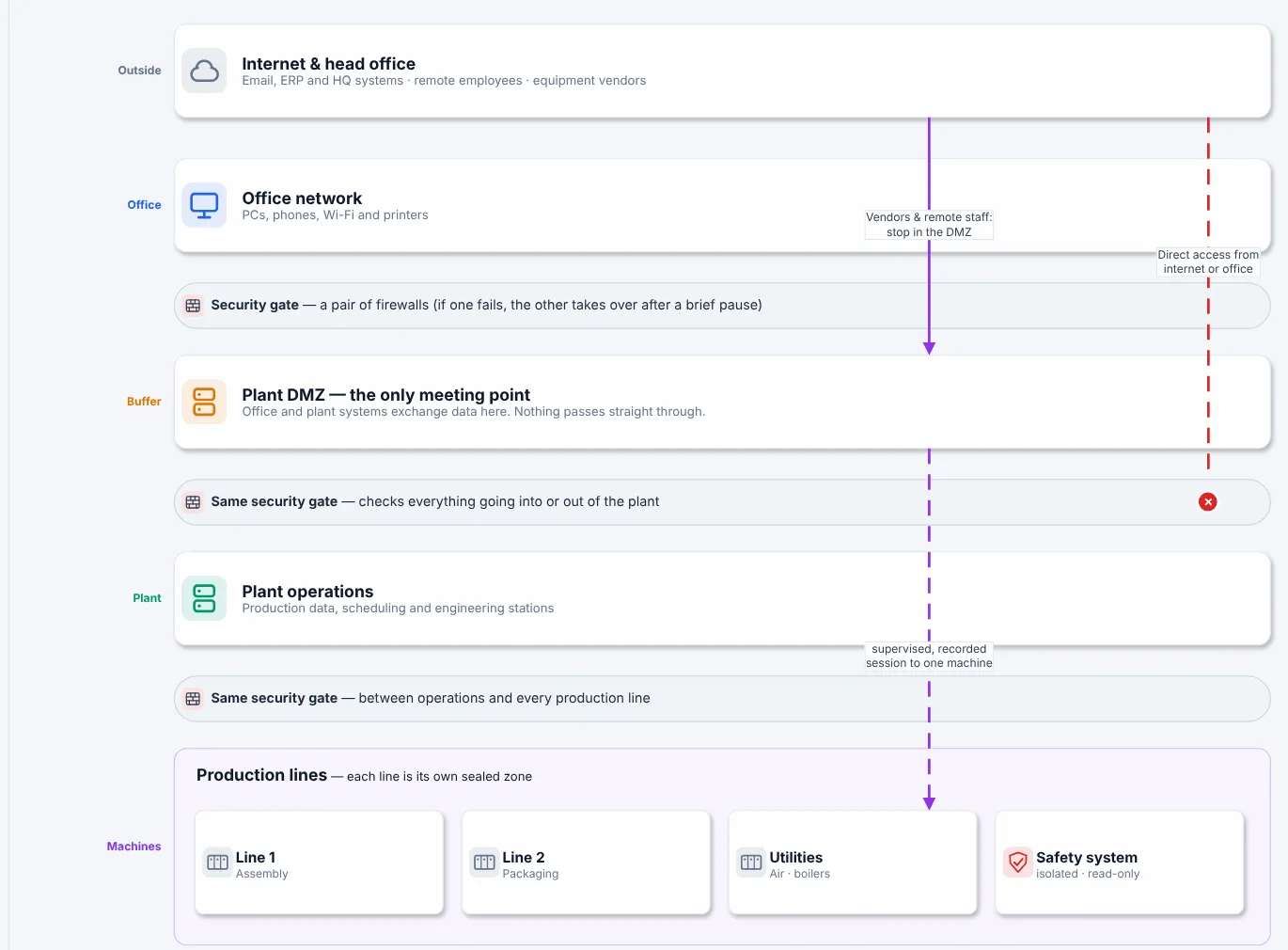
The overview page from Book 1's sample plant: zones in order of trust, with a gate where every conduit crosses. The dashed line is a path that shouldn't exist.
Security levels: SL-T, SL-C and SL-A
Every zone and conduit gets a target security level (SL-T) from 1 to 4. Roughly: SL 1 protects against casual or accidental misuse, SL 2 against intentional attack with simple means, SL 3 against sophisticated attack with moderate resources and IACS-specific skills, and SL 4 against the same with extended resources. 62443 also talks about the level a component or system can reach (capability, SL-C) and the level it actually reaches once installed (achieved, SL-A).
For a drawing, the rule is short: write the SL-T on every zone box. It is the one number that tells a reviewer how hard each wall is meant to be, and it makes a mismatch visible, such as an SL 3 safety zone that only an SL 1 conduit protects.
The seven foundational requirements
62443-3-3 groups its requirements under seven foundational requirements (FRs). You don't need to memorise the sub-requirements to draw well, but you should know which ones a network diagram can show:
| FR | Name | What the drawing can show |
|---|---|---|
| FR 1 | Identification and authentication control | Where authentication happens: jump hosts, the remote access gateway, OT domain services |
| FR 2 | Use control | Who may reach what; management interfaces in their own zone |
| FR 3 | System integrity | Mostly outside the drawing (hardening, patching); mark unpatchable assets |
| FR 4 | Data confidentiality | Encrypted conduits, such as vendor VPNs and wireless bridges |
| FR 5 | Restricted data flow | The whole drawing: zones, conduits, default deny, the flow register |
| FR 6 | Timely response to events | Where logs and alerts go; monitoring sensors and SPAN points |
| FR 7 | Resource availability | Rings, redundant pairs and what fails when a link goes down |
FR 5 is the network diagram's job. If your drawing can't answer "what is allowed to cross this boundary, and who starts the conversation?", it does not support FR 5, however tidy it looks.
How to draw zones and conduits
- List what you could lose on its own. Each line, cell or system whose loss is a separate bad day is a candidate zone.
- Merge by consequence and owner, not by building. Two lines with the same owner and the same consequence can share a zone even in different halls. The safety system never shares a zone with anything.
- Draw zones as boxes and Purdue levels as bands. They are different ideas. A cell/area zone usually holds levels 0 to 2, but "level 2" is not a zone. The Purdue model chapter shows both on one page.
- Put the enforcement point on the edge. Every conduit crosses a box edge at a named firewall, router ACL or data diode.
- Write the SL-T on each zone and conduit.
- Write the conduits down as rows. One row per conversation: source zone, destination zone, who starts it, protocol and port, purpose, owner, review date. Default deny at the top, in words. That is a flow register, and it is the page auditors ask for first.
- Date the drawing and name its source, so the next reader knows whether it still shows the plant.
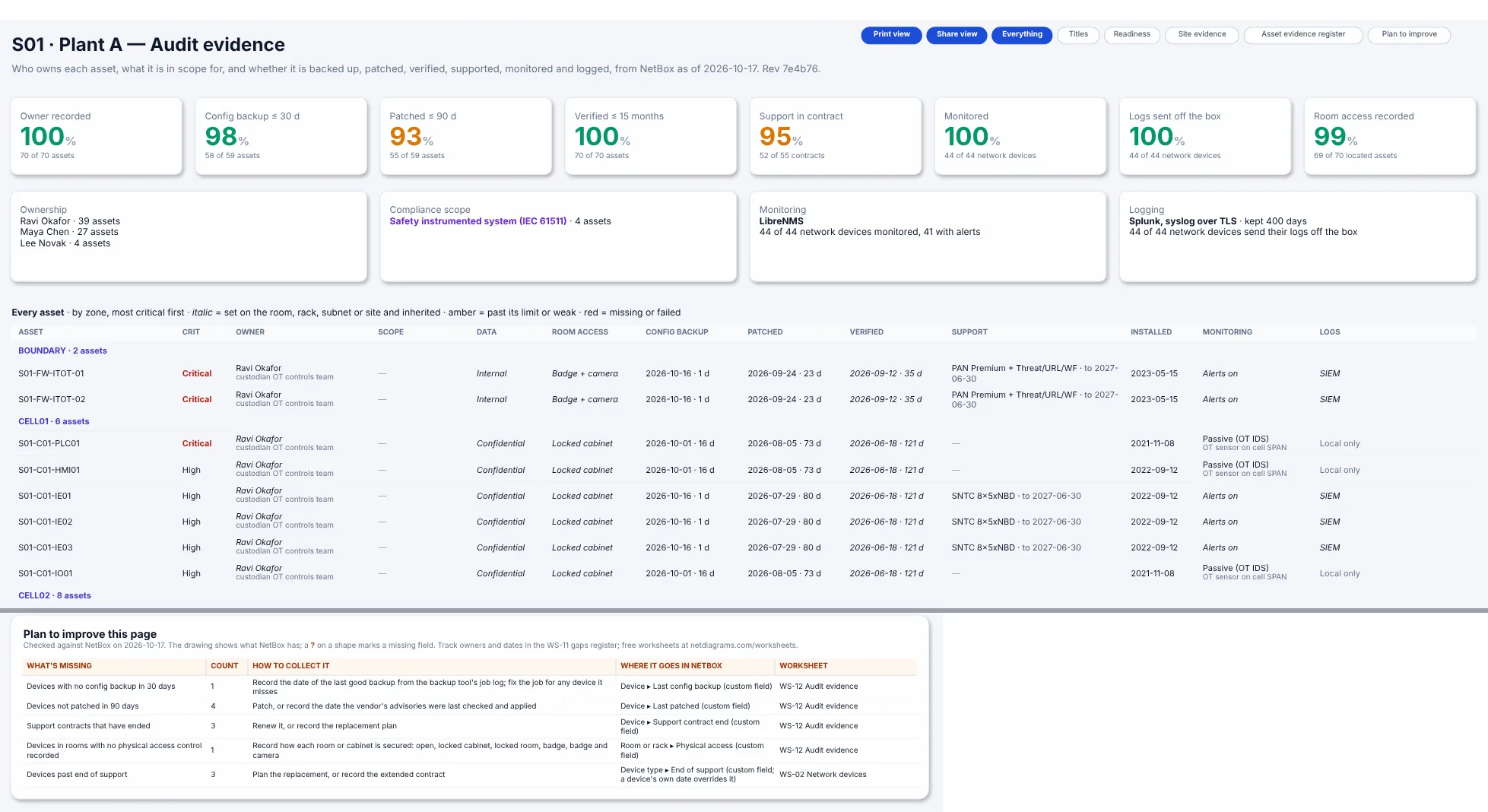
The audit evidence sheet from Book 1: every asset in its zone, with the zone's target security level next to it.
The zone and conduit diagram vs the flow register
The diagram shows the shape: which zones exist, how they nest, where the boundaries are. The flow register shows the content: exactly which conversations each conduit carries. You need both, and they must agree. A conduit drawn on the diagram with no rows in the register is either unused (remove it) or undocumented (find out what crosses it). The free chapter IEC 62443 zones and conduits: how to write a flow register walks through the register row by row, with a zone matrix an auditor can read in a minute.
Common mistakes
- One zone called "OT". It satisfies nobody. A single PLC worm should not reach every line.
- The IDMZ as a pass-through. Brokers live in the industrial DMZ (historian replicas, patch and antivirus relays, remote access gateways). If a rule lets the enterprise talk straight to level 3, the IDMZ is decoration.
- Conduits with "any" ports. A row that says "any" must say why, and when it will be narrowed.
- Drawn but not enforced. The firewall decides what is actually allowed. Compare its rules with your register at least once a year.
Where to go next
- Free: the Purdue model network diagram, Chapter 3 of Book 1, covers levels, zones, the IDMZ, safety and SL-T on one page.
- Free: the flow register chapter, Chapter 10.
- New to OT? Start with OT security basics for IT people.
- Studying for an OT security certification? The OT security study map shows which guides and chapters cover each exam topic.
- Manufacturing Network Diagrams, Book 1, takes a plant from a blank page to a zone and conduit drawing set, with a sample plant you can copy.
This guide explains concepts from the ISA/IEC 62443 series in our own words. It is not a substitute for the standards, which you can buy from ISA and IEC.