The cold open
The finding below is invented. The network it describes is not unusual.
MOCK FINDING 3-1 (illustrative; no examiner wrote this)
Condition. The institution operates one flat network. It serves the teller line, the platform desks, the two wire workstations, the instant-issue card printer, the camera recorder, the alarm panel, the lobby Wi-Fi and a television in the break room. A second network, named TEST, also exists. On inspection it contains both ATMs.
Observation. A laptop joined to the lobby guest Wi-Fi received an address in the same range as the wire workstations. From the lobby it could load the camera recorder's login page, the alarm panel's web interface and a printer configuration page titled "Welcome." It did not attempt anything further. It did not need to.
Cause. Management stated that the network was configured this way at installation and that segmentation is on the project list. The project list was provided. Segmentation is item 11, below "replace break room television."
Effect. Any device on the network can start a conversation with any other device. This includes the television.
Supporting documentation. The network diagram shows one switch, labeled "Network," with a line to every device. The diagram is accurate.
Management response. Agreed. Target date: before the next exam.
Note the supporting documentation. A flat network drawn honestly looks exactly like what it is, and no amount of careful drawing turns it into a segmented one.
This chapter is about designing the zones first, so the honest drawing is also a good one. It covers bank network segmentation the way a community bank or credit union of 2 to 40 branches actually runs it: which zones you need and why, the one-line rule for each, how they stack on a page, where the core processor's router belongs, and why the two smallest zones in the building, the wire room and the card room, are the ones that matter most.
Zones, VLANs and the firewall, in one paragraph each
A zone is a group of devices that share the same rules about who may talk to them and whom they may talk to. The teller workstations are one zone. Customers' phones (members' phones, at a credit union) on the lobby Wi-Fi are another. A zone is a trust decision, written down.
A VLAN is how a switch keeps groups apart on shared cabling. Each VLAN is its own small network with its own address range. A zone holds one VLAN, sometimes two. A VLAN never sits in two zones.
The firewall is where zones meet. Every packet that leaves one zone for another passes through it, and its policy decides whether that packet may go. At most community institutions one firewall pair does this for every zone at once. That is the whole design in a sentence: every zone has its own door, and every door is on the firewall.
The sample: Ninebark Community Bank
The examples come from Ninebark Community Bank, a fictional institution of about $900 million in assets, six branches and about 140 staff. Everything here applies to a credit union too.
Its main office, B01, has the banking hall on floor 1: a five-station teller line, platform desks, a three-lane drive-up with an ATM in lane 3, a lobby ATM, the vault and the comms room. Floor 2 holds operations, a badge-and-camera wire room with two workstations, a card room with an instant-issue card printer, and the board room. Its Elm Street branch, B02, is a full-service branch; the other four branches are copies of it.
The core processor hosts the core banking system in its own data centers and owns a router in B01's rack, on a private 100 Mb/s circuit. The card and ATM processor is reached over that same circuit. Wires and ACH go to the Federal Reserve's FedLine service over the internet, with the Fed's VPN client and tokens. Internet banking is hosted by the core processor's partner, so the bank runs no inbound internet service and has no DMZ. An MSP runs the network, an MSSP collects the logs, and the alarm company monitors the panels.
The bank zone model: six bands, thirteen zones
Ninebark's network has thirteen zones, stacked in six bands from the most exposed at the top to the keys of the network at the bottom:
| Band | Zone | What lives there | The one-line rule |
|---|---|---|---|
| OUTSIDE · INTERNET & PARTIES | Internet and outside parties | Two ISPs, SaaS, FedLine, the alarm monitoring center, remote staff | Untrusted. Everything from here ends on the firewall. |
| EDGE · FIREWALL & PROCESSOR LINKS | Core and card processor links | The core processor's router and private circuit; the card and ATM processor over it | Provider-owned router, our firewall in front of it. Only teller, staff, wire, ATM, card and servers reach it. |
| Firewall and remote access | The firewall HA pair, the VPN pool | The one place zones meet. Every inter-zone packet is inspected here. | |
| BANKING · TELLER, STAFF, WIRE & CARD | Teller line | Teller workstations, cash recyclers, the drive-up teller | Reaches the core processor and named servers. No internet. |
| Platform and back office | Account and loan officers, operations, accounting; staff Wi-Fi; printers | Reaches the core processor, servers and filtered internet. Nothing reaches into it. | |
| Wire room | Two wire workstations | Reaches FedLine and the core processor. Nothing else, nothing in. | |
| Card issuing | Instant-issue card printer and its workstation | Reaches the card processor only. Nothing reaches in. | |
| SERVICES · SERVERS & VOICE | Servers | Two virtualization hosts, the backup NAS | Reached from teller and staff on named ports. Backs up to the cloud vault. |
| Voice | Desk phones | Talks to the cloud phone service only. | |
| CUSTOMER-FACING · ATM & GUEST | ATMs | Drive-up and lobby ATMs | Reach the ATM processor only. Nothing reaches in but the servicer, booked. |
| Lobby guests | Customers' phones on NB-GUEST | Internet only. Clients can't see each other. | |
| SECURITY & MANAGEMENT | Physical security | Cameras, NVR, alarm panel, door controller | Cameras talk to the NVR only. The alarm panel talks to its monitoring center only. |
| Network management | Firewall, switch, AP and UPS management; the console server | Reached only by IT and the MSP, through the VPN with MFA. |
Read the right-hand column on its own and you have the bank's segmentation policy in thirteen lines. "The wire room reaches FedLine and the core processor; nothing else, nothing in" is a sentence the head of operations can agree to, the MSP can build and an examiner can test.
The order is deliberate. Strangers sit at the top. The processors' door and the firewall sit just below, because everything from outside must stop there. Banking, the reason the building exists, is in the middle. Customer-facing devices, which members of the public touch, sit below the bank's own systems. The cameras, the alarm and the keys to the network are at the bottom, where nothing should fall into them by accident.
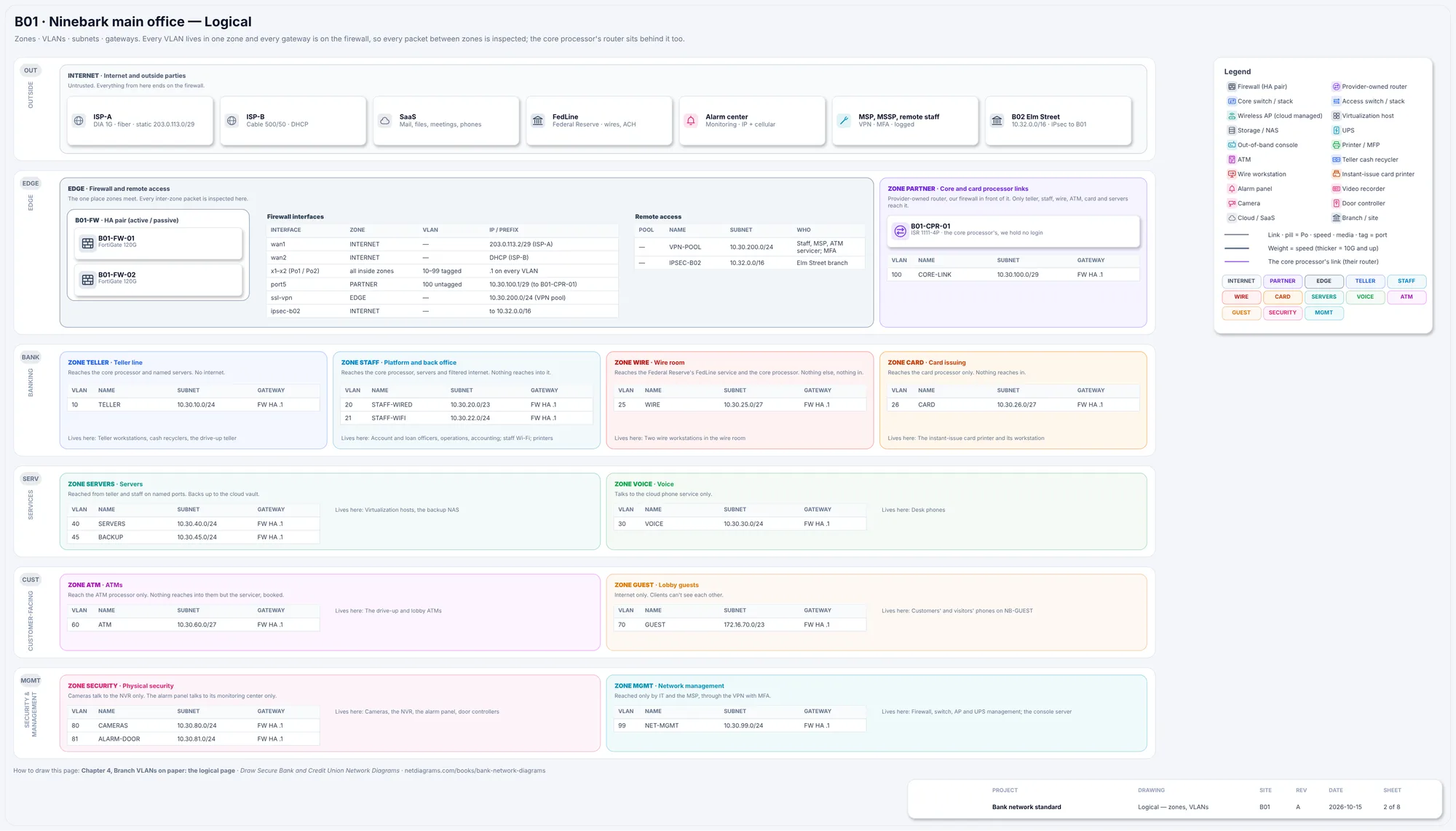
Figure 3.1. Sheet 2, Logical, from the Ninebark sample (netdiagrams sample --profile bank). The six zone bands with each zone's VLANs and subnets, the firewall HA pair holding every gateway, and the core processor's router in the processor-links zone, behind the firewall.
The rules
Rule 1. The firewall routes every VLAN.
A VLAN keeps traffic apart only until something routes between VLANs. Whatever does that routing decides whether the zones are real.
Most core switches can route. Turn it on, give each VLAN a gateway on the switch, and traffic from the platform VLAN to the teller VLAN goes switch to switch at full speed without meeting the firewall. The firewall can hold a perfect rule saying "nothing reaches into the teller line," and the rule is decoration, because the packets go around it.
Ninebark does it the other way. Its core stack, B01-CORE, is layer 2 except for its own management address. Every VLAN's gateway is the firewall HA pair's .1, so every packet between zones crosses a policy. Three things follow, and all three belong on the drawing:
- Inside a zone, the firewall sees nothing. Two teller workstations can talk directly through the switch. The control there is each workstation's own firewall, set to refuse inbound connections from its neighbors; that's acceptable on the teller line, and not enough on the lobby Wi-Fi, which is why guests are isolated from each other.
- The firewall carries the bank's internal traffic, not just its internet traffic. File and check imaging traffic from staff to the servers crosses it. Each firewall reaches the core stack over two 10 Gb/s links bundled together.
- One gateway per VLAN, and it's the firewall's. A second gateway added on the switch "temporarily" for one awkward scanner is the bypass this rule exists to prevent.
If your core switch routes, draw it honestly: it is then a boundary device, and its access lists are part of your policy.
Rule 2. Write each zone's rule as who starts the conversation.
"Tellers reach the core processor" is a rule. "Tellers and the core processor are connected" describes a cable.
A teller workstation opening a session to the core is the bank's daily business. Anything opening a session to a teller workstation is not, and the rule says so by omission. The ATM rule names its one inbound exception, the servicer, and attaches a condition: booked. When you can't write a zone's line in this form, you haven't designed the zone yet. You've named it.
Rule 3. The core processor's router sits behind your firewall, not beside it.
The core processor's router is the strangest device in a bank's comms room. It sits in your rack, on your power, labeled with your naming standard, and you can't log in to it. At Ninebark it is B01-CPR-01, a Cisco ISR 1111-4P at U42 of rack R01, on the core processor's private 100 Mb/s circuit. The core processor owns it, manages it and patches it. The bank holds no login.
Where it plugs in is the design decision. At Ninebark it connects to port5 on each firewall, on violet Cat6, untagged, in its own small subnet: CORE-LINK, 10.30.100.0/29. It never touches the bank's switches. VLAN 100 exists on the firewall and nowhere else.
That placement gives the bank three things:
- A policy between the bank and a box it doesn't control. Only the teller line, platform and back office, the wire room, the ATMs, card issuing and the servers may reach the processors, each on named flows. Lobby guests, cameras and voice can't, because nothing gives them a path.
- No back door the other way. Whatever happens on the processor's side of the router reaches the bank as traffic arriving at a firewall interface, where the default is deny. A router plugged into the core switch would hand the processor's side a seat on every VLAN trunked to that switch.
- One place to see everything. Teller, ATM and card traffic to the processors crosses one interface pair, so its logs are in one place.
The circuit also shows something the board should know. It has one path at B01, and branch teller and ATM traffic reaches the core processor through B01. If the circuit drops, every branch goes to the core system's offline mode (store-and-forward), and the bank calls the core processor. That is a deliberate finding, and the failover sheet should show it rather than hide it.
Give the router its own zone, the processor-links zone in the edge band, and draw it as theirs: recorded, labeled and drawn, with the owner on the shape. "Their box in our rack" is a sentence an examiner, an IT auditor and the core processor's field engineer all need to read on the same page.
Rule 4. The wire room and the card room are zones of their own, however small.
The wire room holds two workstations. The card room holds one card printer and its workstation. Each gets a zone, a VLAN and a /27: WIRE, VLAN 25, 10.30.25.0/27; CARD, VLAN 26, 10.30.26.0/27. Two zones with three devices between them can look like over-engineering. They are the opposite.
Small zones make loud alarms. On the platform VLAN, a few hundred denied connections a day are background noise. On the wire VLAN, the expected traffic is short enough to write on an index card: FedLine from WIRE-01 and WIRE-02 only, to the Fed's ranges, with no other internet (F06), and postings to the core processor through the router (F07). Anything else is news. So Ninebark's register denies every other zone into the wire room (F08) and into card issuing (F10), logs both, and alerts on any hit.
Small zones keep scope small. Card data at Ninebark is handled in two places: the card room, where cards are printed, and the ATMs, which read cards and PINs. Each has its own zone, and each zone's rule sends card data to the card and ATM processor and nowhere else (F09 from CARD-01 only, F11 from the ATM VLAN only), through the core processor's router. Marking that subnet as card data on the drawing shows where card data lives. It is not, by itself, a PCI DSS assessment boundary, which is decided by the assessment.
Small zones stay off most cables. VLANs 25 and 26 are trunked only on the floor 2 uplink, Po12, where the wire room and the card room are. The banking hall's uplink never carries them. A VLAN that isn't on a trunk can't be plugged into by accident at the teller line.
Small doesn't mean unmanaged. The wire and card workstations still need patches, endpoint protection and log forwarding, and they're the machines an examiner asks about first. Ninebark lets them start those sessions themselves, to named hosts in the servers zone and to the MSSP, and nothing else (F28): the rooms still answer nobody. Write that row down, or the next person 'fixes' the patching with a rule that faces the other way.
One thing the wire zone doesn't do is enforce dual control. Two people per wire is a procedure operations owns, not a network control. The drawing shows which two machines can send a wire. Who may press the button is in the procedures, and the drawing should not imply otherwise.
Rule 5. Tellers get the core, not the internet.
The teller line handles cash and the core system all day. It needs the core processor and a few named servers. It doesn't need the web, and at Ninebark it can't reach it: teller to internet is denied and logged (F03). Updates reach teller workstations from the servers.
Platform and back office are a different zone for exactly this reason. Loan officers, operations and accounting need email, files, meetings and the web, so their zone gets filtered internet (F04), with TLS inspection on except for banking and health sites (those carry customers' and staff's own private data, and many refuse inspection anyway). Put tellers and platform staff in one zone and one of two things happens: tellers get the web, or loan officers lose it. The cash recyclers at the teller line and in the drive-up live in the teller zone with the stations they serve.
Rule 6. Give a zone to anything you don't fully control.
Ask of every kind of device: who looks after it, and would I trust it next to the teller line? Five kinds fail at nearly every bank.
ATMs. Owned by the bank, driven by the card and ATM processor, updated by the servicer. They reach the processor only, over the core circuit (F11), and the servicer reaches in only by VPN with MFA, in a booked window, logged (F12). Ninebark's ATM VLAN is a /27 for two machines.
Lobby guests. Customers' phones on NB-GUEST, behind a captive portal, get the internet at 10 Mb/s per client with a DNS filter (F16), and nothing internal (F17). Clients are isolated from each other. Guests get addresses from a different private range, 172.16.70.0/23, so a guest address is recognizable in any log.
Physical security. Cameras talk to the NVR only (F18). The alarm panel talks to its monitoring center only, one destination, by IP with cellular backup, supervised every 90 seconds (F19). The NVRs, cameras and door controller have no internet at all (F20). The alarm company needs its panel to work; it doesn't need the panel on your staff network.
Voice and servers. Desk phones need one destination, the cloud phone service (F15). The servers are reached from teller and staff on named ports (F05) and back up nightly to an immutable cloud vault (F14).
Management. The management interfaces of the firewalls, switches, access points and UPSs are the keys to every other zone. They're reached only by IT and the MSP, through the VPN with MFA, named admins, logged (F21). Every other zone is denied (F24). On-site admins come in the same way, or from a named admin workstation in the management zone; either way, not from their everyday desk PC. The out-of-band console, with its own cellular link, lives here too.
The firewall belongs to no inside zone. It sits in the edge zone with the VPN pool, so remote staff and the MSP land at the edge, not on a staff VLAN.
Rule 7. Draw the bands in order, and make branches copies.
Each zone sits in exactly one band. A line from the security band straight to the internet that skips the edge looks wrong on the page, and should.
Branches follow the same model with fewer zones. Elm Street, B02, has a teller line, staff, voice, ATM, guest, security and management, using the same VLAN numbers as B01 where the zone exists: 10 TELLER, 20 STAFF, 30 VOICE, 60 ATM, 70 GUEST, 80 SECURITY, 99 NET-MGMT. It has no wire, card or server zone, because it has no wire room, card printer or servers. Its firewall applies the same zone rules between the branch's own zones, and builds an IPsec tunnel to B01 over broadband with LTE backup; traffic that leaves the branch is checked again at B01 (F23).
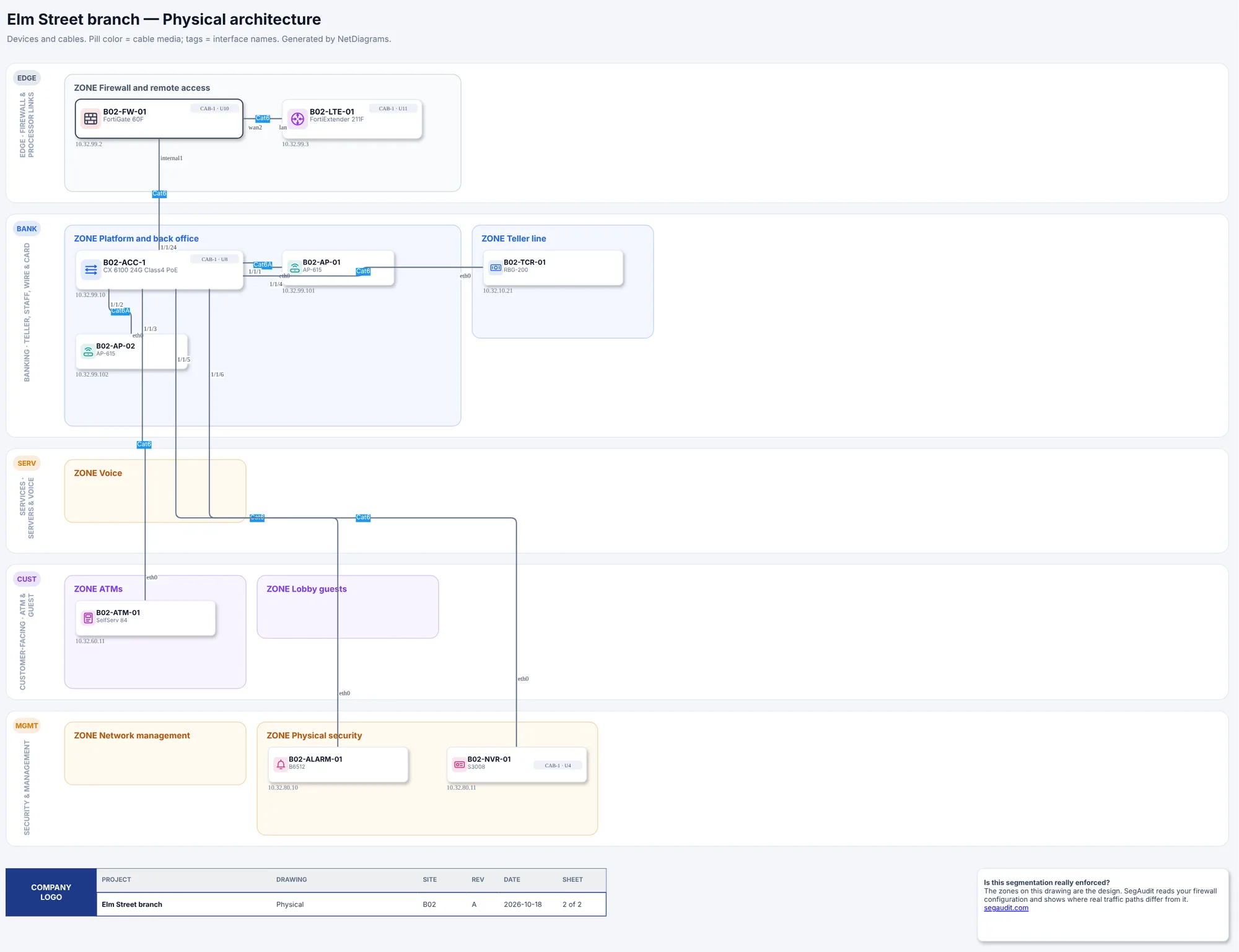
Figure 3.2. The Elm Street branch (B02): one firewall with an LTE router, one access switch, two access points, the drive-up ATM, a cash recycler, the alarm panel and the NVR, in the same six bands as the main office.
The test for leaving a zone out: a zone disappears when its devices do, never because two zones seem close enough. If Elm Street gets an instant-issue printer next year, it gets a card zone the same day.
Choosing your zones: an hour with the floor plan
If your network is flat today, design the zones in one sitting with the IT officer, the head of operations and whoever holds the alarm contract.
- Walk the floor plan. List every kind of device by where it sits: teller line, drive-up, platform, back office, wire room, card room, vault, lobby, comms room.
- Ask Rule 6's question of each kind. Anything that fails it gets its own zone.
- Write each zone's rule in "who starts what" form. Borrow the table above.
- Find the processors' routers. Write down where each plugs in today. Anything plugged into a switch moves to the firewall.
- List every outside party and how it reaches you. Each ends on the firewall.
- Check the small rooms. If wires or card data share a VLAN with anyone else, that is the first change.
In NetDiagrams
NetBox has no built-in idea of a security zone. NetDiagrams reads zones from zone-* tags, and it can write the NetBox import files to add them.
Set up NetBox for a bank. Run:
netdiagrams netbox-setup --profile bank
It writes numbered CSV files to a netbox-setup/ folder, ready for NetBox's Import buttons, including the thirteen bank zone tags and the bank device roles:
| What | Values |
|---|---|
| Zone tags | zone-internet, zone-partner, zone-edge, zone-teller, zone-staff, zone-wire, zone-card, zone-servers, zone-voice, zone-atm, zone-guest, zone-security, zone-mgmt |
| Device roles | firewall, provider-router, router, console-server, core-switch, access-switch, access-point, hypervisor, storage, ups, atm, cash-recycler, wire-workstation, card-printer, printer, nvr, camera, alarm-panel, door-controller |
When NetDiagrams can read your NetBox, it leaves out what is already there. --check lists each item as present or missing and changes nothing. --apply creates the missing items through the API, with a token that can write; it never updates or deletes, and it is the only command in NetDiagrams that writes to NetBox. Everything else only reads.
Tag where the zone really is. NetDiagrams takes the first match: a security_zone custom field on the device, then a zone-* tag on the device, then the nearest location up the tree that carries a zone. VLANs and prefixes carry their own tags.
At a bank, two rooms are exactly one zone each: tag the Wire room location zone-wire and the Card room location zone-card, and the devices filed there inherit it. Tag everything else on the device. The banking hall holds tellers, ATMs, cameras and access points, so don't tag the floor. An untagged camera is counted under "Devices without a zone" on the plan card, where someone will see it; a camera that inherited "teller" from its floor looks correct and isn't.
To mark where card data lives, set the compliance_scope field to PCI CDE on the CARD and ATM subnets. The same caution applies: it marks card data, not an assessment boundary.
Tell NetDiagrams the site is a bank. Pass --profile bank, or record "profile": "bank" once in netdiagrams.json or in the netdiagrams custom field on the NetBox site, region or site group. Before the first build, netdiagrams doctor prints where it read each zone from (fields, tags, the location tree, or nothing), the zones that have devices but no VLANs, and the next three things to fix. It draws what NetBox says; the zones themselves stay your decision.
No NetBox yet?
Start with the zone table, in a spreadsheet. Add a zone column to your device list and fill it with this chapter's thirteen zone names: by room first where a room is one zone (the wire room, the card room), then device by device.
Then draw the bands. netdiagrams blank --profile bank -o my-bank.drawio writes an empty drawing with the six bank bands. Load the shapes from netdiagrams stencils --profile bank, and copy the one-line rules into each zone box. netdiagrams sample --profile bank -o ninebark.drawio writes the full Ninebark set to copy from.
Missing pieces?
The zone design needs little on day one: the zones you know of, in their bands, and the devices you're sure of in each. A zone you know you need but can't fill yet, such as physical security before the alarm company sends its device list, still gets its box, with UNKNOWN G-031 inside. A device placed on a hunch gets ? G-032 beside it. Each gap ID is a row on WS-11, the gaps register. Collect zones on WS-01 (site, areas and zones) in Appendix G.
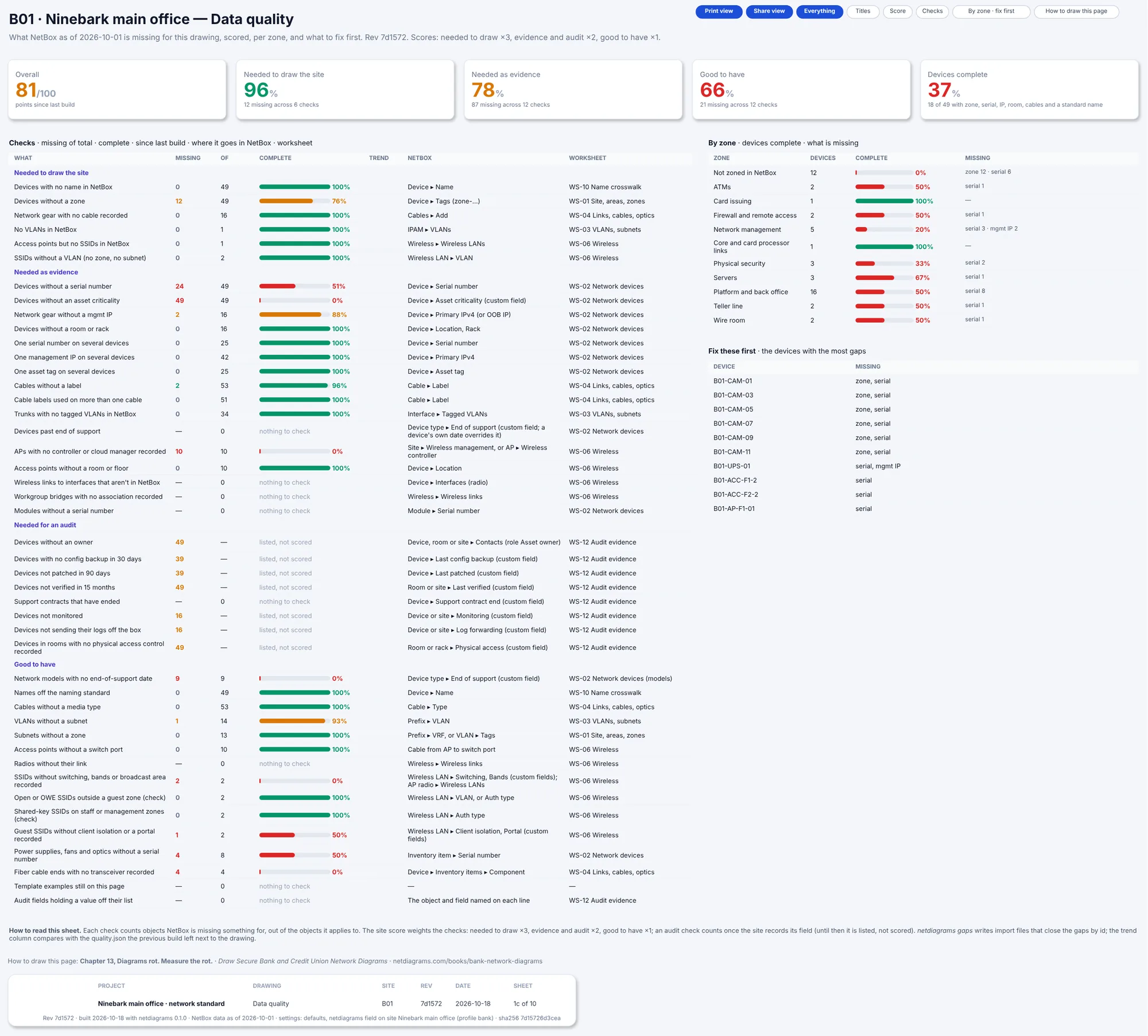
Figure 3.3. Sheet 1c of the day-one (starter) build of the bank sample: Overall 81/100, the checks NetBox fails, starting with 12 devices without a zone, the by-zone table with "Not zoned in NetBox 12", and the "Fix these first" list.
Monday morning
- Write your zone table. Start with the thirteen rows here, delete the zones whose devices you truly don't have, and write a "who starts what" rule for each one you keep.
- Find out what routes between your VLANs. Check whether any VLAN has a gateway on a switch. Each is a path that skips the firewall.
- Trace the core processor's router to the port it plugs into. If it's a switch port, plan the move to the firewall.
- From the lobby Wi-Fi, try to open the alarm panel's and the camera recorder's web pages. If either answers, the guest zone is a password, not a zone.
- Run
netdiagrams netbox-setup --profile bank, import the tags and roles, tag the wire room and card room locations, and build. No NetBox yet? Add a zone column to your device list and fill it for the main office.
Quotable: The wire room has two computers and the strictest rules in the building. That's not a contradiction; that's segmentation.
Next: Chapter 4, "Branch VLANs on paper: the logical page", where each zone gets its VLANs, subnets and gateways.