The cold open
SABLE RIDGE CAMPUS ZONING BOARD Minutes of a hearing · Application ZB-04 · South building, all floors
Present: the network team (applicant), Security, Facilities, the legal practice's IT lead.
1. The application. The applicant seeks a variance to let South's distribution switches route between the staff, legal and printer districts locally, "without referral to the firewall in North". Today every packet between South's VLANs crosses the campus fiber to North and back, and a floor 3 print job to a floor 3 printer visits two buildings, twice.
2. Objection, Security. If the switches route between all of South's VLANs, the rule "staff may not reach the legal systems" will continue to exist and cease to apply. It would still look excellent.
3. Objection, legal practice. The practice's clients have been told, in writing, that there is a wall. The practice would like there to still be one on Monday.
4. Earlier informal use. The board notes one prior instance of spot zoning: a static route on the core "for the scanner in the mailroom", since used by three further scanners and, it is believed, a vending machine.
5. Finding. Both the applicant and the objectors are right. Trunking every VLAN to one firewall does not scale to a campus. Routing every VLAN on the switches does not keep a wall. The application is refused in its present form.
6. Resubmission (approved, with conditions). Neighborhoods may route among themselves. Districts meet only at a checkpoint. (a) Each district is a VRF. (b) VRFs meet only at the internal firewall pair. (c) No route leaks on any switch, including for scanners. (d) The visitors' district gets no road into the campus at all. (e) In the data center, every tier meets every other tier at the checkpoint.
7. Any other business. The spot-zoned route is to be removed. The mailroom has been told.
That hearing is every company's second building. The one-floor design gets expensive, someone proposes routing on the switches, and the segmentation quietly stops existing. The resubmission is this chapter's design: VRFs as the big zones, internal firewalls where they meet, and a zone model written down so everyone draws it the same way.
The company in this chapter
The examples come from Sable Ridge Group, a fictional professional services firm of about 2,400 staff, including a legal practice of about 180. Its HQ campus, C01, has three buildings joined by fiber in two ducts: North (the core and the primary data center, DC-N), South (the legal practice on floors 3 and 4) and Commons (reception, training rooms, the cafeteria). A DR cage, a regional office and fourteen branches join over SD-WAN.
Why "the firewall routes every VLAN" stops at the second building
In one building, the cleanest design puts every VLAN's gateway on the firewall, so every packet between zones crosses a policy. If that's your network, keep it; Book 5 draws it.
Add a second building and three things go wrong at once.
Every VLAN has to reach the firewall. Either each one is trunked across the campus fiber, so a layer 2 domain spans buildings and ducts and one loop in Commons becomes an outage in North, or every building gets a firewall of its own.
The firewall carries all the east-west traffic. File shares and printing for 1,400 people hairpin through one pair, which becomes the campus router at a firewall's price per gigabit.
Someone turns on routing at the core. Traffic gets fast and stops meeting the firewall, because every VLAN now has a gateway in one routing table. The firewall policy is still there. Nothing passes through it.
The enterprise answer keeps the speed and the policy: let the core route, give each trust zone its own routing table, and make a firewall the only way between tables.
Four terms first
A VRF (virtual routing and forwarding instance) is a separate routing table on the same switch. Two VRFs on one core pair act like two routers: a subnet in VRF CORP has no route to a subnet in VRF LEGAL unless something puts one there. Without MPLS this is VRF-lite: each VRF carried between switches on its own sub-interfaces, with its own routing protocol.
A transit is the small subnet joining a VRF to the firewall: at Sable Ridge, a /29 on an 802.1Q sub-interface, carrying the VRF's default route.
An internal segmentation firewall (ISFW) is a firewall pair whose job is the traffic between your own zones, not the traffic to the internet. It is where VRFs meet. At Sable Ridge it's a separate pair from the edge firewalls, though a smaller site can run both roles on one pair, as Sable Ridge's DR cage does.
A route leak is any route that lets traffic cross from one VRF to another without the firewall: a static route into another VRF, or routes imported between VRFs on a switch. In a campus that uses VRFs as security zones, it is a hole with a configuration line.
The corporate zone model: six bands, twenty zones
Sable Ridge's zones are stacked in six bands, from the most exposed at the top to the most privileged at the bottom. The VRF column is what makes this a segmentation model rather than a list of VLANs.
| Band | Zone tag | Zone | VRF | What lives there | The one-line rule |
|---|---|---|---|---|---|
| OUTSIDE | zone-internet |
Internet and SaaS | — | ISP-1, ISP-2, SaaS, home workers before they connect | Untrusted. Everything from here ends on an edge firewall. |
zone-wan |
SD-WAN overlay | per segment | The SD-WAN hubs and spokes, the carrier underlays | Carries CORP and LEGAL as separate segments. Ends on a hub. | |
zone-cloud |
Cloud | — | Transit hub, client-portal spoke, analytics spoke | Reached over the private circuit, IPsec as backup. | |
| EDGE | zone-edge |
Firewalls and remote access | — | Edge firewall pairs, the ISFW pair, the VPN pool | Where zones meet. Every crossing is inspected and logged. |
zone-dmz |
DMZ | — | Reverse proxy for the client portal, secure file transfer | Reached from the internet on named ports; reaches in only to named APIs. | |
zone-extranet |
Client extranet | — | One client's dedicated IPsec tunnel and its landing server | One client, one peer, one service. | |
| USERS | zone-corp |
Corporate users | CORP | Staff laptops and desktops, wired and on SR-CORP | Reaches SaaS, the DC apps and infrastructure. Not the legal systems. |
zone-voice |
Voice | CORP | Desk and meeting-room phones | Cloud phone service only. | |
zone-print |
Printers | CORP | Multifunction printers | Answers the print servers. Starts nothing except scan-to-email. | |
zone-legal |
Legal users | LEGAL | Legal staff, wired or on Wi-Fi, on any floor, by identity | Reaches the legal systems. Everyone else can't. | |
| DATA CENTER | zone-dc-app |
DC applications | DC | Application servers | Reached by users on named ports; reaches data. |
zone-dc-data |
DC data | DC | Database servers, file services | Reached only by the app tier and backup. | |
zone-dc-infra |
DC infrastructure | DC | Directory, DNS, DHCP, NAC, PKI, print servers, PAM jump hosts | Everyone uses it; only PAM reaches management. | |
zone-dc-backup |
Backup | DC | Backup servers and the immutable backup store | Pulls from every tier; nothing pulls from it. | |
zone-dms |
Legal systems | LEGAL | Document management and matter databases, on their own hosts | Legal users only. The ethical wall in the network. | |
| SHARED & BUILDING | zone-guest |
Guests | GUEST | Visitors on SR-GUEST | Internet only. Never routed internally. |
zone-rooms |
Meeting rooms | BUILDING | Room systems and displays | Cloud meeting service; staff may cast. | |
zone-building |
Building systems | BUILDING | Cameras and recorders, badge controllers, the BMS | Facilities and its contractor only, through the edge with MFA. | |
| MANAGEMENT | zone-mgmt |
Network management | MGMT | Switch, firewall, WLC, AP, UPS and server management | Reached only from the PAM jump hosts. |
zone-oob |
Out-of-band | — | Console servers with cellular | Works when the network doesn't. Every login logged. |
The right-hand column is the company's segmentation policy in twenty lines; the VRF column is six routing tables. Zones with no VRF live on a firewall or outside the campus, and the core never routes them.
The six VRFs, their gateways and their way to the ISFW:
| VRF | Route distinguisher | Zones | Gateways | Way to the ISFW |
|---|---|---|---|---|
| CORP | 65010:10 | corp, voice, print | Core pair (.1); South distribution for South's VLANs | Transit 10.1.255.0/29 |
| LEGAL | 65010:20 | legal, dms | Users: South distribution (210), core pair (211, 215); legal systems (440): ISFW | Transit 10.1.255.8/29 |
| DC | 65010:40 | dc-app, dc-data, dc-infra, dc-backup | ISFW (VLANs 400 to 430) | None needed: its gateways are on the ISFW (10.1.255.32/29 joins the ISFW to the edge) |
| GUEST | 65010:70 | guest (including quarantine) | Edge firewalls' guest interface | None, by design |
| BUILDING | 65010:80 | building, rooms | Core pair | Transit 10.1.255.16/29 |
| MGMT | 65010:99 | mgmt | Core pair | Transit 10.1.255.24/29 |
The rules
Rule 1. VRFs are the big zones. Zones are the rooms inside them.
Draw a VRF wherever you'd put a firewall between two groups if you could, then divide it into zones by the rules its devices follow. CORP holds staff, voice and printers; BUILDING holds building systems and meeting rooms.
Be honest about it. Zones that share a VRF share a routing table, and between them the switch routes without a firewall in the way. At Sable Ridge, the voice zone's rule ("cloud phone service only") is enforced where voice traffic leaves CORP, at the ISFW. Inside CORP, the core routes voice like any other CORP subnet.
That's a deliberate trade, and the drawing must say so. Sable Ridge narrows it with access lists on the core's SVIs: the printers' VLAN 130 accepts only the print server's traffic; the cameras' VLAN 800 reaches no subnet but its own (the recorders share it, so camera-to-recorder traffic is switched and no SVI sees it); and the badge and BMS VLANs, 810 and 820, answer only their own head-ends and the contractor's path.
Meeting rooms share BUILDING for convenience, which is why they get no route to the door controllers. Anything stronger gets its own VRF. Never let two colored boxes imply a firewall that isn't there.
Rule 2. VRFs meet only at a firewall. No route leaks on switches.
Each VRF has exactly one way out: its transit to the ISFW pair, carried on 802.1Q sub-interfaces over the port-channel between the core pair and the firewalls, with a default route pointing at the firewall. OSPF runs per VRF on the core pair and the South distribution pair, so each routing table learns its own subnets across the campus and nothing else.
A packet that changes VRF goes through the ISFW. No static route on a switch points into another VRF, and no switch imports one VRF's routes into another. That sentence is the campus's whole security design, and it's checkable: each VRF's routing table on each switch holds its own prefixes and a default to its transit, nothing more.
The usual pressure to leak comes from shared services: DNS, DHCP, directory and the NAC. Sable Ridge keeps them in zone-dc-infra, gatewayed on the ISFW, and every VRF except GUEST reaches them through it (F03, F23; the F numbers are rows in the company's flow register). Which VRFs can reach the directory? The ones the firewall says.
On the drawing, every transit is a row in a zone table, with its VRF, subnet and firewall interface. An undrawn transit is where the next scanner route goes.
Rule 3. In the data center, the firewall routes every VLAN again.
Inside DC-N, the old one-building rule comes back on purpose. The data center leaf pair (a vPC pair) is layer 2 only for the DC VLANs. Every DC VLAN's gateway is on the ISFW pair: DC-APP (400), DC-DATA (410), DC-INFRA (420), DC-BACKUP (430) and the legal systems, DC-DMS (440), which is in VRF LEGAL but gatewayed on the same pair. The storage VLAN, 460, has no gateway at all.
So every crossing in the data center is policy. A laptop reaching the practice management application (F02) crosses the ISFW; the application reaching its databases (F05) crosses it again, from the app servers only; a laptop going straight to the databases (F04) is refused there. Size the pair for it: tier-to-tier traffic often exceeds user traffic. On the drawing, the leaf pair is not a boundary device; the ISFW is.
The leafs also carry two VLANs that skip the ISFW, by design: the DMZ and extranet servers run on the production cluster too, so VLANs 600 and 610 reach the leafs from the edge pair on their own bundle, Po44, gatewayed on the edge firewalls.
Rule 4. Identity picks the zone, not the port.
At Sable Ridge, 802.1X with EAP-TLS runs on every campus access port and on the SR-CORP wireless network. The NAC policy decides where a device lands: legal staff in LEGAL (VLAN 210 on a wired port in South, VLAN 211 on a wired port in North or Commons, VLAN 215 on Wi-Fi anywhere), everyone else in CORP, and unknown devices in a quarantine VLAN, 199, which sits in the GUEST VRF and gets the internet only.
So zone-legal is not "floors 3 and 4 of South". A lawyer at a hot desk in North is in LEGAL too, wired or on Wi-Fi, because her certificate says so, and a visitor's laptop on a free port lands in quarantine. The drawing shows the zone as a policy result, with the NAC nodes in zone-dc-infra as part of the boundary. The port isn't the zone. The identity is.
Printers, cameras and controllers can't present a certificate, so the NAC places them by MAC address and device profile instead. That is weaker, since a MAC can be copied, which is why their VLANs carry access lists or sit in a VRF of their own.
Rule 5. Guests get no road inside, not a rule against using one.
The GUEST VRF has no transit to the ISFW at all. Its only route is a default to the edge firewalls' guest interface, which VLANs 199 and 700 reach at layer 2 on Po46, so the core has no address in them. Guests on the visitor network, SR-GUEST, are anchored on the wireless controller pair and use 172.20.0.0/16, which is never routed internally. Quarantine shares the same VRF and the same fate.
A rule saying "deny guests to internal" can be edited into a permit in an afternoon. Opening a VRF with no route inside takes a new route, a new ISFW interface and a new rule at once, which nobody does by accident. F15 denies guests to any internal zone; the routing table makes it true twice.
Rule 6. Boundary devices sit on the boundary, with an interface per zone.
The edge pair and the ISFW pair belong to zone-edge, not to any zone they protect. Draw each one across the bands it joins, with a table of its interfaces and the zone each faces. For the ISFW, that's the four VRF transits, the five DC gateways and the internal-to-edge transit. For the edge pair, it's the two ISP handoffs, the DMZ (VLAN 600) and extranet (VLAN 610) toward the DC leafs, the guest interface, the VPN pool and the link from the ISFW.
VPN users land in a pool in zone-edge (10.250.0.0/21 at C01, or 10.250.8.0/21 at C02 when C01 can't answer) and get CORP or LEGAL policy by identity group (F10), never a user VLAN. Management is reached only from the privileged access (PAM) jump hosts, which record every session (F21); the cellular console servers sit outside every VRF, in zone-oob.
A zone with no interface on a boundary device is either deliberately unrouted (say so) or routed where nobody drew.
Rule 7. A zone is a rule, not a building.
Zones cross buildings. CORP has VLANs in all three; so does LEGAL, wired and wireless; the cameras are on every floor and their recorders sit in a data center rack. So the logical page is arranged by trust; buildings belong on the physical and riser sheets. Tag a location with a zone only when that zone is the right default for what's in it, and tag the exceptions (cameras, printers, badge controllers, the legal cluster's hosts) on the devices.
The logical sheet at company scale
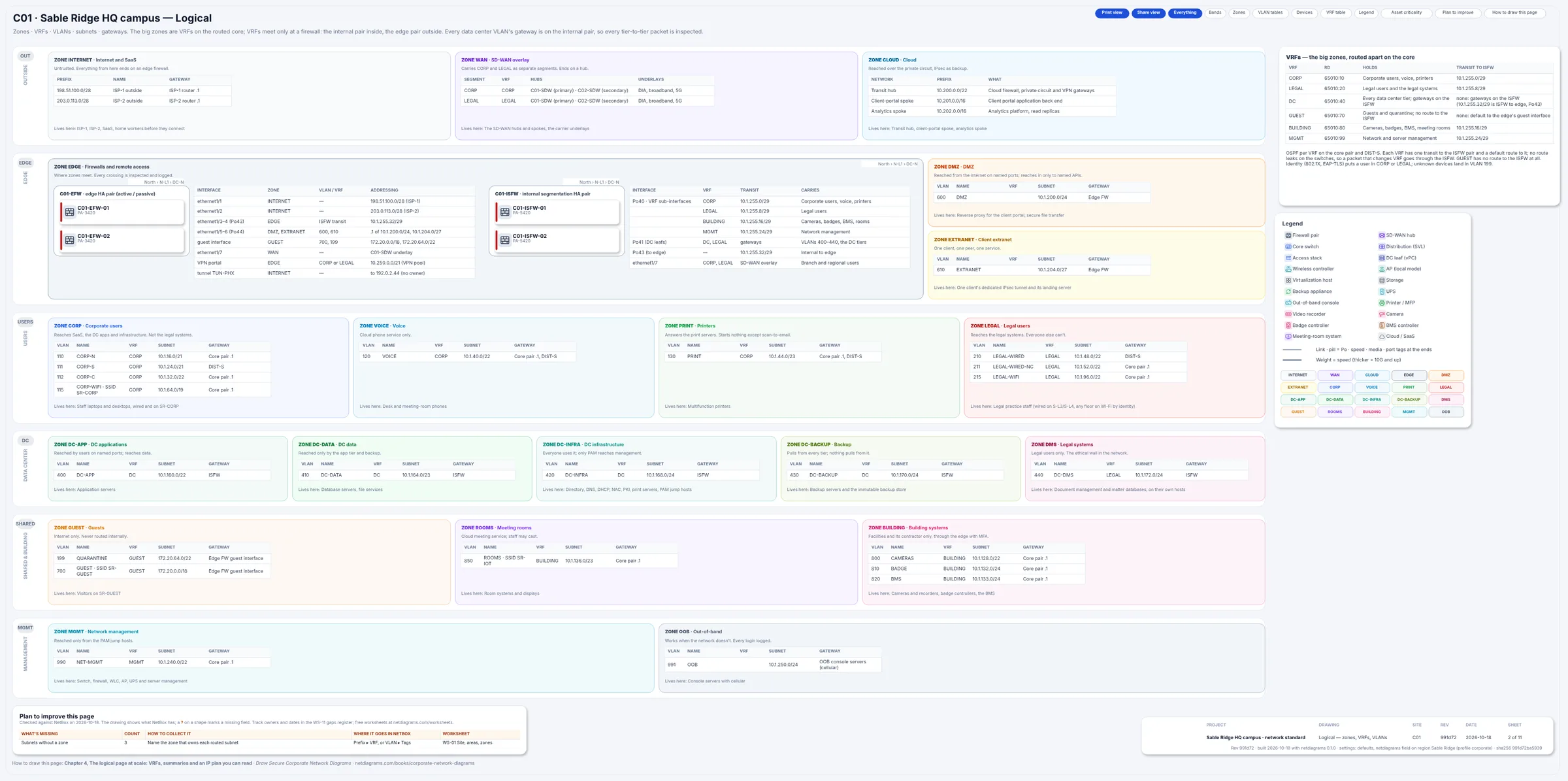
Figure 3.1. Sheet 2, Logical, for C01, from netdiagrams sample --profile corporate. The six bands, one box per zone with its VLAN table (VLAN, NAME, VRF, SUBNET, GATEWAY), the VRFs, and the ISFW and edge firewall pairs with their interfaces.
In Figure 3.1, find VLAN 440, DC-DMS: zone-dms, VRF LEGAL, 10.1.172.0/24, gateway on the ISFW. That row is the ethical wall's network half: the legal systems sit in a routing table with no corporate subnet, behind a firewall gateway. Then find VLAN 700, GUEST, gatewayed on the edge's guest interface, with no ISFW interface at all.
Redesigning a flat campus: one afternoon with the routing table
If your campus routes everything in one table today, sketch the zone model in one sitting with the people who run the core and own security.
- Export the core's configuration and list every SVI with its subnet.
- Write the rule each subnet needs, as "who may start a conversation with whom".
- Group subnets by the boundaries you'd firewall. Each group is a VRF candidate; expect five to eight.
- Put shared services (DNS, DHCP, directory, NAC) behind the firewall, not on a leaked route.
- List existing leaks (static routes, policy routing) with an owner each.
- Put the data center's gateways on the ISFW, unless you can say why not.
You'll end with a zone table, a VRF table, a leak list and one subnet nobody can explain. All four go on the drawing.
In NetDiagrams
NetBox has no built-in security zone. NetDiagrams reads zones from zone-* tags and routing tables from NetBox's own VRFs, and it can write the import files to set both up.
Set NetBox up for a corporate estate:
netdiagrams netbox-setup --profile corporate
It writes numbered CSV files for NetBox's Import buttons, including the twenty zone-* tags from the zone table and the corporate device roles, from firewall and core-switch to camera and room-system.
--check lists each item as present or missing and changes nothing. --apply creates what is missing with a token that can write; it never updates or deletes, and it is the only command in NetDiagrams that writes to NetBox.
Record VRFs as NetBox VRFs, with their route distinguishers, and put each prefix in its VRF. Sheet 2's VLAN tables read the VRF from the VLAN's prefix, and look for the gateway inside that prefix, in its own VRF. A prefix with no VRF shows plainly; it's the commonest first-import gap.
Tag where the zone really is. For devices, the first match wins: a security_zone field, a zone-* tag, then the nearest location with a zone. VLANs and prefixes carry their own tags; a VLAN with none takes its prefix's zone or VRF. At Sable Ridge the South floor 3 and 4 stacks carry zone-legal, the legal cluster's hosts zone-dms, and each camera zone-building. Don't tag a whole building: a forgotten device would inherit its zone and look correct.
Set the profile once: {"profile": "corporate"} in the netdiagrams JSON custom field on the NetBox region, and every site under it builds to the corporate standard. Then build:
netdiagrams build --profile corporate
Before the first build, check where zones are read from:
netdiagrams doctor --profile corporate --site c01
…
Zones
  Read from: field security_zone, iec62443_zone, ot_zone on 0 devices, zone-* tags on 315, the location tree on 0, nothing on 0.
  Zones with devices but no VLANs in NetBox: zone-edge, zone-wan
…
All 315 devices take their zone from a tag. Edge and WAN hold devices but no VLANs, as expected: their links are transit.
No NetBox yet?
Start with two tables in a spreadsheet: the zone table from this chapter, trimmed to the zones you have, and a VLAN list with columns for VLAN, name, zone, VRF, subnet and gateway. Sort by VRF, then zone, and each block of rows is one box on the logical sheet.
Then draw the bands: netdiagrams blank --profile corporate -o my-campus.drawio writes the six empty corporate bands, netdiagrams stencils --profile corporate -o Corporate-Stencils.xml saves the corporate shapes for draw.io, and netdiagrams sample --profile corporate -o sable-ridge.drawio writes the Sable Ridge set to copy from. Put each zone's one-line rule in its box.
Missing pieces?
The zone model needs very little on day one: the zones you know of, in their bands, the VRFs that exist on the core, and the devices you are sure of in each zone.
A zone you can't populate yet still gets its box, with UNKNOWN G-003 inside; a subnet placed in a VRF on a hunch gets ? G-004 beside the VRF. Each gap ID is a WS-11 row. Collect zones on WS-01 and VLANs, VRFs and gateways on WS-03, fastest from the core's and the ISFW's configuration exports.
In a NetDiagrams build, NetBox's gaps are drawn rather than hidden:
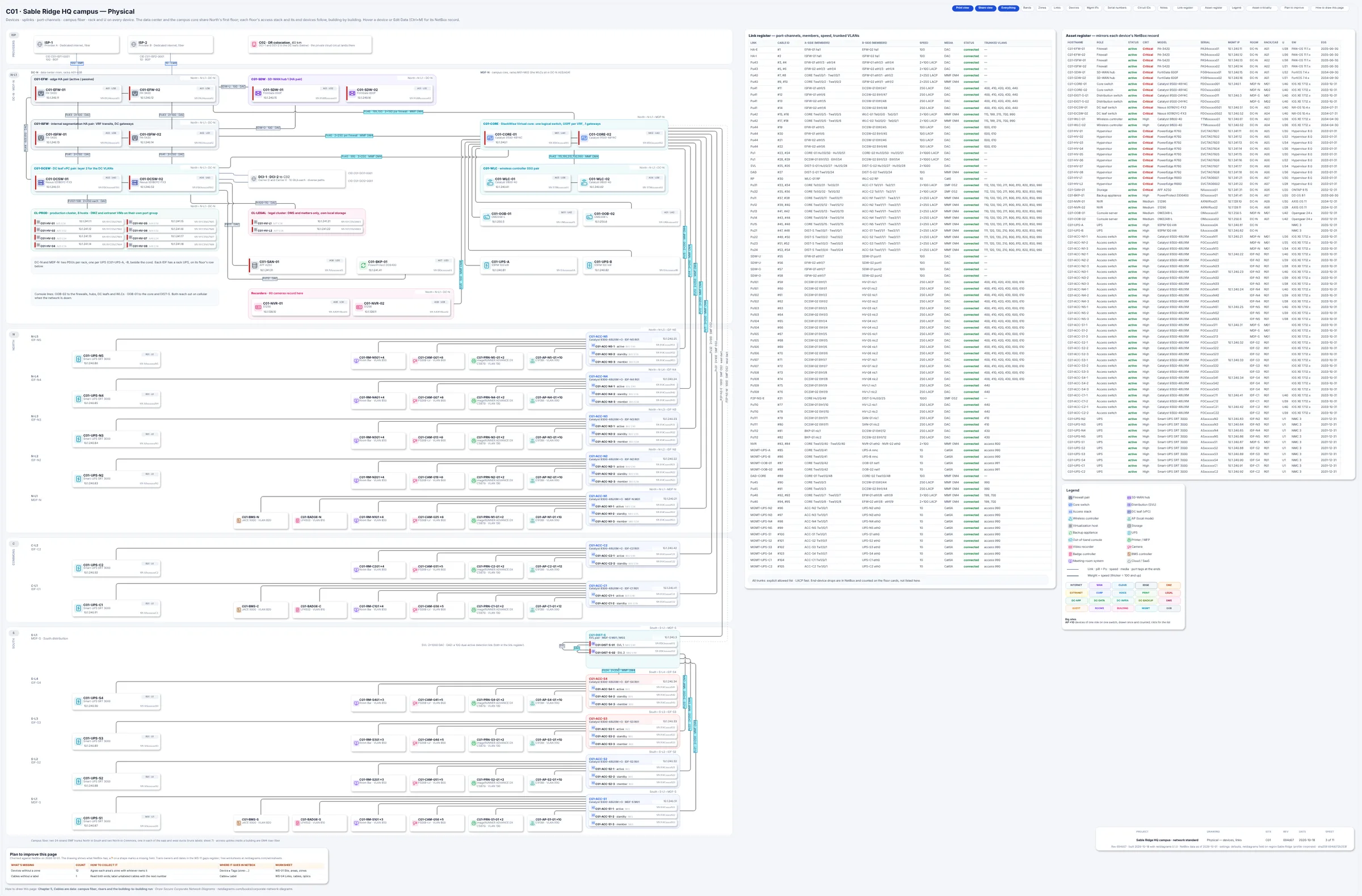
Figure 3.2. Sheet 3 of the day-one campus build (corporate-starter). Amber "?" marks on the gaps, the P2P-NS-W link drawn dashed, and the "Plan to improve this page" card: 12 devices without a zone (ten Commons cameras and the two legal hosts) and 1 cable without a label.
The starter campus also has no VRF on half its prefixes and leaves the legal cluster's hosts untagged, so they look like any other hypervisor: the gap a client's reviewer would find first. Chapter 16 builds it.
Monday morning
Five things to do with your own company network this week:
- Write your zone table from this chapter's twenty rows, with a one-line rule for each zone you keep.
- List the VRFs on your core and which zones are in each. Mark zones that share a VRF, and what separates them.
- Look for route leaks: anything in a VRF's routing table that isn't its own prefixes and its default route. Every exception gets an owner.
- Find your data center tiers' gateways. If it's a switch, list the tier-to-tier paths with no policy.
- Run
netdiagrams netbox-setup --profile corporate, import the tags and roles, put your prefixes in VRFs, and rundoctor. No NetBox yet? Add zone and VRF columns to your VLAN list.
Quotable: VRFs make the roads. Firewalls make the crossings. A route leak is a road somebody built at night.
Next: Chapter 4, "The logical page at scale: VRFs, summaries and an IP plan you can read", where each zone gets its VLANs, prefixes and gateways, site by site.