The cold open
The state CJIS auditor arrives at nine, on time, with a laptop and a list. The police department's terminal agency coordinator, a sergeant who has done this twice before, has booked the small conference room and printed the network diagram.
The diagram is the one the city's IT manager drew four years ago for the phone system upgrade. It shows City Hall, the police wing, the library and public works, each as a cloud, joined to a big cloud in the middle labeled CITY NETWORK. The police cloud has a padlock drawn on it.
The auditor looks at the padlock for some time.
"Where does the police VLAN get routed?"
The sergeant looks at the IT manager. The IT manager knows the answer, and it isn't the padlock. The police VLANs are routed on the core switch in the basement, the same switch that routes the library's public Wi-Fi, because that was how the network was built in 2017, and nobody had a reason to change it until about forty seconds ago.
The audit doesn't fail that morning. It produces a finding, a corrective action plan and a follow-up date. It also produces a budget request, a council agenda item and a new rule in the IT office: nobody draws a padlock on anything again.
This chapter is about designing a city network so that the drawing can answer the auditor's question without anyone looking at anyone: the zones a city needs, why police, the public and City Hall can share fiber but never a VLAN, what to do with the systems the city touches but doesn't own, and how to write the design down so that the state, the risk pool and the next IT manager all read it the same way.
Zones, VLANs and the firewall, in one paragraph each
A zone is a group of devices that follow the same rules about who they may talk to. City staff laptops are one zone. The public's phones on the lobby Wi-Fi are another. A zone is a decision about trust, written down.
A VLAN (virtual LAN) is how a switch keeps groups apart on the same cables. Each VLAN is its own small network with its own range of addresses. A zone usually holds one VLAN, sometimes two or three. A VLAN never belongs to two zones.
The firewall is where zones meet. Every packet that leaves one zone for another passes through it, and its policy decides whether that packet may go. In a city the size of most cities, one firewall pair at City Hall does this for every zone and every building on the city's fiber. That is the design in a sentence: many departments, one gate, and the police behind a wall of their own.
The municipal zone model: six bands, twelve zones and a boundary
The examples in this book come from the City of Halvern, a fictional city of about 38,000 people with an IT team of four. Its main building, site CH1, is the Halvern Civic Center: City Hall in one wing and the Police Department in the other, with a council chamber, the utility billing and permit counters on the ground floor, and a basement data room that both wings share. The police keep their own rack in that room, inside a cage with its own badge reader.
The rest of the city hangs off CH1 on city-owned fiber: the Main Library (LB1), the Public Works Yard (PW1), three fire stations and 42 signalized intersections. The water treatment plant, the county's 911 dispatch center and the state's CJIS network are next door in the network sense, and none of them is the city's to draw. More on those shortly.
Halvern's network has twelve zones and one boundary, stacked in six bands from the most exposed at the top to the most sensitive at the bottom:
| Band | Zone | What lives there | The one-line rule |
|---|---|---|---|
| OUTSIDE | Internet and providers | Two internet lines, cloud services, staff on the VPN, patrol cars on cellular | Untrusted. Everything from here ends on the firewall. |
| State, county and vendors | The state CJIS router, the county dispatch link, vendor support | Not ours. We draw the edge and the one door through it; the owner draws the rest. | |
| Water plant (boundary) | The utility's treatment plant network | Out of scope. No city zone has a path into it, and none is drawn. | |
| EDGE | Firewall and remote access | The firewall HA pair, the staff and patrol VPN pools | The one place zones meet. Every inter-zone packet is inspected here. |
| PUBLIC | Public Wi-Fi | Lobby and council chamber Wi-Fi for residents and visitors | Internet only, filtered. Clients can't see each other or anything the city owns. |
| CITY HALL | City staff | City Hall computers, wired and on the staff Wi-Fi | Reaches the internet, city servers and printers. Never police systems. |
| Voice | Desk phones in both wings | Talks to the hosted phone service only. | |
| Payment counters | Card terminals at the billing and permit counters | Talks to the payment processor only. | |
| City servers | Virtualization hosts, the backup appliance | Reached from staff and VPN users on named ports. Backs up offsite. | |
| PUBLIC SAFETY | Police (CJIS) | Police workstations, records and evidence servers, police Wi-Fi | Walled off. Reached from police devices, the state router and dispatch on named hosts only. |
| FACILITIES & FIELD | Building systems | Cameras, the video recorder, door access, HVAC controls | Each system talks to its own server only. No internet. |
| Traffic signals and field | The signal central system and the signal cabinets | Signals talk to their central system only. Vendor support by booked session. | |
| Network management | Firewall, switch, AP and UPS management; the console server | Reached only by IT, through the VPN with MFA. |
Read the right-hand column on its own and you have the city's security policy in thirteen lines. "The public gets the internet and nothing the city owns" is a sentence a council member can vote for, a technician can build and an auditor can test from a phone in the lobby.
The order is deliberate. Strangers and other people's networks sit at the top. The public comes next, because a city invites the public in, which no factory and few offices ever do. City Hall's own business sits in the middle. The police sit below it, behind their own wall. At the bottom are the things that move traffic and open doors, and the keys to the network itself.
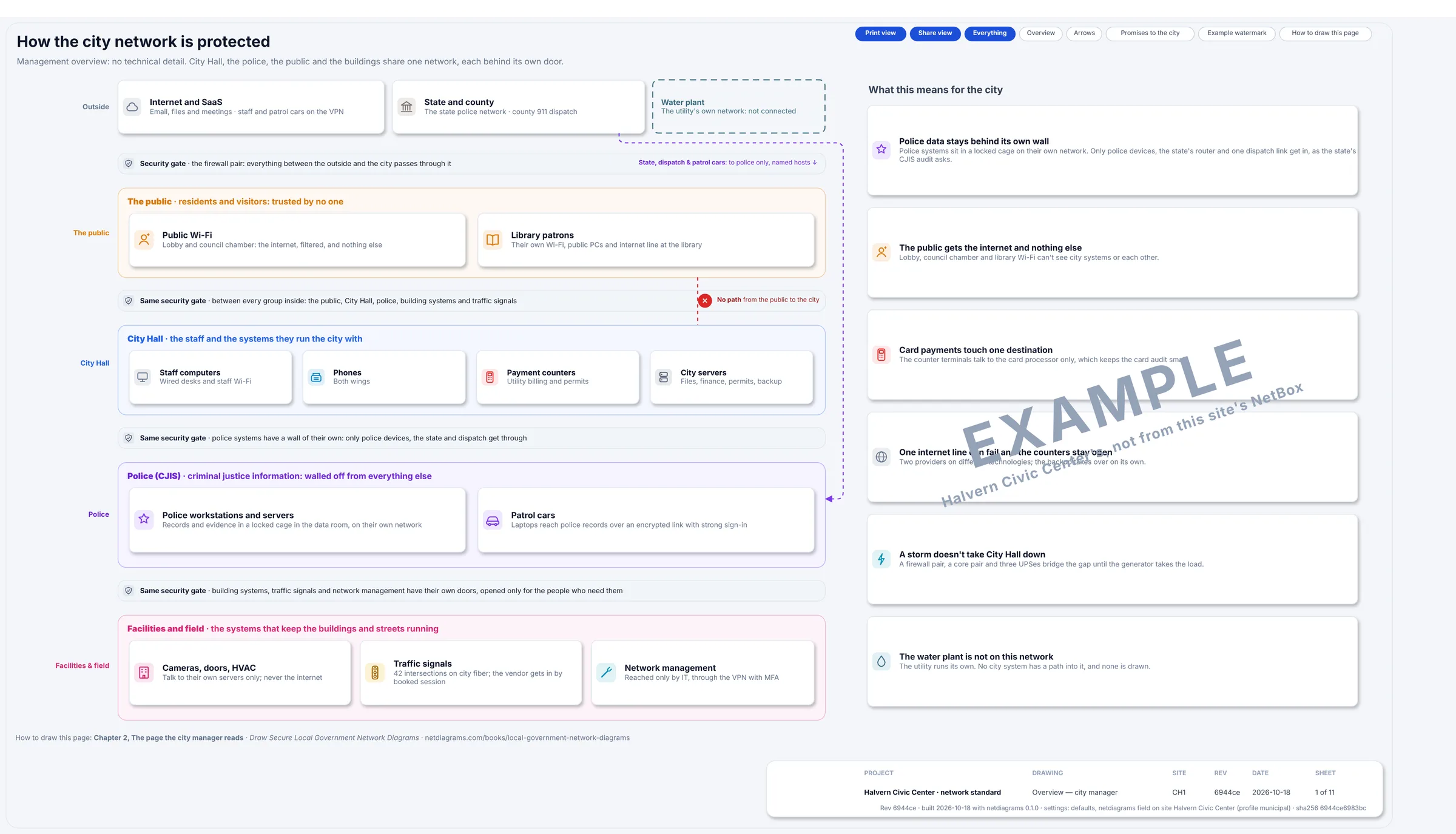
Figure 3.1. Sheet 1, "How the city network is protected", from netdiagrams sample --profile municipal. The same bands without the jargon, with the firewall pair drawn as a "security gate" bar between each one. The cards on the right say what each zone means for residents, the police and the people who run the city.
Figure 3.1 has no VLAN numbers or addresses, and doesn't need them. The city manager reads this page, the technicians read the logical page, and both are looking at the same city.
Agenda item 7B
Before the rules, the design in the form every city already knows how to read.
CITY OF HALVERN · CITY COUNCIL · REGULAR MEETING
Agenda item 7B. Network segmentation design (consent calendar)
Recommendation: That council receive and file the attached network zone design, and direct staff to stop drawing padlocks on things.
Background: The city operates one network for twelve departments, one police department, a library that invites the entire public to use it and 42 traffic signals that would prefer not to be used by anyone. Until recently, these were separated by goodwill.
Discussion: Staff propose twelve zones. The public will get the internet and nothing else. The police will get a zone that the rest of the city cannot enter, including staff, who have asked. The traffic signals will talk to their own central system and will not be invited to anything.
Fiscal impact: Moderate, and mostly labor. Considerably less than the alternative, which staff have priced but would prefer not to read aloud.
Public comment: One resident asked whether the library Wi-Fi password could be shorter. Staff confirmed that the library Wi-Fi has no password. The resident was satisfied.
Attachments: Network diagram (13 sheets). Please do not print the CJIS pages. Chapter 14 explains why.
The rules
Rule 1. The firewall routes every VLAN, including the police.
A VLAN keeps traffic apart, but only until something routes between VLANs. Whatever does that routing decides whether the zones are really separate.
Most core switches can route, and in many cities they do, because routing on the core is fast, free and was the default when the network was built. Give each VLAN a gateway on the core and traffic from the library Wi-Fi to the police records server goes switch to switch at full speed. It never meets the firewall. The firewall can carry an excellent rule that says "the public reaches nothing the city owns", and that rule is decoration, because the packets go around it.
Halvern does it the other way. Its core pair switches traffic but routes nothing except its own management address. Every VLAN's gateway is on the firewall HA pair, so every packet between zones crosses a policy, the police ones included.
Three things follow, and all three should be on the drawing:
- Inside a zone, the firewall sees nothing. Two city laptops on the staff VLAN talk directly through the switch. That's fine for staff and wrong for the public, which is why the public Wi-Fi isolates clients from each other (Rule 3).
- The firewall carries the city's internal traffic, not only its internet traffic. File shares, the finance system, police queries to the records server, the library staff's connection back to City Hall: all of it crosses the firewall. At CH1 each firewall connects to the core over two 10 Gb/s links bundled together. Size yours for the traffic between zones, not the internet line.
- One gateway per VLAN, and it's the firewall's. A second gateway on the core, added for one awkward device "until the upgrade", quietly recreates the bypass the auditor asked about. Chapter 4 makes the gateway a column on the logical page so the second one shows.
If your city routes on the core and that won't change this year, draw it honestly: the core is then a boundary device, its access lists are part of the policy, and it belongs on the CJIS pages. Undrawn routing is where segmentation goes to be assumed.
Rule 2. A zone is a promise about who starts the conversation.
Write each zone's rule as who may start a conversation with whom. "Police workstations reach the records server" is a rule. "Police and records are connected" is a description of a cable.
Direction matters most at the edges of the police zone. A patrol laptop opening a query to the records server is the job. The records server opening a connection to a laptop in City Hall is something nobody can explain at an audit. The county's dispatch system sending a call record to the police records system is expected, and the rule names exactly that: one county host, one records host, one port.
Every one-line rule in the zone table follows this pattern. When you can't write the line, you haven't designed the zone yet; you've only named it.
Rule 3. Give a zone to anyone the city invites in, and to anything the city doesn't fully control.
A city has a category of user that most networks never have to plan for: everyone. The resident paying a water bill, the reporter at the council meeting, the teenager doing homework in the library after school. They are welcome, and they are strangers, and their devices are the least trusted things the city will ever connect.
The public. The public Wi-Fi in the lobby and the council chamber gets the internet and nothing else, filtered and rate-limited so one large download doesn't slow a council livestream. Clients are isolated from each other, so one visitor's laptop can't see the next. The public range comes from a different private block from everything else (172.20.0.0/22 at Halvern, where city ranges are 10.30 and police 10.31), so a public address is recognizable in any log at a glance.
The library is the same zone, bigger. Its patron Wi-Fi and public computers sit in the public zone at LB1, on the library's own filtered internet line. If your library takes E-rate funding, the Children's Internet Protection Act asks for a filter on patron internet access; check with your library director, who will already know.
Payment counters. The card terminals at the utility billing and permit counters talk to one destination, the payment processor. They don't need to see the finance server, the clerk's laptop or anything else, so they don't. Give them a zone of their own even if there are only two of them. The card industry's security standard cares a great deal about what can reach a terminal, and a small zone is a short answer.
Building systems. Cameras, the video recorder, door access and the HVAC controllers were installed by specialists, often on a capital project, often by someone who asked for "a port and the internet". The cameras need the recorder. The door controllers need their server. The HVAC controller needs the facilities workstation. At Halvern none of them has internet access, and each talks only to its own server. A door controller that can't reach the internet can't be reached from it either, which is the point.
Traffic signals and field systems. The signal central system in the data room talks to 42 signal cabinets over city fiber. That is a small control network, owned by Public Works, maintained in part by the signal vendor, and running on equipment with a long service life and a short patch history. It gets its own zone. The vendor reaches the central system only in a booked support session, with MFA, and every session is logged. Nothing else in the city reaches the signals at all.
Management. The management interfaces of the firewall, the switches, the access points and the UPSes are the keys to every other zone. They get a zone of their own, reached only by IT through the VPN with MFA. The out-of-band console, a small box with a cellular modem that reaches the firewall and core when the network itself is down, lives here too.
Staff, voice and city servers get zones for simpler reasons. Desk phones need one destination, the hosted phone service. Servers hold the files and the finance system: staff and VPN users reach them on named ports.
The backup appliance gets a VLAN of its own, 45, for one reason: ransomware goes for the backups first. Only the hosts' backup interfaces share that network, and everything else has to cross the firewall to reach it. Two more habits belong on the card, both from current CISA ransomware guidance: an offsite copy that can't be changed or deleted from the city network, and backup admin accounts that aren't in the city directory.
Rule 4. The police zone is a wall, not a VLAN.
Police systems that handle criminal justice information (CJI) are governed by the FBI's CJIS Security Policy, as administered in your state by its CJIS Systems Agency. This book does not interpret that policy, and it never tells you what is in or out of scope: your state agency decides that, and its auditor is the one in the conference room. What the book can do is draw the design so that the auditor's questions have answers on the page.
Four of those questions come up in nearly every city where police share the city's network, and Halvern's design answers each one in the drawing:
Where is the police zone routed? On the firewall, like every other zone (Rule 1). The police wing's switch stack carries police VLANs, voice and management only: VLANs 60, 62, 20 and 99. No city or public VLAN is on that trunk, and the physical page says so on the link label.
What can reach it? Police workstations and police Wi-Fi, inside the zone. Patrol laptops over the patrol VPN pool, with MFA and encryption. The county's dispatch system, one host to one host. The state network, through the state router. Everything else is denied and logged, and the flow register (Chapter 10) lists those denials as rows, not as an absence of rows.
Where are the police servers, physically? In rack R03, in a cage inside the shared data room, with its own badge reader, its own UPS and its own violet patch cords. City IT has escorted access. The physical page draws the cage as a separate rack with its owner on it, because "where is it and who can touch it" is a network diagram question in a city, not only a facilities one.
Who runs it? At Halvern, city IT runs the switches and the firewall that carry police traffic. When people outside the police department manage systems that carry CJI, the policy expects that to be governed in writing, often through a management control agreement between the police department and the city, with background checks and training for the IT staff involved. Your state agency will tell you what it expects. The drawing's job is to show which boxes city IT touches, so that the agreement and the drawing describe the same equipment.
The state's own router sits in the police rack too. The state owns it, configures it and draws the network behind it. Halvern draws the router, labels it "state-managed", and draws one cable from it to each firewall. That's all.
Rule 5. Draw the boundary, never the inside, of what isn't yours.
A city's network touches systems it doesn't run. Halvern has three:
- The state CJIS network, behind the state router.
- The county's 911 dispatch center, at the end of a county fiber. The county runs the dispatch system; the city's police receive call records from it.
- The water treatment plant, run by the city's utility on a network of its own.
Each goes in the top band as a box, with the owner's name in it and a one-line rule. Where there is a connection, it's drawn as one labeled edge through the firewall, matching one row in the flow register. Where there isn't, the drawing says so.
The water plant is the clearest case. It has its own control network, its own operators and, often, its own regulator. Halvern's diagram does not open that box, does not name the devices inside it and does not draw any flow into it. The box says: "Out of scope. No city zone has a path into it, and none is drawn." The flow register carries one row, F20, any city zone to the water plant: denied, no route.
That row matters more than it looks. When someone asks whether the city network can reach the treatment plant, the honest answer is a drawing that shows the boundary and a register row that says "deny", backed by a firewall that agrees. If yours has a connection, perhaps a historian replica or a billing feed, draw that one edge and its owner, and leave the inside to the utility's own documentation.
Rule 6. Draw the bands in order, and keep each zone in one band.
Bands run across the page with their names in the left margin; zones are boxes inside them, one band each. A line from the bottom band to the top that skips the edge band looks wrong, and should: a traffic signal cabinet talking straight to the internet is what the design forbids.
Give each zone one color and use it on every sheet. At Halvern the police zone is violet, and so are its patch cords, its rack label and its link lines, so a violet port on the floor 1 switch would be a question before anyone reads the label. (There isn't one. That's the point of checking.)
Rule 7. Size changes the number of zones, not the rules.
A town of 4,000 with one IT person and a county of 400,000 with an IT department follow the same rules. What changes is how many zones it takes to follow them.
In a small town, zones collapse. A town hall with a clerk's office, a two-officer police department and a public library room might have six VLANs. There's no field zone because the state runs the signals on the highway through town. There may be no servers zone because finance runs in the cloud.
The test for collapsing a zone is the same everywhere: a zone disappears when its devices do, never because two zones are "close enough". The public is never merged into staff "because it's only the lobby". Police are never merged into staff "because it's only two workstations". If the police department has one workstation that touches CJI, it has a police zone, and it has one the day it gets the workstation.
In a large county, zones grow, mostly by adding VLANs. A county usually needs more addresses before it needs more rules: a second staff VLAN per building, a VLAN per building system, separate VLANs for jail systems or courts. Halvern already does a little of this: staff have a wired and a Wi-Fi VLAN, servers have a server and a backup VLAN, police have workstations, servers and Wi-Fi, and building systems have one VLAN each for cameras, doors and HVAC. Several VLANs, one zone, one rule.
Add a new zone only when a group of devices needs a different rule: courts, a jail, an emergency operations center, a fleet fuel system with a vendor's modem in it. "Floor 2" is not a zone. It's a location, and its laptops follow the staff rule like everyone else's.
Choosing your zones: one afternoon with the building list
If your city's network is mostly flat today, here's a way to design the zones in one sitting, with whoever runs IT, the police department's coordinator and someone from facilities or public works.
- List every building on the network. City Hall, the police station, the library, public works, fire stations, parks buildings, the pump station that somebody connected in 2019.
- List every kind of device by building. Desks, counters, cameras, doors, HVAC, signals, kiosks, the council chamber's streaming encoder.
- Ask Rule 3's question of each kind. Is the city inviting someone in, or does someone other than IT control it? Either answer means its own zone.
- Mark everything that touches CJI. The police coordinator knows the list: workstations, mobile data computers, records, evidence storage, the state connection. Those form the police zone, and its boundary is drawn the way Rule 4 describes.
- Mark every boundary. The state router, the county link, the water plant, any vendor's modem. Each gets a box, an owner and either one edge or the words "no connection".
- Write the one-line rule for each zone in the "who starts what" form of Rule 2, and decide where the gateways go: on the firewall, unless you have a reason that comes with a date to revisit.
You'll finish with a zone table, a list of questions for the state agency and at least one device in a fire station that nobody can name. All three belong on the drawing.
In NetDiagrams
NetBox, the open-source tool many IT teams use to record their network, has no built-in idea of a security zone. NetDiagrams reads zones from zone-* tags, and it can write the NetBox import files to add them if you don't have them yet.
Set up NetBox for a city. Run:
netdiagrams netbox-setup --profile municipal
It writes numbered CSV files to a netbox-setup/ folder, ready for NetBox's Import buttons. Among them are the municipal zone tags and device roles:
| What | Values |
|---|---|
| Zone tags | zone-internet, zone-partner, zone-water, zone-edge, zone-public, zone-staff, zone-voice, zone-pay, zone-servers, zone-cjis, zone-building, zone-field, zone-mgmt |
| Device roles | access-point, access-switch, camera, console-server, core-switch, door-controller, firewall, hvac-controller, hypervisor, nvr, payment-terminal, printer, public-pc, router, signal-system, storage, ups |
When NetDiagrams can read your NetBox, it leaves out what is already there. --check compares and lists each item as present or missing, and changes nothing. --apply creates the missing items through the NetBox API, with a token that can write; it never updates or deletes anything, and it's the only command in NetDiagrams that writes to NetBox. Everything else only reads.
Tag where the zone really is. NetDiagrams takes the first match: a security_zone custom field on the device, then a zone-* tag on the device, then the nearest location up the tree that carries a zone. VLANs and prefixes carry their own zone-* tags.
In a civic center, locations and zones mostly don't line up. The basement data room holds the firewall, the city servers, the signal central system and the police rack, all in different zones. So tag a location only when everything in it belongs to one zone, as a police wing closet like IDF-PD does.
The Halvern sample keeps it simpler: all 47 devices carry their zone tag themselves, and no location carries one. Zones don't come from racks, so the police host and evidence storage in rack R03 are tagged zone-cjis on the devices, and the state router beside them zone-partner. Cameras, door controllers, the HVAC controller and payment terminals are tagged on the devices too.
Resist tagging a whole building zone-staff to save time. A camera you forget to tag would then inherit "staff" quietly and look correct. An untagged camera, by contrast, is counted on the plan card under "Devices without a zone", where everyone can see it. A visible question beats a confident wrong answer, and an auditor prefers it too.
Tell NetDiagrams the site is a city. Either pass the flag:
netdiagrams --profile municipal
or record it once, as "profile": "municipal" in netdiagrams.json, or in the netdiagrams JSON custom field on the NetBox site, region or site group. A region called "City of Halvern" with the setting on it covers every city building at once. The zone bands on every sheet follow this chapter's model.
Before the first build, netdiagrams doctor prints, among other things, where it reads each zone from and the next three things to fix. Here are those parts for the day-one sample:
Zones
  Read from: field security_zone, iec62443_zone, ot_zone on 0 devices, zone-* tags on 41, the location tree on 0, nothing on 6.
  Zones with devices but no VLANs in NetBox: zone-edge, zone-partner

Next three things to fix
  1. Devices without an asset criticality: 47 · Rate it with the asset owner: critical, high, medium or low (what stops when it fails) · Device ▸ Asset criticality (custom field) · WS-02 Network devices
  2. Devices without an owner: 47 · Name who is accountable for it (asset owner) and who runs it day to day (custodian); set once on the room or site for everything in it · Device, room or site ▸ Contacts (role Asset owner) · WS-12 Audit evidence
  3. Devices not verified in 15 months: 47 · Walk the room against the drawing and record the date on the room: it covers every device in it · Room or site ▸ Last verified (custom field) · WS-12 Audit evidence
The six with "nothing" are the day-one cameras, which nobody has tagged yet. The two zones with devices but no VLANs are expected: the firewalls and the state router have no VLAN of their own.
The "Read from" line lists every place a zone can come from. The zones themselves stay a decision: NetDiagrams draws what NetBox says, and it can't tell you that the council chamber's streaming encoder deserved a zone of its own.
No NetBox yet?
Start with the zone table, on paper or in a spreadsheet. Add a zone column to your device list and fill it using this chapter's zone names. Fill it by location first where a location is one zone (the police closet), then device by device for the rest. That's the same order NetDiagrams uses, done by hand.
Then draw the bands. netdiagrams blank --profile municipal -o my-city.drawio writes an empty drawing with the six municipal bands. Load the netdiagrams stencils --profile municipal library in draw.io for the zone and VLAN table shapes, and copy the one-line rules from the table above into each zone box. netdiagrams sample --profile municipal -o halvern.drawio writes the full Halvern set to copy from.
With NetBox behind it, the zone column becomes tags every build reads. Appendix F covers getting a city into NetBox.
Missing pieces?
The zone design asks for very little on day one: the zones you know of, in their bands, and the devices you're sure of in each.
A zone you know you need but can't populate yet, such as building systems when nobody has the camera list from the last capital project, still gets its box, with UNKNOWN G-003 inside it. A device you've placed on a hunch, like the box in the fire station closet that is "probably the station alerting", gets ? G-004 beside it. Each gap ID is a row on worksheet WS-11, the gaps register.
Collect zones on Appendix G, worksheet WS-01 (site, areas and zones). For building systems, the capital project's closeout documents usually list every camera and controller. For police systems, the coordinator's inventory for the last state audit is the best list in the building. For boundaries, ask the owner what they own in your space, and write down the answer with the date.
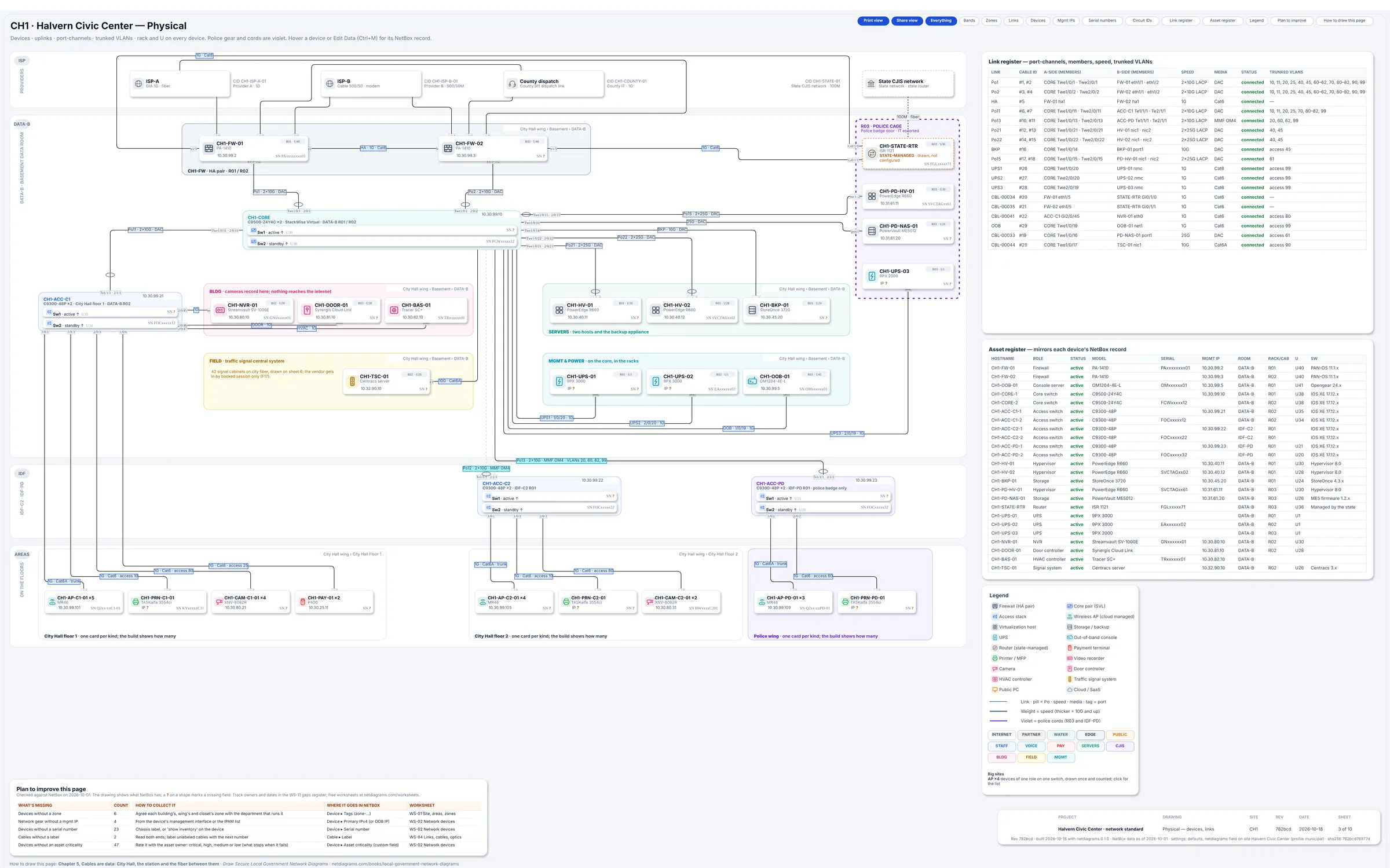
Figure 3.2. Sheet 3 of the day-one build (municipal-starter). Missing values show as an amber "?", and the "Plan to improve this page" card at the bottom left opens with "Devices without a zone: 6" and the worksheet that collects them, WS-01 Site, areas, zones.
Monday morning
Five things to do with your own city this week:
- Write your zone table. Thirteen rows to start, from this chapter. Delete the zones whose devices you truly don't have, and write a one-line "who starts what" rule for each one you keep.
- Find out what routes the police VLANs. Log in to the core switch and check whether any VLAN has a gateway there. Each one is a path that skips the firewall, and the police ones are the auditor's first question.
- Join the public Wi-Fi from your phone in the lobby and try to open the printer's web page, the finance server and a camera. If any answers, the public zone is a password you forgot to set, not a zone.
- List your boundaries. The state router, the county link, the water plant, every vendor modem. Write each owner's name next to it, and "no connection" where that's true.
- Run
netdiagrams netbox-setup --profile municipal, import the tags and roles, tag the police closet and the police servers, and build. Check the plan card's "Devices without a zone" row. No NetBox yet? Add a zone column to your device list and fill it for one building.
Quotable: A city can share fiber with its police. It should never share a gateway.
Next: Chapter 4, "Department VLANs on paper", where each zone gets its VLANs, subnets and gateways.