The cold open
A mechanical engineer checks into room 417 on the first night of a conference. Out of habit, the same habit that makes some people read the fire exit map, he joins the guest Wi-Fi and looks around.
He finds the internet, which is what he came for. He also finds a web page titled with the hotel's name and the word PLANT, showing two chillers, two boilers, four air handlers and a box for a username. The username box has a helpful grey hint inside it. The hint is the username.
He doesn't type anything. He writes a polite email to the front desk instead, the kind that starts "I'm sure you know this already, but". The front desk forwards it to the general manager, who forwards it to IT, who forwards it to the building controls contractor, who replies that the BMS "has always been on the network like that" and attaches a photo of the drawing he left in the engineering office in 2019.
The drawing shows a switch in the middle and a line to everything in the building: front desk, restaurant registers, cameras, the TV system, the boiler. It is completely accurate. That is what makes it frightening.
Two weeks later the PCI assessor arrives for the annual review and asks for the network diagram, "showing how the card systems are separated from everything else". This chapter is about having a better answer than that photo: the zones a hotel needs, why they all meet at one firewall pair, who owns each one, and how to write it down so a drawing tool, a vendor and the next IT manager read it the same way.
Zones, VLANs and the firewall, in one paragraph each
A zone is a group of devices that follow the same rules about who they may talk to. The restaurant's card terminals are one zone. Guests' phones are another. A zone is a decision about trust, written down.
A VLAN (virtual LAN) is how a switch keeps groups apart on the same cables. Each VLAN is its own little network with its own range of addresses. A zone usually holds one VLAN, sometimes several. A VLAN never belongs to two zones.
The firewall is where zones meet. Every packet that leaves one zone for another passes through it, and its policy decides whether that packet may go. In a single hotel, one firewall pair usually does this for every zone at once.
That's the design in a sentence: many zones, one pair of doors, every crossing inspected. A hotel just has more zones than most buildings, and more people who think they own one.
Why a hotel is not a store, and not an office
If you own Book 4 or Book 5 in this series, some of this will feel familiar. The rules carry over. The building doesn't.
A store is small, and the card register sits at the center of it. An office is mostly staff laptops. A hotel is a small town with a reception desk. It has a restaurant and a bar that take cards like a store, a back office that works like an office, a few hundred guests who live on the network overnight, a ballroom that hosts a different crowd every day, and a plant room that heats, cools and lifts the whole building.
It also has three owners. The owner owns the building and usually the equipment. The management company runs the hotel and often its IT. The brand (if the hotel is franchised) sets standards, mandates some systems and sometimes installs its own router in your rack. Add a dozen vendors with a support contract and a remote-access habit, and a hotel network has more stakeholders than most corporate head offices.
So the hotel zone model has to answer two questions for every group of devices: who may talk to it, and whose is it. The second question decides who fixes it at 3 a.m. and who signs off on changes. It belongs on the drawing.
A tour of the property, lobby to plant room
Before the rules, the zone model the way a new hire learns the hotel: on the orientation tour, from the front door down to the basement.
"Welcome to the Alder Bay. If you'll follow me.
On your left, the front desk. Those three card terminals take payments from guests checking in. Behind them, the workstations that run the property management system, the PMS, which lives in the cloud now. Different things, different zones. Please don't let anyone plug the terminals into the PC's spare port. They will ask.
Straight ahead, the restaurant and bar. More POS stations, more terminals, and the kitchen ticket printer, which counts as payments because it hangs off the POS. The handhelds the servers carry are on their own Wi-Fi. Yes, the one that doesn't show up on your phone.
Through here, the ballroom. Tonight it's a wedding, tomorrow a sales kickoff, Thursday a medical conference. Each gets its own event network, and none of them can see each other. The AV company will tell you they've always just used the house network. They're wrong about that, but they're lovely people.
The elevators are on your right. The elevator company monitors them over its own cellular connection. That's not our network, and we've drawn it so nobody forgets.
Up on the guest floors, every other room has a small access point on the wall. Guests get the internet, and casting to their own room's TV, and nothing else. The TV, the thermostat and the door lock in each room are hotel equipment, guest-facing, and on their own networks.
And down these stairs, mind your head, the plant room. Two chillers, two boilers, four air handlers and the BMS that runs them. This is the most important room in the building and the least drawn. If this stops in August, nobody cares about the Wi-Fi.
Questions? The fire exits are on the drawing. So, as of this chapter, is everything else."
The hotel zone model: five bands, thirteen zones
The examples in this book come from the Alder Bay Hotel and Conference Center, site H01, a fictional full-service hotel. It has 160 guest rooms on floors 2 to 6, a restaurant, a bar, a spa, a gift shop, a ballroom with six meeting rooms, a pool and a central plant. It's owned by Alder Bay Owner LLC, managed by Kestrel Hospitality and flagged with the (equally fictional) Larkline Hotels brand. A 120-room select-service sister property, H02 Alder Bay Airport, sits twenty minutes away.
Its network has thirteen zones, stacked in five bands from the most exposed at the top to the most sensitive at the bottom:
| Band | Zone | What lives there | The one-line rule |
|---|---|---|---|
| OUTSIDE | Internet and providers | Two internet lines, the cloud PMS, the payment processor, vendor clouds | Untrusted. Everything from here ends on the firewall. |
| Brand and management company | The brand's router and circuit; the management company's VPN and log collector | Partners, not insiders: named systems, named ports. | |
| EDGE | Firewall pair | The two firewalls | The one place zones meet. |
| PAYMENTS & HOTEL OPERATIONS | Payments | Card terminals at the front desk, restaurant, bar, spa and gift shop; POS workstations and server; handheld POS | Talks to the processor and its own POS server. Posts charges to rooms without card data. Nothing else reaches in. |
| Hotel operations | Front desk and back-office PCs, sales and catering, housekeeping and engineering tablets, printers | Reaches the cloud PMS, brand systems and the internet. Never reaches payments. | |
| Property servers and interfaces | Two hosts running the PMS interface server, lock server, call accounting and TV middleware | Talks to each vendor system on its named port. | |
| Voice | Call server, room and admin phones | Talks to the interface server and the phone provider. | |
| GUESTS, EVENTS & ROOMS | Guests | The guest gateway, room and public Wi-Fi, wired room ports | Internet only. Guests can't see each other. |
| Meetings and events | Ballroom and meeting-room event networks | Internet only. One event can't see another. | |
| Guest room technology | TV head-end and room TVs, casting devices, room-controls gateway, lock gateways, key encoders | Talks to its own servers and vendor clouds. A guest reaches only their own room's casting device. | |
| BUILDING, SAFETY & MANAGEMENT | Building systems | BMS, chiller, boiler and air-handler controllers, kitchen refrigeration, pool controller | Reached only from engineering's named PCs in the shop and by the controls contractor through the VPN. No internet. |
| Safety and security | Cameras and recorder, back-of-house door controller, staff safety buttons | Cameras to the recorder only. Safety buttons reach their monitoring service only. | |
| Network management | Firewall, switch, AP and UPS management; console server | IT and the management company only, through the VPN with MFA. |
Read the right-hand column on its own and you have the hotel's security policy in thirteen lines. "Guests get the internet and their own TV, and nothing else" is a sentence a general manager can agree to, a Wi-Fi vendor can build and an assessor can test.
The order is deliberate. Strangers and partners at the top. Money and the hotel's own work next. Then the people who are staying with you, and the things in their rooms. At the bottom, the building itself and the keys to the network, where nothing should fall into them by accident.
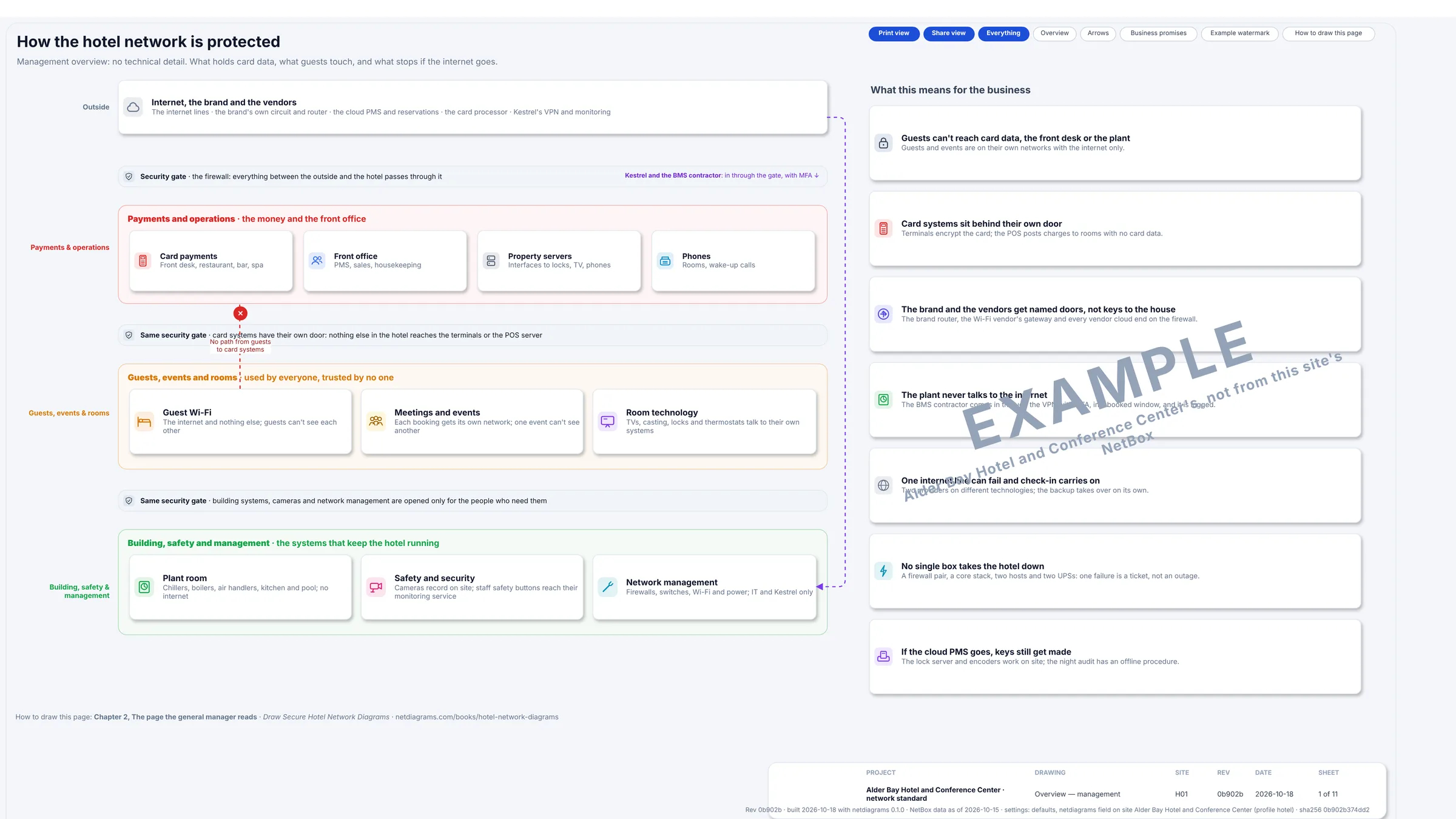
Figure 3.1. Sheet 1 of the built H01 set: the same bands without the jargon, with the firewall pair drawn as a security gate between them, for the general manager and the owner's asset manager.
The rules
Rule 1. The firewall routes every VLAN.
A VLAN keeps traffic apart only until something routes between VLANs. Whatever does that routing decides whether the zones are really separate.
Most hotel core switches can route, and many installers turn it on because it's faster and the firewall "doesn't need to see internal traffic". Then traffic from the front desk VLAN to the POS VLAN goes switch to switch at full speed and never meets the firewall. The firewall can carry a lovely rule that says "nothing reaches payments", and that rule is decoration.
At the Alder Bay, the core switch stack is layer 2 except for its own management address. Every VLAN's gateway is on the firewall pair, with one exception that has a reason: the guest VLANs' gateway is the guest gateway, a box the Wi-Fi vendor runs, whose outside leg is a firewall port of its own. Guests still cross the firewall to reach anything.
Three things follow, and all three belong on the drawing:
- Inside a zone, the firewall sees nothing. Two POS workstations talk directly through the switch. That's fine inside payments, and wrong for guests, which is why guest Wi-Fi isolates clients (Rule 4).
- The firewall carries the hotel's internal traffic. Every PMS interface message crosses it. Size the firewall for that, not just the internet lines.
- One gateway per VLAN, and you know whose. A second gateway on the core, added "just for the TV system", creates exactly the bypass this rule exists to prevent. Chapter 4 makes the gateway a column on the logical page so the second one shows.
If your core routes and that won't change this year, draw it honestly: the core is then a boundary device and its access lists are part of the policy. An assessor will find the routing either way. Better that they find it on your drawing.
Rule 2. A zone is a promise about who starts the conversation.
Write each zone's rule as who may start a conversation with whom. "The POS posts charges to the PMS interface" is a rule. "POS and PMS are integrated" is a sales brochure.
Direction is where hotels get into trouble, because so much is "integrated". The POS server starts a post-to-room message toward the interface server: room number, amount, check number, no card number. The interface server doesn't start anything toward the POS. That one-way arrow is the difference between the interface server being connected to payments and being inside it, and an assessor will ask which.
When you can't write a zone's line in "who starts what" form, you haven't designed the zone. You've only named it.
Rule 3. Draw who owns each zone, not just what's in it.
Every zone box on a hotel drawing gets an owner and, where different, a custodian: who decides and who runs it.
At the Alder Bay, payments belong to the food and beverage director and the front office manager, with Kestrel's IT as custodian. Building systems belong to the director of engineering. Safety belongs to the security director. The guest gateway is run by the Wi-Fi vendor under a contract the hotel holds. The brand's router belongs to the brand, sits in the hotel's rack and accepts no visitors.
This sounds like paperwork. It's the opposite. When the guest Wi-Fi is down at 9 p.m., the drawing tells the night manager whom to call. When the controls contractor asks for "a port and the internet", the drawing tells them who says no. And when the hotel changes management company, which hotels do, the new one inherits a map of who to ask instead of a list of mysteries.
Rule 4. Give a zone to anything guests touch, and to anything you didn't buy.
The fastest way to choose zones in a hotel is to ask, for each kind of device: "who looks after this, and would I trust it next to the card terminals?"
Guests. A few hundred devices you've never seen, arriving every afternoon and leaving every morning. The guest zone gets the internet and nothing else. Clients are isolated from each other, so the laptop in 417 can't see the laptop in 418. Guests get addresses from a different private range from everything else, so a guest address is obvious in any log.
Events. A ballroom full of strangers is a guest zone with extra requirements: the medical conference wants its own network name, the AV company wants a wired port for streaming, and the wedding wants nothing to do with either. Each booking gets its own VLAN from a small pool, so one event can't see another, and the pool is drawn so nobody invents a fifteenth event VLAN on the night.
Guest room technology. The TV, the thermostat and the door lock live in the guest's room but belong to the hotel. Guests shouldn't reach them, except for casting to their own TV, which the casting service pairs by room and unpairs at check-out. Their servers and vendor clouds are named destinations. Lock gateways and key encoders sit here too, because a lock system belongs with the doors it opens, not with the front desk PCs that happen to sit beside the encoder.
Payments. Card terminals, POS workstations, the POS server and the kitchen ticket printer that hangs off it. Card data has its own rules and its own assessor. The zone exists so the assessor has a small thing to test instead of a large one.
Building systems and safety. These were installed by specialists who wanted "a port and the internet". They need the BMS supervisor, the recorder or the monitoring service, and that's all. With no rule out to the internet (F15), and nothing in except the contractor's VPN (F14), a boiler controller has no other conversation with the internet in either direction. Those are separate rules; check both.
Management. The firewall, switch, AP and UPS management interfaces are the keys to every other zone. They get their own zone, reached only by IT and Kestrel through the VPN with MFA. The out-of-band console, which reaches the firewalls over cellular when the network itself is down, lives here, and its use is logged.
Rule 5. Partners get a zone, not a password.
The brand's router and the management company's VPN are not "outside" the way the internet is. They're trusted for specific things: reservations and loyalty over the brand circuit, Kestrel's IT over the VPN, Kestrel's log collector receiving the firewall's logs.
They're not trusted for everything, which is why they get a zone of their own at the top of the page rather than a line straight into hotel operations. Each flow from that zone is named, with a destination and a port. A partner who needs something new asks for a new line on the flow register (Chapter 10), and gets one, with an owner and a review date.
The same goes for vendors. The PMS, POS, lock, TV and BMS vendors each want remote access. None of them gets a standing tunnel into their zone. They come in through the VPN, to their zone only, in a booked window, logged. Chapter 9 draws those paths.
Rule 6. Draw the bands in order, and keep each zone in one band.
Bands run across the page with their names in the left margin. Zones are boxes inside them, one band each. A line from the bottom band to the top that skips the edge looks wrong, and should: a chiller controller talking straight to the internet is exactly what the design forbids.
Give each zone one color and use it on every sheet, so a payments-colored port on the floor 1 switch says what's plugged in before anyone reads the label.
Rule 7. Size changes the number of zones, not the rules.
A 60-room select-service hotel and a 600-room convention hotel follow the same rules. What changes is how many zones it takes to follow them.
A smaller property collapses zones by losing devices. H02, the Alder Bay Airport, has 120 rooms and no restaurant. Its "market pantry" sells snacks through one POS. It has no ballroom, so its NetBox holds no event VLANs. What it does hold is ten devices: a single firewall, the brand's router, the guest gateway, a core switch, the pantry POS and a front desk terminal, a call server, one lock gateway and two APs, with VLANs for payments, operations, voice, guests, room technology, building systems, cameras and management.
The airport property didn't merge zones; it just doesn't have the devices. That's the test: a zone disappears when its devices do, never because two zones are "close enough". Guests are never merged with events "because they're both guests". The lock gateways are never moved to the front desk VLAN "because the encoder is there anyway".
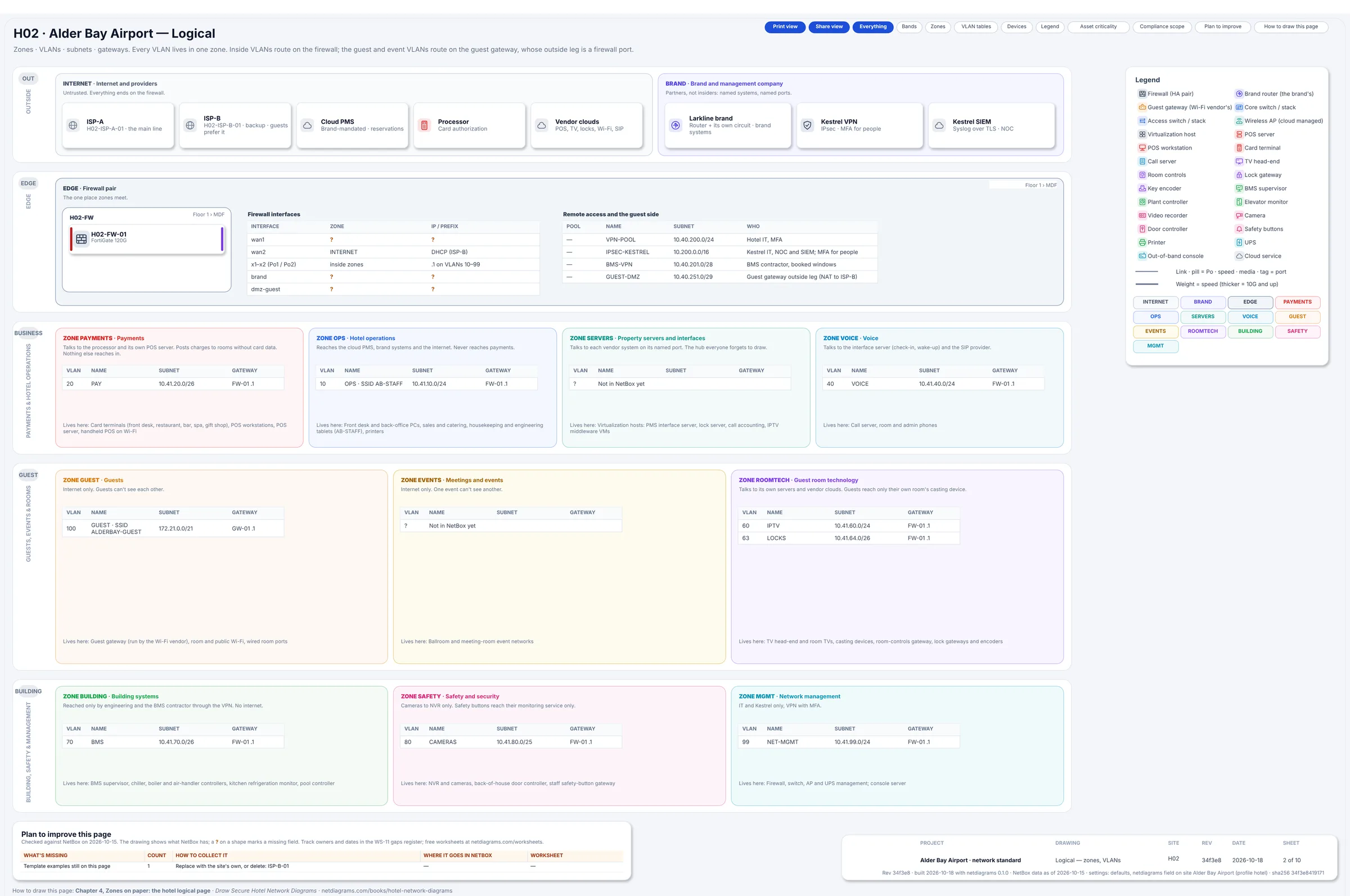
Figure 3.2. Sheet 2 of H02 Alder Bay Airport, built by NetDiagrams from its NetBox data: one firewall, H02-FW-01, the same thirteen zones and one-line rules as the main hotel, and fewer VLANs. Payments has one VLAN where H01 has three; the events and servers zones say "Not in NetBox yet".
A bigger property grows by adding VLANs. Usually it needs more addresses before it needs more rules: a second guest VLAN, a VLAN per building system, the event pool. The Alder Bay already does this at 160 rooms: payments has three VLANs (terminals, POS, the handheld Wi-Fi), room technology has four (TV, casting, room controls, locks). Several VLANs, one zone, one rule.
One rule, but not one open room. Two VLANs in the same zone still meet at the firewall, and the default there is deny unless a register row says otherwise. Check that your firewall agrees: many treat traffic inside a zone as allowed unless told not to. It matters most in room technology, where the casting VLAN is the one guests can reach (F10) and the lock VLAN is the one that opens doors.
Add a new zone only when a group of devices needs a different rule. "Floor 4" is not a zone. Neither is "the spa". The spa's POS is payments, its booking PCs are operations, and its music system is someone's phone on the guest Wi-Fi, which is fine.
Choosing your zones: one afternoon with the floor plans
If your hotel is one flat network today, here's a way to design its zones in one sitting, with IT, the director of engineering and whoever runs the front office.
- Walk the floor plans, top to bottom. List every kind of networked device by where it sits: guest floors, public spaces, outlets, back of house, the plant room, the roof.
- Ask Rule 4's question of each kind. Anything guests touch, anything a vendor installed and anything that takes a card gets its own zone.
- Write the one-line rule and the owner for each zone. Borrow the table above. The owner is a job title, not "IT".
- Decide where the gateways go. On the firewall, unless there's a reason. The guest gateway is a reason; write it down.
- List the outside and the partners. Internet lines, cloud PMS, processor, the brand, the management company, every vendor with remote access. Each ends on the firewall.
- Find the leftovers. The elevator company's modem, the beverage dispenser with a network card, the TV in the GM's office that someone plugged into the POS switch. Each gets a zone or a note saying it isn't yours.
You'll finish with a zone table, an owner list, some questions and at least one box in the plant room nobody can name. All of them belong on the drawing.
In NetDiagrams
NetBox, the open-source tool many IT teams use to record their network, has no built-in idea of a security zone. NetDiagrams reads zones from zone-* tags, and it can write the NetBox import files to add them if you don't have them yet.
Set up NetBox for a hotel. Run:
netdiagrams netbox-setup --profile hotel
It writes numbered CSV files to a netbox-setup/ folder, ready for NetBox's Import buttons. Among them are the thirteen hotel zone tags and the hotel device roles.
Run offline (--offline -o setup), it writes six files holding 88 objects:
| File | Objects |
|---|---|
| 1-custom-field-choice-sets.csv | 12 |
| 2-custom-fields.csv | 33 |
| 3-zone-tags.csv | 13 |
| 4-device-roles.csv | 25 |
| 5-inventory-item-roles.csv | 3 |
| 6-contact-roles.csv | 2 |
The thirteen zone tags are this chapter's zones: zone-internet, zone-brand, zone-edge, zone-payments, zone-ops, zone-servers, zone-voice, zone-guest, zone-events, zone-roomtech, zone-building, zone-safety and zone-mgmt. The 25 device roles are: Access point, Access switch, BMS supervisor, Building controller, Call server, Camera, Card terminal, Console server, Core switch, Door controller, Elevator monitor, Firewall, Guest gateway, Hypervisor, Key encoder, Lock gateway, NVR, POS server, POS workstation, Printer, Room-controls gateway, Router, Safety-button gateway, TV head-end and UPS.
When NetDiagrams can read your NetBox, it leaves out what's already there. --check compares and lists each item as present or missing, and changes nothing. --apply creates the missing items through the NetBox API, with a token that can write; it never updates or deletes anything, and it's the only command in NetDiagrams that writes to NetBox. Everything else only reads.
Tag where the zone really is. NetDiagrams takes the first match: a security_zone custom field on the device, then a zone-* tag on the device, then the nearest location up the tree that carries a zone. VLANs and prefixes carry their own zone-* tags.
In a hotel, locations and zones rarely line up. The MDF holds the firewalls, the brand's router, the guest gateway, the POS server and the TV head-end, in five different zones. The plant room is the happy exception: tag the Central plant location zone-building and every controller filed under it inherits the zone. Tag terminals, encoders, lock gateways and cameras on the devices themselves.
Resist tagging a whole guest floor zone-guest to save time. The lock gateway in that floor's closet would inherit "guest" quietly and look correct. An untagged lock gateway, by contrast, is counted on the plan card under "Devices without a zone", where everyone can see it (Figure 3.3). A visible question beats a confident wrong answer.
Tell NetDiagrams the site is a hotel. Either pass the flag:
netdiagrams --profile hotel
or record it once, as "profile": "hotel" in netdiagrams.json, or in the netdiagrams JSON custom field on the NetBox site, region or site group. The zone bands on every sheet then follow this chapter's model.
Before the first build, netdiagrams doctor prints, among other things, where it reads each zone from and the next three things to fix. Here are those parts for the day-one sample, where nobody has tagged everything yet:
Zones
  Read from: field security_zone, iec62443_zone, ot_zone on 0 devices, zone-* tags on 160, the location tree on 0, nothing on 16.
  Zones with devices but no VLANs in NetBox: zone-brand, zone-edge

Next three things to fix
  1. Devices without an asset criticality: 176 · Rate it with the asset owner: critical, high, medium or low (what stops when it fails) · Device ▸ Asset criticality (custom field) · WS-02 Network devices
  2. Devices without an owner: 176 · Name who is accountable for it (asset owner) and who runs it day to day (custodian); set once on the room or site for everything in it · Device, room or site ▸ Contacts (role Asset owner) · WS-12 Audit evidence
  3. Devices not verified in 15 months: 176 · Walk the room against the drawing and record the date on the room: it covers every device in it · Room or site ▸ Last verified (custom field) · WS-12 Audit evidence

Data quality: 83/100
On day one, 160 of the 176 devices carry a zone-* tag and 16 carry nothing; those 16 are cameras. The brand and edge zones have devices but no VLANs, which is expected: the brand's router and the firewall pair sit between zones rather than in a VLAN of their own.
"Read from" lists every place a zone can come from. The zones themselves stay a decision: NetDiagrams draws what NetBox says, and it can't tell you that the beverage dispenser deserved a zone of its own.
No NetBox yet?
Start with the zone table, on paper or in a spreadsheet. Add a zone column and an owner column to your device list and fill them with this chapter's thirteen zone names. Fill by location first where a location is one zone (the plant room), then device by device for the rest. That's the same order NetDiagrams uses, done by hand.
Then draw the bands. netdiagrams blank --profile hotel -o my-hotel.drawio writes an empty drawing with the five hotel bands. Load the netdiagrams stencils --profile hotel library in draw.io for the zone and VLAN table shapes, and copy the one-line rules into each zone box. netdiagrams sample --profile hotel -o alder-bay.drawio writes the full Alder Bay set to copy from.
With NetBox behind it, the zone column becomes tags every build reads. Appendix F covers getting a hotel into NetBox.
Missing pieces?
The zone design asks for very little on day one: the zones you know of, in their bands, with an owner, and the devices you're sure of in each.
A zone you know you need but can't populate yet, such as building systems when the controls contractor hasn't sent the point list, still gets its box, with UNKNOWN G-003 inside it. A device you've placed on a hunch, like the box in the plant room that is "probably the elevator thing", gets ? G-004 beside it. Each gap ID is a row on worksheet WS-11, the gaps register.
Collect zones and owners on Appendix G, worksheet WS-01 (site, areas and zones). For building systems, the controls contractor's as-built documents usually list every controller. For the brand's and the Wi-Fi vendor's equipment, ask each for a one-page handoff: what they own in your rack, what it connects to, and who to call.
In a NetDiagrams build, NetBox gaps are drawn rather than hidden:
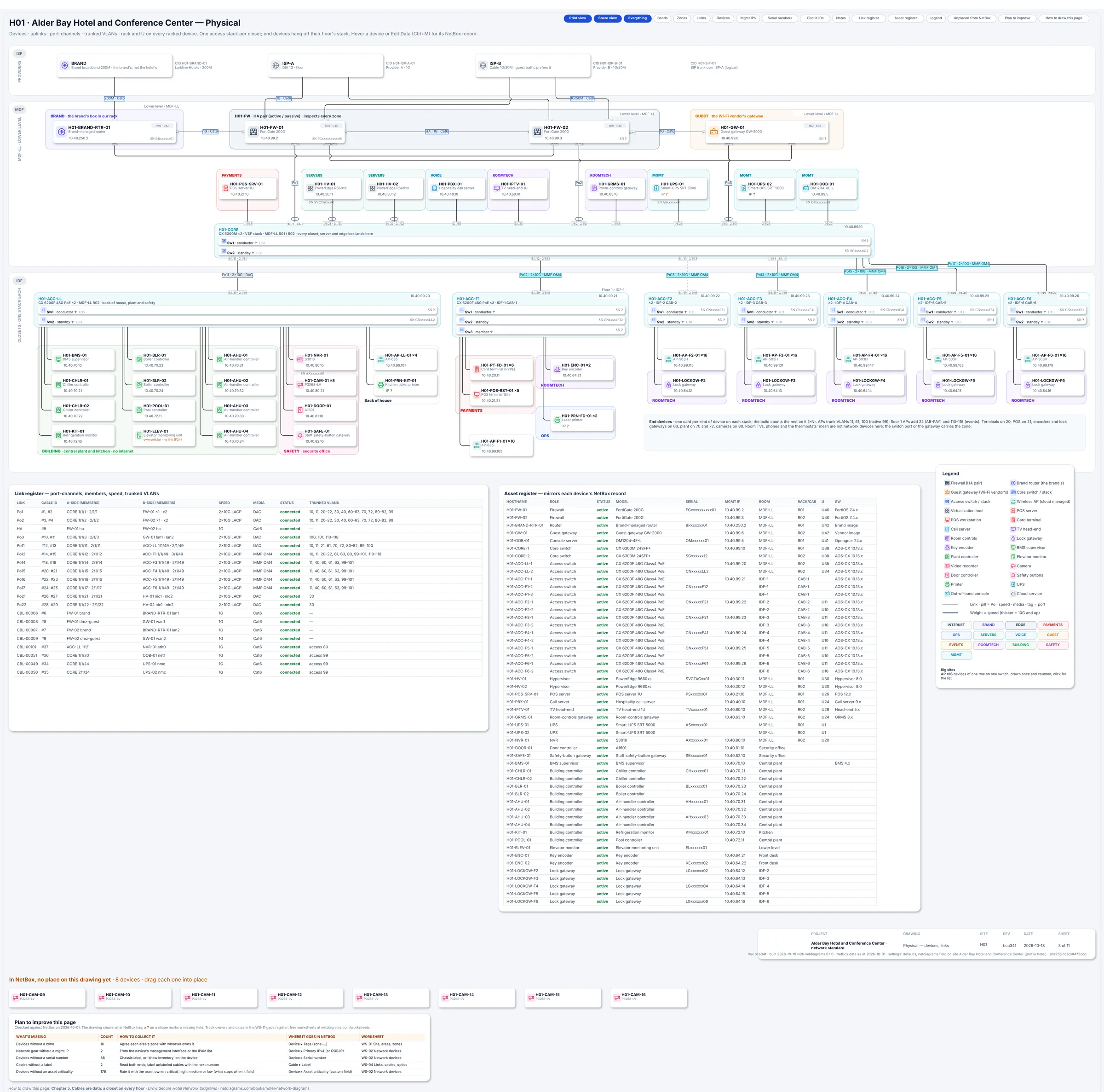
Figure 3.3. Sheet 3 of the day-one build (hotel-starter): missing serials and addresses show an amber "?", eight untagged cameras wait in the tray below the page, and the "Plan to improve this page" card counts what's missing (16 devices without a zone among them) with the worksheet for each.
To try it, run python scripts/make_hotel_sample.py --site starter -o hotel-starter.json in the NetDiagrams repository, then netdiagrams build --profile hotel --input hotel-starter.json.
Monday morning
Five things to do with your own hotel this week:
- Write your zone table with owners. Thirteen rows to start. Delete the zones whose devices you truly don't have, and write a one-line "who starts what" rule and a job title for each one you keep.
- Find out what routes between your VLANs. Check whether any VLAN has a gateway on the core switch. Each one is a path that skips the firewall.
- Join the guest Wi-Fi from a guest room and try to reach the POS server, the BMS login page and the TV head-end. If any of them answers, the guest zone is a password, not a zone.
- List every vendor with remote access and how they get in. Each one is a line on the drawing, and probably a conversation.
- Run
netdiagrams netbox-setup --profile hotel, import the tags and roles, tag the plant room location, and build. Check the plan card's "Devices without a zone" row. No NetBox yet? Add zone and owner columns to your device list and fill them for one floor.
Quotable: A hotel has a door for every guest and a key for every door. The network deserves the same courtesy.
Next: Chapter 4, "Zones on paper: the hotel logical page", where each zone gets its VLANs, subnets and gateways.